Brief Hands-On Report--Apple's New iTunes 5
iTunes 5 features a new even more powerful instant search, including the new Search Bar which helps you find exactly what you are looking for in iTunes or from among 2 million songs on the Music Store, folders for organizing playlists, and new Parental Controls for music, music sharing and podcasts.
The new iTunes 5 "skin" or interface is not very different from its immediate predecessor. It is more consistent with Apple's Mail in that the Source panel's background is light blue rather than white. The main panels are no longer cut outs. The top info "Apple" window has squared off ends rather than semi-circles. The volume slider control has been moved alongside the play controls rather than under them so that the header area has commensurately less height. The button to expand iTunes' Visualizer to full screen is only visible on the Visualizer.
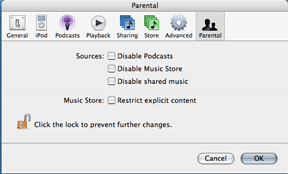 One of the main new features is a lockable "Parental" preference panel. It allows one to disable podcasts, the Music Store connection and music sharing and to restrict explicit content on the Music Store.
Playlists can now be sorted into and kept in folders.
Another new feature is called "Smart Shuffle" in the Playback preference panel. One can move a slider to select how likely one is to hear songs from the same artist or album in a row.
Finally, iTunes 5 allows one to sync music to the new iTunes Phone (Motorola ROKR E1).
We downloaded and installed iTunes 5 on several Power Macs (G5 and G4 Cube), iMac G5s and PowerBook G4s with no difficulty. We were able to play all of our playlists just fine and to download music from Apple's iTunes Music Store. The new search engine worked very quickly while searching the iTunes Music Store. [Bill Fox & Dana Baggett]
Saw something? Send a tip or a correction
The archive ran on reader tips. What did you see, where, and do you want the credit? Something wrong on this page? Say so and it gets fixed.