Hands-On Report--Add AirPort Extreme to Your Mac mini
Our base Mac mini came without AirPort Extreme Wi-Fi and Bluetooth wireless capability. Only base Mac mini's were available from the Apple Stores at the time of their release and the stores did not have the kits necessary to install AirPort or Bluetooth. But since we already had an extra AirPort Extreme card, we figured that we could just install it for wireless networking. Wrong! When we cracked open the Mac mini's case we found that it was not a simple matter to just plug in the card like in other Macs. The mezanine board that the card plugs into was missing along with an AirPort antenna. So we have been using our Mac mini wired to our network.
About 10 days ago we discovered that the missing parts could be bought online from a third party. The mezanine board was $47 and the antenna was $24. With sales tax and overnight shipping the total was $92. If you do this and have to buy an AirPort Extreme card, the cost rises significantly by another $79 plus tax and shipping.
If we had ordered AirPort Extreme via CTO and waited for our Mac mini to be delivered, the cost would have been only $79. Also, we wouldn't have had to use our extra AirPort Extreme card. Apple charges just $99 for a CTO Mac mini with both AirPort and Bluetooth, options we highly recommend. We do not know how much it costs to have AirPort Extreme installed as a retrofit by the retail Apple Stores.
Okay, let's not cry over spilled milk and get to work....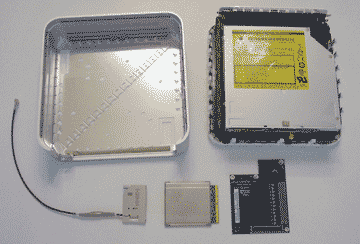
Installing AirPort Extreme is not difficult. One can get a PDF file from Smash's Web site that shows the details.
First, one cracks open the Mac mini's case using a very thin and tapered putty knife, Apple's official Mac mini case-opening tool. While Apple recommends a 2" model, we use a 4" model because it frees each side of the case with one insertion each. The opened Mac mini with the parts we plan to install are shown above. The only part(s) missing are the tiny screws needed to hold the mezanine board in place and some kapton tape. To our dismay they didn't come with our antenna and mezanine board order from CGNUSA.com. A moderately intensive local search failed to locate either but we didn't let that stop us.
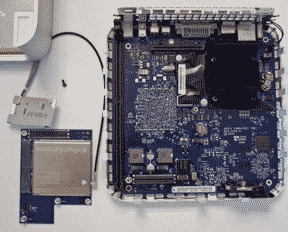 Second, one removes upper the fan/drives assembly by removing three tiny screws with a #0 jeweler's philips head screw driver, freeing the power button cable from its kapton taping and lifting the assembly off the motherboard. We also removed the RAM chip to give us more working room. The photo at right shows the exposed motherboard, the AirPort Extreme card and antenna plugged into the mezanine board and one of the tiny screws that held the upper right corner (as looking from the front) of the fan/drives assembly on the motherboard. We are going to re-purpose (love that word) the latter to hold down the mezanine board. One can also see the antenna cut out in the top case at the upper left of the photo.
Third, one assembles the AirPort card and antenna on the mezanine board and secures it into place. One is supposed to use kapton tape to hold the card on the board but it seemed pretty secure to us. We don't plan to play catch with our Mac mini. The assembled mezanine board snaps into its motherboard connector with ease. Then the tiny re-purposed screw is used on the upper right corner (again looking from the front) to hold the mezanine board in place.
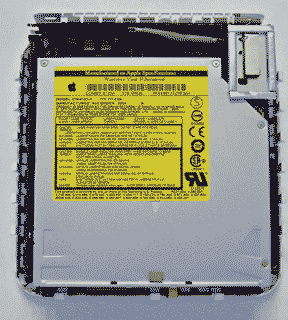 Fourth, the fan/drive assembly is replaced, with the Airport antenna coming up through the rear slot and making sure the drive interconnect board is fitted properly into its motherboard slot. The two remaining retaining screws are replaced, the RAM chip is replaced and the kapton tape that holds the power button wires is replaced.
Fifth, the AirPort antenna is snapped onto the retaining post on the upper rear of the fan/drives assembly (see photo above right). The Mac mini's top case has a hole cut through its metal shielding right over the area where the antenna sits.
Finally, the Mac mini's top case is replaced.
We started up our Mac mini and it gets excellent AirPort reception, four-to-three bars up to about 20 feet from the AirPort Express in the same room and three-to-two bars up to about 40-50 feet away through walls. After several days use our Mac mini's AirPort connection is still working fine.
For those who wish to add AirPort wireless networking themselves to their base Mac mini, it is not difficult. The workaround to not having kapton tape and screws seems to work fine, at least if one does not move their Mac mini around much. If we locate a source of the screws and kapton tape, we'll revise this article accordingly.
One last note, demand has driven up prices of the parts from $47 to $59 for the mezanine board and $24 to $29 for the antenna. We recommend first checking with your local retail Apple Store "genius" on the cost of them retrofitting your Mac mini with AirPort, now that parts are available. [Bill Fox]
Saw something? Send a tip or a correction
The archive ran on reader tips. What did you see, where, and do you want the credit? Something wrong on this page? Say so and it gets fixed.