Hands-On Report--Apple's Mail 2.0 (Tiger)
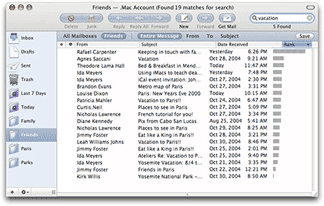 Apple's Mail 2.0 in Tiger (Mac OS X 10.4) is a major revision of Mail. We are not going to post a full tutorial on all of the new features of Mail 2.0. Apple has done a great job of describing them on this Web page and subsequent links. We are, however, going to comment on the good, ambivalent and bad aspects of Mail 2.0 based on our extensive use over the past two weeks since Tiger has been officially out.
The Good.
Search Speed--Searching your email among mailboxes is super fast. When we searched for the word "Kamas" (the best PowerBook stand) in the entire message of over 85,000 email messages accumulated over five years and sorted into a dozen or so mailboxes, it took but a few seconds to array the several thousand messages with "Kamas" somewhere in them in the mail list pane.
Stability--One corrupted email message won't cause you to lose your entire mailbox. This is because each email message is now treated as a separate file rather than the mailbox being treated as a file and each message a text addition to it. Unfortunately, this also has consequences for backup speed as noted below.
Smart Mailboxes--This is a cool feature. We have always sorted our incoming mail into a number of mailboxes based on the rules capability in Mail. The rules feature still exists to do this in Mail 2.0 but there is more. The new Smart Mailboxes can do this and much more because the ability to set criteria is more flexible. Just set up a Smart Mailbox and the email messages in your mailboxes meeting the criteria automatically flow to the Smart Mailbox. Any new messages meeting the criteria also end up in the Smart Mailbox. We found that this feature works very well.
The Ambivalent.
User Interface--Simply stated we prefer the user interface of previous versions of Apple's Mail. We think the design from both visual and functional perspectives was better but it's not a big deal.
Apple dropped the sliding mailboxes sidebar tray that protruded to the left or right (user's choice) of previous Mail 1.3's primary window in favor of a pane contained on the left within the outline of Mail 2.0's primary window. It may be six to one or a half-dozen to the other to most but not to us. We normally kept the tray out on the right, not the left, and we could snap it closed if we wanted to see or access something lined up down the right side on the desktop. The main application and everything within the window kept its size when doing so. With Mail 2.0, the mailbox pane is fixed on the left side. It can be closed but it just makes the mail list pane and message viewing pane larger--no desk space is revealed.
There is a new search filter bar in Mail 2.0 that appears above the the mail list after something is typed into the search window. That bar allows one to select the mailbox to be searched and whether it's "Entire Message", "To", "From" or "Subject". In Mail 1.3 and earlier, these selections popped up when the magnifying glass icon was clicked so that they could be selected before starting the search. The new paradigm may be easier to learn by doing than clicking on a magnifying glass icon but we find it to be logically backwards to select where one is searching and for what after the search has begun as happens in Mail 2.0.
Then there are the new colors. The background of the mailboxes pane is a light blue-gray in Mail 2.0 rather than white--we like the clarity of the white background in Mail 1.3. A darker blue-gray is used in the new filter selection bar that appears across the top of the mail list and in "bubbles" surrounding the action button icons. We tend to prefer not having this new color introduced. It is very Entourage-like so maybe switchers will feel better. We also like the original action button icon set against the almost white background in Mail 1.3 and earlier much better than those in Mail 2.0 surrounded by the blue-gray bubble. Well, we suppose the new icons do look a bit more like typical Aqua action buttons. This is a very minor deal anyway.
The Bad.
Backup Speed--One of the downsides of Mail 2.0's changes to improve stability and search speed and capability, is that each message is now treated as a separate file. While this is good from some aspects noted above, it has a major downside that is first encountered when importing messages from Panther's final version of Mail 1.3. It took almost 20 minutes to import some 85,000 messages that we have accumulated since 1998. Worse, it used to take less than 2 minutes to complete our nightly backup of email and other changed files with Tri-Backup v3.2.2. But with Mail 2.0's monstrous number of files to check for changes, it now takes nearly 30 minutes for the same amount of work, i.e. copying and deleting a net 500 or so files per day. Apple's Backup application takes just as long.
One solution would be to move our email archives for years prior to 2005 out of Mail's folder in ~/Library/Mail/Mailboxes since they do not ever change. The problem with this is that we occasionally have to search our archives for things like application serial numbers or customer orders, etc.
Stability--Probably the most critically important application to be stable is an email client, especially to those in business who rely on email as their primary communication and record system. Unfortunately, Mail 2.0 has done some weird things that shake our confidence. Occasionally, opening an email will cause Mail 2.0 to unexpectedly quit. That continues to happen with the same message until we reboot our computer. Sometimes, Mail 2.0 will temporarily lose all of the messages. Clicking on a mailbox results in a blank list and the application's header note that there are "0" messages when there may actually be 1000s. Quitting and relaunching Mail 2.0 usually fixes this. Occasionally, Mail 2.0 just freezes.
Junk Mail Handling--At one point several years ago, Mail's Junk filter was over 95% effective. Only a few spam escaped being filtered out and only a few emails were falsely tabbed as spam. That success rate has slowly declined over the updates to Mac OS X and the increase in sophistication by spammers in dealing with Bayesian filters. We currently get about 150-200 spam messages per day and Apple's Mail 1.3 was correctly filtering about 80% of them to the Junk folder. After the installation of Tiger, Mail 2.0's record is less than half as effective. We usually saw a modest drop in effectiveness with each Mail update, but it quickly recovered. This has not happened with Mail 2.0. In an attempt to improve Mail 2.0's low performance, we have set Mail 2.0's Junk mail preference back into training mode. We will see how good it gets.
In Summary.
Mail 2.0 has several significant technological advances over Mail 1.3 that we welcome. We have yet to use some of the new features, like using iSync and .Mac to keep our PowerBook synchronized with our Power Mac G5. This feature should be extremely helpful. We do it manually now and will be converting over as soon as some of the stability issues in Mail 2.0 are resolved, hopefully in 10.4.1 when it arrives. [Bill Fox]
Saw something? Send a tip or a correction
The archive ran on reader tips. What did you see, where, and do you want the credit? Something wrong on this page? Say so and it gets fixed.