Hands-On Review--Apple's New $499 Mac mini After A Month of Use
In our initial Mac mini note, we mentioned that the people around us in line who were also getting a Mac mini (all of them the $599 model) were PC users, i.e. switchers or semi-switchers. All of us were drawn to buy the tiny computer because of its style, power and, of course, price. We have now used it extensively so it's time for our hands-on review.
Warning! This review is primarily for those in Apple's target market, i.e. entry level and price conscious users, including PC switchers. But we have included a little something for everyone.
The Models
The Mac mini comes in two basic standard models, one with a G4 CPU running at 1.25GHz and a 40GB hard drive for $499 and the other with a G4 CPU running 13.6 per cent faster at 1.42GHz and an 80GB hard drive for $599. We think the 1.25GHz model is the best buy. Both come with 256MB of PC 2700 RAM (actually, ours came with faster PC3200 RAM), the same ATI Radeon 9200 graphics chip and the same combo optical drive that will read CDs and DVDs and burn CDs. Also included is a small white power brick and a VGA to DVI video adapter. The coffee mug (image below) is for size comparison only and not included.
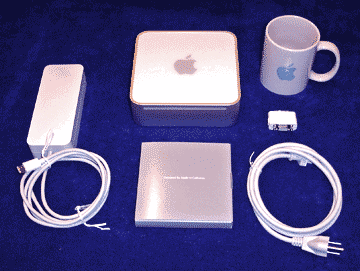 Weighing less than three pounds, the Mac mini is 6.5" by 6.5" and 2" high with rounded corners. The top is white polycarbonate plastic with a light gray Apple logo. The sides are brushed aluminum and the bottom has a non-skid pad. The ports, located in the rear side, are: power, 10/100 ethernet, v.92 modem, 2 USB 2.0, FireWire 400 and an audio out "headphones jack". Also in back are the power button, fan exhaust grille and a Kensington lock slot. The front has a CD slot and a blue LED. A small but audible speaker is inside.
The Mac mini comes with an outstanding software package: Mac OS X, iLife '05, the rest of the "iApps" (iCal, iSync, iChat AV), AppleWorks, Quicken 2005, Nanosaur 2 and Marble Blast Gold. Plus it has a 180+ page manual that covers the basic use of a Mac for novices, a Mac OS X Install DVD with Apple Hardware Test, a Mac OS 9 Install DVD and the iLife '05 DVD.
The Official Options
AirPort Extreme and Bluetooth are available as CTO options from the online Apple Store for $79 alone or $99 together, a good buy if one wants to wirelessly network the computer. The combo optical drive can be swapped for a SuperDrive to be able to burn DVDs for $100, a good buy if one wants to burn DVDs. The online Apple Store will also swap the standard 256MB RAM chip for 512MB ($75) or 1GB ($325). The 512MB is a good buy if one really wants more RAM but the 1GB module is definitely not a good buy. One can also get AppleCare extended from 1 to 3 years for $149 but we would put that in the class of "definitely not a good buy" along with the 1 GB RAM module unless one is also buying an Apple Cinema Display at the same time.
The 256MB RAM Issue
We have analyzed (here and here) whether or not someone who is buying a base computer for normal use really needs more than 256MB of RAM. The answer is clearly no, i.e. 256MB is adequate. We know of no other tests that refute our studies. However, the facts don't seem to matter to most people writing about the Mac mini. One of the first things they write is some absurdly-hyped criticism of Apple for supplying a base computer with "only" 256MB of RAM.
We have now used our 1.25GHz Mac mini extensively for "base" functions for a month, alternately with 256MB and 512MB of RAM. The base functions are web surfing with Safari, doing email with Mail, writing notes with TextEdit and AppleWorks, keeping our finances with Quicken, ripping CDs with iTunes and burning audio and data CDs. And, just like our more objective speed tests, we can not subjectively tell any difference in performance. One will, however, read subjective claims to the contrary.
We are not hard over on the RAM issue. Obviously, if one will ever want to do "advanced" work with large image files or large audio files or large digital video clips or very large text files with embedded graphics with iMovie, iDVD or GarageBand, etc., getting more RAM is probably a good idea. Anyway, it's only $75 for a 512MB module installed by Apple with absolutely no hassle. We just don't think prospective buyers should be misled or Apple slammed by the Mac pundits or advanced Mac users with no facts.
The Small/Slow Hard Drive Issue
A 40GB hard drive isn't bad for an entry level computer. To put things into perspective, after 20+ years of using Macs we finally and fairly recently exceeded 40GB of files on our main PowerBook's hard drive. That includes all of our apps (both frequently used and dormant), all of our digital photos, all of our digital music, seven years of business and personal email, seven years of analized server log files and gillions of accumulated but unused demos and neat-o Mac utilities. Of course, if one is a professional or avid amature photographer, a camcorder fiend or a music lover with hundreds of CDs, then 40GB could be too small. If one fits into one of these drive-gobbling categories, then Apple's $50 80GB option is a bargain. After that is filled up, one can always get a huge external FireWire or USB 2.0 drive for the Mac mini. Or better yet, jump right to the external drive.
We also analyzed the speed of the Mac mini's hard drive. It's not really that much of a slouch. Until the latest release of Apple's professional PowerBook line, they all used 2.5" 4200RPM drives just like the one in the Mac mini. Moving up to 5400RPM and 7200RPM increases performance significantly for some operations but at a significant cost plus heat and some noise. The largest of the fastest 2.5" 7200RPM drives on the market is a 60GB Hitachi drive. It goes for around $175 plus a significant chunk for installation.
Our advice to those in the Mac mini's target market, entry level and price conscious consumers, is to get the Mac mini with the stock 40GB drive. If one has $50 burning a hole in one's pocket, then set it aside for a possible future large external FireWire or USB 2.0 hard drive that you may never need.
External Options
We have already covered hard drives. In addition, one can also get external USB Wi-Fi (wireless network) modules if one does not initially get AirPort Extreme with the Mac mini. Unfortunately, they seem to be limited to the slower (but fast enough) and cheaper 802.11b protocol. For example, this D-Link USB module (DWL-122) has Mac OS X drivers. One can also get an inexpensive external USB Bluetooth module (D-Link DBT-120) from many retailers including a retail Apple Store. So neither wireless technology opportunity is completely lost if one doesn't buy them originally with the Mac mini. One may need an externally powered USB hub, however, since the Mac mini has only 2 USB 2.0 ports.
Advanced Uses
Many people who buy a Mac mini will not be in Apple's target market, like us for example. Other than to serve as a unit for our review, our Mac mini has extended one of our G4 Cube's work. One Cube currently serves as our Global Headquarters' quiet and totally reliable network server. We are currently using our Mac mini headless (i.e. w/o a monitor) via Apple Remote Desktop as a RADIUS server to secure our wireless network using Elektron. It is also streaming digital music to our home theater system via an audio cable and playing digital movies from rented DVDs and, when we find a good Mac-compatible service, from files legally downloaded off the internet via Apple's S-video adapter and S-video cable. Surfing the internet on our large screen TV with the Mac mini is possible but redundant to the PowerBook that we use to control it. Finally, we plan to use our Mac mini as the nerve center for controlling things like lights, air handling and some security operations. It will quietly look great doing doing all of the above.
In Summary
The Mac mini is a terrific computer for $499 (or more, for that matter). It will do everything that entry level or price conscious users do with a computer right out of the box, assuming they already have a keyboard, mouse and monitor. It's small, light, quiet and stylish. Another strength is its included, secure and easy-to-use sofware.
We have used the Mac mini for a month for everyday type of work. In our opinion, it is every bit as good a Mac as any other we have owned and better looking than most of them. Subjectively, it's performance in everyday use is on par with a PowerBook or a recent iMac G4 or the top end of a recent single processor Power Mac G4. We encountered no problems of any kind so we can recommend the Mac mini without reservation.
Are there any cons? Well, we can think of only one but, in our opinion, it is a glaring omission--none of the included literature, software and hardware (save one) specifically and directly addresses the major share of the Mac mini's target market, price conscious PC switchers. The Mac mini comes with a 180+ page manual but nowhere does it mention how to migrate files from a PC to the Mac mini. It doesn't even mention the software on the market that will easily do this for a PC user--Detto's nifty Move2Mac. It's also missing a simple PS2 to USB adapter to connect older PC keyboards and mice to the Mac mini. Fortunately, it has a VGA to DVI adapter for older monitors. Maybe Apple could put together a simple kit, the iSwitch Kit, to hand out to PC switchers who buy Mac minis? [Bill Fox]
Saw something? Send a tip or a correction
The archive ran on reader tips. What did you see, where, and do you want the credit? Something wrong on this page? Say so and it gets fixed.