Hands-On Review: Apple's New iPod nano
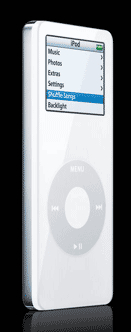 Apple released its latest iPod model, the iPod nano, during a September 7th special event at San Francisco's Moscone West Convention Center. Even though our two-year-old iPod mini, the model that the nano replaces, had died just a few weeks earlier and we had elected to replace it with a new color 20GB iPod, we ordered a new iPod nano for this review. We ordered a white 4GB nano through the online Apple Store to take advantage of the free engraving offer for the unofficial staffer who will perform the nano's long-term test. Our nano was ordered the afternoon of September 9th and it arrived the morning of September 14 by FedEx directly from Shanghai, China--i.e. less than three U.S. business days for engraving and shipping. We had selected the free FedEx Ground shipping but Apple frequently uses express early in product releases with high demand.
Unlike the iPod mini that the nano replaces, there are only two color choices, white or black, instead of five (or six originally). Some Web reports state that the black iPod nano is in the greatest demand and the lowest supply. Still, we chose the white iPod nano because we like the stark white that is the Apple iPod unofficial trademark color. We were also worried that the black iPod nano might show scratches more easily. Our original white 5GB iPod that now kicks around in our car's glove box for use during long, unplanned waits still shows few scratches. But we tend to take extra care of our stuff.
We also opted for the larger-capacity 4GB model instead of the less expensive 2GB model. Reports that we have seen claim that the 4GB is the most popular. Our digitized music and photo collection that we carry on our iPod runs close to 2GB, so we opted for the larger model for some room for growth.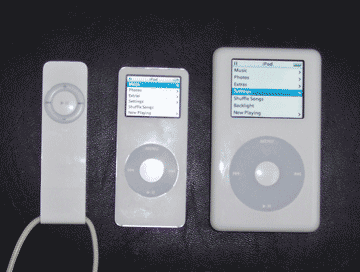
What You Get
Our iPod nano arrived in a small square box about the same size as an iPod box but only 1" deep, between a third and a quarter of the iPod box's depth. It contained the iPod nano, earbud headphones, earbud sponges, USB 2.0 cable, dock adapter, CD, 12-page quick start guide, Apple logo stickers and 12-month limited warranty. Like the iPod shuffle, an AC adapter is not included. The CD contains the iPod software installer, iPod User Guide PDF, iPod nano Features Guide PDF, iTunes 4.9 and QuickTime 6.5.2 installers and Web Tutorials in English, French, German and Japanese. The latter sends you to Apple's iPod Service and Support Web site.
The dock adapter is a small plastic insert to be used with future third-party accessories that will have a standard cutout for iPods so that all iPods may fit into one accessory. This is a nice move by Apple for manufacturers and consumers but it is likely to confuse some people since it is presently useless.
 The iPod nano is small and light (3.5" tall by 1.6" wide by 0.27" thick and 1.5 oz.) and is thinner even than the iPod shuffle. In a volume and weight comparison with its principal siblings, the shuffle, nano and 20GB iPod are respectively 1.07, 1.51 and 6.20 cubic inches in volume and 0.8, 1.5 and 5.9 oz. in weight (see image above). The iPod nano clearly rivals the iPod shuffle in the portability department.
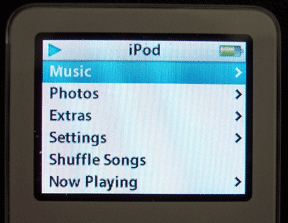
The font on iPod nano's 1.5" (diagonal) color screen (at left) is as easy to read as the font on the 2" screen on the 20GB iPod (at right below). The nano's font appears slightly smaller and the screen shows one less line of menu text (6 vs 7), the same number of lines as the original 5GB iPod screen. The iPod nano's screen is clearly brighter than the 20GB iPod's and is easily readable in bright sun light. In order to read the nano's color screen, the backlight must come on as with the 20 GB iPod's color screen.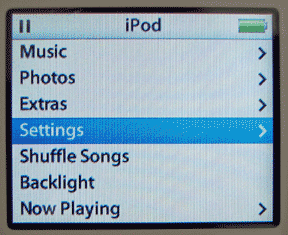
The click wheel controller on the iPod nano is smaller in diameter than an iPod's but the center button is the same size. We have no problem using the click wheel and center button, either because of the click wheel's smaller diameter or the narrower width of the nano itself.
We installed the iPod nano software and copied the guide PDF files to our PowerBook G4's hard drive.
Using the iPod nano
Out of the box, our iPod nano was nearly fully charged. The first screen that came up asked us to select a language. A note at the bottom of the "About" screen stated that our nano was formatted for Windows.
We plugged the dock connector of the included USB 2.0 cable into its port on the bottom edge of the iPod nano and noted the space available next to it to plug in headphones or other audio-out devices. Despite many published comments, there is plenty of space to plug devices into the headphones jack. The only issue we see is that when the iPod nano is sitting in currently available docks, one will not be able to plug anything into the headphones jack. However, we expect that to be remedied in new accessories. There is even a drill-out depression in the dock adapter included with the iPod nano.
When we first plugged our iPod nano into our PowerBook G4's USB 2.0 port, a dialog box popped up stating "Optimizing for Mac OS X." In a few seconds, the iPod nano shut down and re-started. We suspect that it reformatted from Windows to the Mac format.
iTunes 5.0 launched and displayed the iPod preferences screen. After registering our iPod nano with Apple, iTunes began to load our 337 audio files, i.e. 320 songs and 17 podcasts. iTunes hung after about 3 minutes while loading file number 320, The Deep by Steven C. We don't know if the hang was caused by our iPod nano or iTunes 5.0--neither was responsive so we had to force quit iTunes 5.0. After that, we couldn't get our iPod nano to work properly even with a reset so we used the iPod Updater 2005-09-06 to restore the iPod nano software. Then it worked fine.
How Fast is It?
Loading the 337 audio files, 1.67GB, by USB 2.0 took 3:31. Preparing and loading 296 photos, another 191MB, took another 3:14. iTunes prepares lower resolution photos for transfer to the iPod nano and that took most of the time. In all, it took us around eight minutes to load our 4GB iPod nano with 1.71GB of audio and image files.
Some have complained about being unable to use FireWire to load the iPod nano. A FireWire connection can charge an iPod nano but not load it. The main concern is for those who have an older Mac with only much slower USB 1.1 ports. Others have claimed that FireWire would be even faster than USB 2.0, an issue for transferring very large collections of songs and/or images. Still others lament Apple dropping its own superb FireWire technology in favor of the USB 2.0 technology that is more ubiquitous in the Windows world than FireWire. While we can relate to the latter, it is clearly a business decision to sell more iPod nanos since potential Windows customers outnumber Mac customers by a large margin. On the other points we decided to conduct some speed tests.
We tried loading the songs and podcasts on our iPod nano from a USB 1.1 port on our 450 MHz Power Mac G4 Cube. After 3:31 (the same time it took to load all of the audio files using USB 2.0), it had loaded only 12 of the 17 podcasts and none of the 320 songs in our collection. It took 16:39, just to load all 17 podcasts and 83 of the 320 songs (i.e. the first 100 audio files). Fortunately, an update will be much faster than the initial loading of a collection. But USB 1.1 is slow. It may make sense to get a USB 2.0 PCI card for an older Power Mac or a USB 2.0 PCMCIA card for an older PowerBook. Older iBooks and iMacs appear to be out of luck unless there is a USB 2.0 to FireWire adapter out there.
Since the iPod nano can't be loaded by FireWire, we alternately used USB 2.0 and FireWire to load our 20GB iPod. Before each load, we used the iPod Updater 2005-09-06 to to erase our 20GB iPod and restore the software. Using USB 2.0 it took 3:50 to load 337 songs and podcasts. It took another 0:26 to load the 296 photos. Using FireWire, it took 4:10 for the songs and 0:27 for the photos. Both songs and photos took slightly longer to load with FireWire.
Battery Life?
What about the iPod nano's battery life? Apple claims that battery life is up to 14 hours. We suspect that measurement is under optimal conditions, i.e. with the backlight off and no other activity but playing songs. But it is relatively hard to see the menus on the color screen of the iPod nano (and 20GB iPod color) with the backlight off and we would expect normal use to include some fiddling with the song order, etc., and that would require turning on the backlight. Remember also that the iPod nano's backlight is relatively bright.
We decided on a maximum battery drain test for our iPod nano and, for comparison, we also applied it to our relatively new 20GB iPod color, which Apple claims plays for up to 18 hours, and our original 5GB iPod. Apple claimed the latter would get up to 10 hours but it's old and it recently tested at about a total of seven and a half hours of undisturbed play time with the backlight off. Our test was to set the iPods to "repeat all," set the backlight to "always on" and then to time how long it took before it automatically shut off. Before starting the test, we ran each iPod battery down to shut down and then recharged them fully to ensure that they were at maximum capacity.
The original 5GB iPod ran for 3:17:00. The iPod nano ran a bit longer to 4:23:00. The 20GB iPod color ran the longest to 5:54:00, nearly 6 hours. Based on proportioning to the original 5GB iPod's 7.5-hour performance, the iPod nano would be expected to exceed 10 hours. However, we believe that the backlight causes a greater proportion of the battery drain in the iPod nano so Apple's 14-hour number seems about right.
Finally, how good is the music? To our ears, we can not tell any difference among our iPods. The music sounds great, especially with Griffin EarJams on the Apple earbuds or with our Bose Quiet Comfort 2 headphones.
In Summary
Apple's iPod nano is the best ever portable music device for carrying and listening to digital music and for viewing one's photos, contacts and calendars. The iPod nano represents the best balance of size, capacity, features and style of any music player on the market today. It will clearly take over for the iPod mini as Apple's leading iPod model and may even crowd the regular iPod and iPod shuffle further into more specialized niches. Apple also has some great accessories for the iPod nano. The iPod nano is $199 for the 2GB model and $249 for the 4GB model. [Bill Fox]
Saw something? Send a tip or a correction
The archive ran on reader tips. What did you see, where, and do you want the credit? Something wrong on this page? Say so and it gets fixed.