Hands-On Review--First Impressions Of Our New Video iPod
We ordered the $299 30GB model in white. Since it replaces a 20GB color iPod which is less than half full of songs and photos, we felt that the 30GB model would be more than adequate for our needs since we do not plan to load huge quantities of videos in addition. We suspect that black will be the hot color like for the iPod nano, but we like classic white and the instant recognition it brings.
The video iPod is technically just the "iPod" since Apple does not officially add a "video" suffix to its name as it does with the iPod nano or iPod shuffle. But we will call it the video iPod to distinguish it from previous models that can not display video. The new video iPod will display video in H.264 or MPEG-4 formats.
What You Get
The video iPod is the same (or virtually the same) size in height and width as our color iPod. It looks a little larger because its front edges are flat like the original iPod's rather than rounded, the screen is much larger and the click wheel is smaller. The video iPod is much thinner than our color iPod, about 3/8" vs 5/8", and lighter, 4.8oz vs 5.9oz.
The box that contained the video iPod is small, only about 1/8" thicker than the iPod nano's. Inside along with the video iPod is a small light-gray & white leatherette slip case, ear bud headphones, a dock adapter, a USB 2.0 cable and--surprise!--no AC adapter. The AC adapter is a $29 extra. There is also a CD with iPod Updater 2005-10-12 which contains the same software as the previous updater plus the new software for the video iPod, a printed Quick Start Guide, a sheet of 2 white Apple logos, a software license and a one-year limited warranty statement.
Using Our Video iPod
Our video iPod's battery came almost fully charged so it took just a few minutes to charge it completely. However, we intend to run it down to nothing and recharge it in order to maximize it's charge which Apple claims will last up to 14 hours playing songs, 3 hours playing slide shows and 2 hours playing video. We'll see about that in our long-term test.
Then we installed the video iPod's software on our PowerBook G4. We already had iTunes 6 and QuickTime 7.0.3 which are also on the CD. Then we plugged it in using the USB 2.0 cable, registered it and loaded our songs, playlists, podcasts, photos and contacts. It took about 3.5 minutes to load our 348 songs and podcasts. It took another 3.25 minutes to load 256 photos and 10 seconds to load the contacts from our Address Book. Then we downloaded U2's video song Where The Streets Have No Name and Pixar's first animated movie Luxo Jr. and loaded them (about 9.5 minutes of video) onto our video iPod--it took only a few seconds.
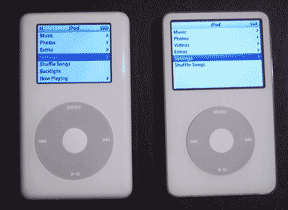 How well does it work? The songs play great just like all of the other iPods that we've had, as do the podcasts. Photos look MUCH better on the 2.5" screen. What a difference a half inch makes! And the video iPod's screen is brighter than the color iPod's, just like the iPod nano's. The videos also looked very good. The Pixar movie is 2:23 and the U2 song video is 7:12. We had no trouble watching them. For the size of the screen, these short videos are fine. Short home movies of a special event or vacation trip would also make the grade. But to tell the truth, it's hard to imagine watching a full length movie or even an hour TV episode on our video iPod but who knows, we haven't tried it yet.
FireWire? There's no mention of it anywhere in the user guide. But it's our duty to be intrepid so we attached our brand new video iPod to our PowerBook G4 with a FireWire cable from our dead iPod mini. Up popped a message on the video iPod's screen that said "FireWire connections are not supported. To transfer songs, connect the USB cable provided." The FireWire cable can only charge the video iPod just like the iPod nano.
In Summary
Apple's new video iPod is terrific! The video iPod's 2.5" screen vs the 2" screen of our 20GB color iPod makes a huge difference in visual clarity and ease of watching. The smaller click wheel is no more difficult for us to use. Of course, we also like the video iPod's thinness and lightness. Adding video to the iPod is something we have expected in the evolution of Apple's iPod over the past year. Now it's here and it works for us--perfectly. The video iPod is $299 for the 30GB model and $399 for the 60GB model which has a longer claimed battery life but is heavier by 0.7oz and thicker by 0.12".
We still plan to run a few tests on our 30GB video iPod this weekend to compare its performance with other recent iPods, so stay tuned for the results. [Bill Fox]
Saw something? Send a tip or a correction
The archive ran on reader tips. What did you see, where, and do you want the credit? Something wrong on this page? Say so and it gets fixed.