Hands-On Review--iPod shuffle 512MB
Why did we get the 512MB model when most people seemed to want the 1GB model? Well, the "Favorites" playlist on our iPod mini is only 87 songs out of 300 total that we have either ripped from our CDs or bought from Apple's iTunes Music Store. Those 87 songs last us for a cross country airline flight, including airport waiting time, about 5 hours or so. They take up about 309MB of space and leave some 183MB free for slide presentations and other files according to iTunes. We plan to use our iPod shuffle as a USB drive which we never carry more than 50-100MB at any given time. So we have room for even more songs than we normally listen to at one time.
What You Get
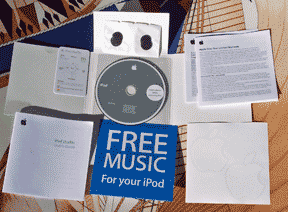 As everyone knows by now, the iPod shuffle is small and light (3.3x0.98x0.33" and 0.78oz). It's only about 3/4" longer than the 256MB Lexar USB drive that we carry on our key ring and just as light. It comes with Apple's earbud headphones and foam pads, a lanyard and a small package with a software CD, quick-start card, User's Guide, limited warranty statement, white Apple logo stickers and a flyer that states "FREE MUSIC For your iPod." The latter just points out that there is a free song every week on Apple's iTunes Music Store.
The CD has PDF files of the User's Guide for each iPod model and the latest iPod software, 2005-1-11. It did not update our iPod shuffle since the latest software came on it. Also included is iTunes 4.7.1 and a couple of web-based tutorials--Apple is not leaving anything to chance.
The quick start card is really helpful. Since the iPod shuffle doesn't have a screen, one has to learn its code of button clicks and LED blinks to control it. But don't despair, it's really simple to operate. On the back there is a single slide switch to turn it on and to set it to shuffle the playlist or to play it in order. On the front, the center button is pressed once to play (one green blink) or pause (constant green blinking) if playing or held down for 3 seconds to lock the controls (3 orange blinks) or to unlock them (3 green blinks). The gray outer ring has four controls: forward, back, increase volume and decrease volume--a single green blink gives visual feedback for each click. On the back again, there is a battery condition button that when pressed glows from green to orange to red and to nothing as the battery's charge is consumed. That's it!
Using It
We plugged our iPod shuffle into our PowerBook and iTunes launched automatically. We clicked the iPod icon on the bottom right of the iTunes window and checked "Enable disk use" so we can carry files on our iPod shuffle like a USB drive. We set it to hold 100 songs. iTunes 4.7.1 has an Autofill button which randomly selects songs to fill the iPod shuffle but we maintain the songs we want to hear in playlists so we just dragged and dropped "Favorites" with 87 songs onto the iPod shuffle icon. We are used to FireWire speed but the iPod shuffle's USB 2.0 interface was slower. That surprised us because the specs of USB 2.0 and FireWire are similar. FireWire is clearly faster.
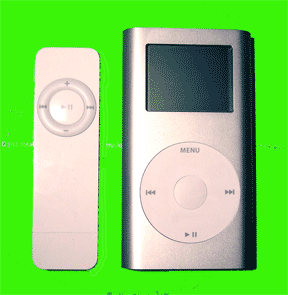 The main question is, how does iPod shuffle sound? We checked it against our iPod mini. Through previous tests we determined that we could not hear any difference between the iPod mini and the regular iPod. We listened to Jimmy Buffet's rendition of "Brown Eyed Girl" over and over again using Apple's standard earbuds, then with Griffin's outstanding $15 EarJams attached and then with our Bose QuietComfort2 headphones, a super holidays gift for a frequent traveler. Our assistant randomly switched between the mini and shuffle behind our back and we could not hear a difference with any headphone setup--nada.
The iPod shuffle has a 12-hour rated battery vs the mini's 8. Our mini seems to get just over 5 hours on a full charge and its battery rapidly discharges when not used, a major annoyance. We just returned from a 2-day trip with our shuffle, using it perhaps a total of 8 hours on a single charge and the battery condition light still shows green when we press it 2 days later.
The lightness of the shuffle vs the mini (0.78oz vs 3.6oz) is also an advantage when moving around, even on an airplane.
In Summary
Apple's new iPod shuffle is an outstanding digital music player, the best yet in our opinion. It's simple to use, light and easy to carry, holds more than enough songs for long listening even at 512MB, holds files like a USB drive, has a great design and the music it plays sounds terrific. Those who like to carry lots of music, like their whole collection, on their iPod will want an iPod mini or regular iPod. We carry our digital music collection on our PowerBook when we travel and find it easy enough to reload our iPod shuffle with new music whenever we get the whim to do so. Those who want to select specific songs rather than listen to whole playlists are better off with a regular iPod or mini. Of course, if one wants use an iPod as an extra hard drive or recording device or to hold and view contacts like a PDA, the the regular iPod or iPod mini is best. But if one just wants to listen to music while mobile and maybe tote a few presentations or other files, we think that the iPod shuffle 512MB can't be beaten at any price which makes it even more compelling at just $99. [Bill Fox]
Saw something? Send a tip or a correction
The archive ran on reader tips. What did you see, where, and do you want the credit? Something wrong on this page? Say so and it gets fixed.