Hands-On Report--FirmTek eSATA ExpressCard 34 and OWC Elite-AL Quad Case--How Fast Are They?
Apple dropped the PCMCIA (PC-card) slot and the fast FireWire 800 port from the new 15.4" MacBook Pro. Instead, the new MacBook Pro came with a 34mm ExpressCard slot, the much faster next generation of PCMCIA. Apple's expectation is that third party vendors will make ExpressCard 34 adapters for the new slot to connect fast FireWire 800 or SATA devices or other devices that have commonly used the PCMCIA slot. Well, six months later there's still no FireWire 800 ExpressCard 34 but there is an eSATA ExpressCard 34 from FirmTek called the SeriTek/2SM2-E.
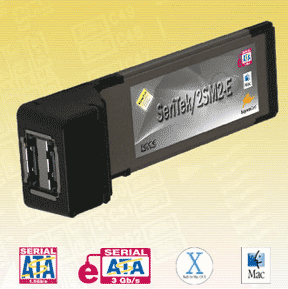 The SeriTek/2SM2-E sells for $119.95 and has two eSATA ports (image at right courtesy of FirmTek). It plugs into the ExpressCard 34 slot on the left side of the MacBook Pro. Unfortunately, there are no native Mac OS X drivers so FirmTek supplies them and they must be installed before using the SeriTek/2SM2-E. FirmTek also has $20 cables for connecting devices with SATA and eSATA connectors and a $309.95 bundle that includes the card, a 3.5" drive case with 2 bays and two cables.
But what good is an eSATA ExpressCard without a SATA external drive in a case with an eSATA port? Fortunately, we have a backup 3.5" SATA drive (250GB Seagate 7200.8 SATA) from our ex-Power Mac G5 Quad and there are a number of cases now on the market. The one that caught our eye is OWC's Elite-AL Pro Quad (image below courtesy of OWC) because for $109.99 the case has eSATA, FireWire 800, FireWire 400 and USB 2.0 ports, comes with four cables for all four port types and looks great! The SeriTek/2SM2-E card and Elite-AL pro Quad case with cables arrived last week so we've had a chance to use them for awhile.
Setting Up
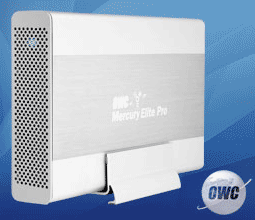 The Elite-AL Pro was easy to set up with our hard drive. OWC supplies an excellent set of installation instructions and a torx 10 screw driver for opening the case. We only had to supply a small philips head screwdriver with a magnetized tip. The latter is important because the screws that hold the drive in place have to be inserted through slots in the sides of the case and they are hard to fit and easy to drop without a magnetized tip on the screwdriver. Once the drive is in place, there are just two connectors to plug into the drive before closing the case. We stood the case up on edge with the included stand as shown in the OWC photo above left. The style of the Elite-AL Pro Quad is very much like the Mac Pro and Power Mac G5 and the blue access light is cool. OWC also supplies a small AC/DC power supply with the case, thankfully with a cord and plug instead of a wall wart.
The SeriTek/2SM2-E slides into the MacBook Pro's ExpressCard slot and clicks into place. To remove it, one just presses it in again and it clicks loose for extrication. Actually, as an aside, we don't particularly like this method of holding the card because once one inserts the card, it's too easy to click it loose again inadvertently when inserting cables into the card's slots. Of course, this is not FirmTek's fault since they didn't design the slot. Upon insertion of the SeriTek/2SM2-E with the eSATA cable attached, an ExpressCard icon pops up in the menu bar. Attach the cable to the drive case and the drive mounts on the desktop.
We plan to use the SATA drive as our "in-office" backup drive and the eSATA connection should let us completely backup our entire MacBook Pro internal drive, about 75GB, as a bootable copy using Drive Utility's "Restore" option in the least time possible. Transferring about 75GB takes over 2 hours by FireWire 400 to a 2.5" external drive. But first we have to transfer the data off our MacBook Pro's internal drive, reformat it and transfer it all back in order to install Boot Camp. By experience, that's a 4-5 hour job using FireWire 400 with a 2.5" drive. We hope to shorten it to under 2 hours with the eSATA connection and 3.5" drive.
How Fast?
So how fast is the eSATA connection? We used three tests to measure the speed of the eSATA, FireWire 400 and USB 2.0 connections between our MacBook Pro and the SATA drive in the Elite-AL Pro Quad case--QuickBench 2.1.2, Xbench 1.3 and duplicating our test 500MB folder. Here are the results:
| Test | Hard Drive Connection | ||
|---|---|---|---|
|
(Higher is faster)
|
eSATA
|
FW 400
|
USB 2.0
|
| . | |||
| QuickBench 2.1.2 Extended Test | |||
| - Write (MB/s), Avg. of 30-100MB runs |
60
|
33
|
16
|
| - Read (MB/s), Avg. of 30-100MB runs |
59
|
37
|
18
|
| Xbench 1.3 Drive Test (256k blocks) | |||
| - Sequential Write (MB/s) |
58
|
32
|
16
|
| - Sequential Read (MB/s) |
58
|
37
|
17
|
| - Random Write (MB/s) |
26
|
20
|
13
|
| - Random Read (MB/s) |
25
|
21
|
12
|
| Duplicate 500 MB Folder (MB/s) |
15
|
11
|
3
|
As expected, the eSATA connection is the fastest in all tests, some nearly twice as fast as FireWire 400. The tests also show how pathetic a USB 2.0 connection is. We are surprised that the eSATA connection wasn't as much faster than FireWire 400 as we expected on the Xbench 1.3 random write and read tests, only some 20-30 percent.
The big job of copying the 75GB of data on our MacBook Pro's internal drive to the external SATA drive and then recopying it back after the internal drive was reformatted took just over 2 hours, about half the time it took using FireWire 400. Afterward, the internal drive booted our MacBook Pro just fine and we were able to create a partition with Boot Camp for a Windows XP SR2 installation in the near future.
In Summary
eSATA is a very fast protocol and it is sure to become a more widespread data transfer protocol in the near future. Perhaps, this is why Apple left the FireWire 800 port off the MacBook Pro. The FirmTek eSATA ExpressCard 34, the SeriTek/2SM2-E, worked great during the speed tests as did the OWC Elite-AL Pro Quad case. We will report later on their general use in a subsequent report. [Bill Fox]
Saw something? Send a tip or a correction
The archive ran on reader tips. What did you see, where, and do you want the credit? Something wrong on this page? Say so and it gets fixed.