Hands-On Report--Lightroom Public Beta 1, Adobe Strikes Back!
 When we earlier talked to John Nack, Adobe's Senior Product Manager for Photoshop & Bridge, about Adobe's trio of apps for digital photographers (i.e. Bridge, Photoshop and Camera Raw) in comparison of Apple's incipiently shipping Aperture we got an early peek at Adobe's upcoming response, code-named Shadowland at the time. Adobe's answer to Aperture, Lightroom, will be available today as a public beta and will get its first public demonstration this week at Macworld 2006 in San Francisco. Lightroom Public Beta 1 may be downloaded for free today from this Adobe Web page.
Last week we received a pre-release brief on Lightroom from Kevin Connor, Adobe's Senior Director for Digital Imaging. The brief updated the November pre-brief and provided a preview copy of the application. We have been using Lightroom off and on for a few days, mostly on a 867MHz 12" PowerBook G4, and are very impressed with the application and with how well it works despite a fair list of so-called "known issues."
Why is Adobe releasing Lightroom as a free public beta? According to Mr. Connor, the reason is that Adobe wants to ensure that it provides digital photographers with the best possible product, one that truly fits their workflow needs. Adobe has set up a specific Adobe Labs Web site with three forums to get that feedback. There's a forum for general discussion, one for reporting bugs and one for requesting features. The feedback will be taken into account in producing the final product with a target release in late 2006. That's a quite long public development program. Adobe may be trying to avoid some criticisms of Aperture and it certainly couldn't leave the field wide open for nearly a year, could it?
Like Aperture, Lightroom is targeted as an integrated tool for digital photography post-production workflow, replacing two components of Adobe's trio. But unlike Aperture, Lightroom does not make use of Mac OS X 10.4's Core Image technology even though it is cocoa-native in Mac OS X. Also like Aperture, Lightroom is designed to work non-destructively with raw files produced by digital cameras and it will work with over 100 digital cameras that the Camera Raw plug-in for Photoshop already handles (many more than Aperture). Furthermore, Lightroom is designed to work with an open standard format, DNG, to maximize compatibility but it will also work with most digital image formats. Lightroom will be cross-platform with a Windows version coming out soon.
The system requirements for Lightroom are quite reasonable. Basically a 1GHz G4 processor is needed for optimum use but it may also work reasonably well on lesser CPUs including a G3. We used it on a 867MHz 12" PowerBook G4 with 640MB RAM and a Power Mac G5 Quad 2.5GHz with 1.5GB RAM so we'll comment on its usability shortly. Suffice it to say for now that Adobe's target is "common systems" according to Adobe's Kevin Connor and that Lightroom is definitely designed to be a "tool for field photographers." Aperture's minimum system requirements are much higher ("Power Mac G5 with a 1.8 gigahertz (GHz) or faster PowerPC G5 processor; 15- or 17-inch PowerBook G4 with a 1.25 GHz or faster PowerPC G4 processor; or 17- or 20-inch iMac G5 with a 1.8 GHz or faster PowerPC G5 processor") and it has still received performance complaints.
Adobe designed Lightroom to efficiently provide a professional digital photography-specific workflow, optimized for high-volume, for the most commonly used photography functions. It simply and quickly imports, selects, develops and showcases large volumes of digital images. As such, Lightroom is strictly complementary to Photoshop or Photoshop Elements. With regard to the interface, Adobe designed Lightroom to simplify and reduce as much as possible the interface in order to focus as much as possible on the photographic image. Lightroom has some cool features that enable this objective. For example, one can hide part or all of the interface which pop back into view with a mouse-over.
Taking a page from Apple's lexicon, Lightroom has no manual. Rather it has a opening dialog box that lists five short rules that introduce one to the use of Lightroom with the headings: 1. Top Module Picker; 2. Side Panels; 3. Bottom Filmstrip; 4. Five Important Key Commands; and 5. Enjoy. After that brief orientation, one is supposed to be able to simply dive in, explore and intuitively use it. Okay...so here we go.
Use
Lightroom launches fairly quickly on both the G5 Quad (6 sec after a cold start and 2 sec subsequently) and 12" PBG4 (10 sec after a cold start and 6 sec thereafter). The first time Lightroom is launched, a dialog box with the five rules is displayed. Subsequently, one may find the rules under the Help menu. The dialog box also has a check box for checking for updates on launch. It is a good idea to keep it checked since Adobe plans to provide frequent updates as they march toward the final release late this year.
All of our digital photos, some 989, are stored in iPhoto. We selected the entire iPhoto library to import as "Reference files in existing location", the default setting, rather than copying, moving or converting them. It took 84 sec on the G5 Quad and 267 sec on the 12" PBG4. We learned about one "problem" with Lightroom the hard way--do not import photos this way and then delete them from Lightroom by choosing "Remove from Lightroom and Trash." Doing so not only deletes the photos from Lightroom but also deletes the originals from their source folder without a sufficiently explicit warning, at least for us. Just use "Remove from Lightroom" which in retrospect is the logical choice but we are learning Lightroom by exploring and using it, right? Fortunately, we backup our data every day and Apple's Backup 3.0.1 worked perfectly to restore our photos to iPhoto. Backing up up routinely is a very good thing.
The first screen (see below) displays the "Library" section interface, the first of four. The other three are: Develop, Slideshow and Print. The Library section is primarily for importing photos into Lightroom and is divided into five panels. The top panel allows one to easily navigate among the four sections. The right panel shows the selected photo and its color distribution. Also on the right panel is the Quick Develop set of tools for basic things like white balance and exposure, and Info tool for a caption, copyright, comments and rating and an EXIF metadata panel. The bottom panel displays the library of photos as a film strip. The left panel is for selecting the portion of the library of photos to be worked on including a search engine. The center panel shows the selected library of photos.
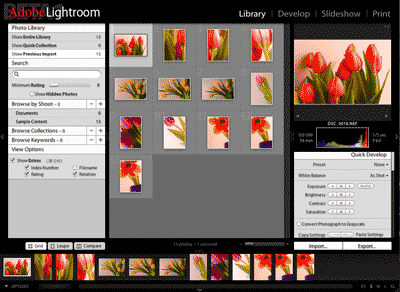
The Library section interface is really simple to use. It has some very cool features like the transparent numbering of the photos, little buttons on each photo frame for quickly rotating it and double-clicking causing the photo to fill the whole center panel in loupe mode with a magnification tool on the cursor.
Adobe's object is to keep the photo as the primary focus and the interface out of the way. This is accomplished in Lightroom by being able to hide all four panels and even the menu bar so just the photos or photo show on the screen. The panels re-appear with a mouse-over as needed.
The Develop section is for applying Lightroom's specific retouching tools. There are eight sets of retouching tools in the right panel: Basic, Tone Curve, Split Toning, Grayscale Mixer, HSL Color Tuning, Detail, Lens Corrections and Camera Calibration. The left panel has a list of presets. The tools are all standard retouching tools. While pretty extensive, they far short of Aperture's filters. But Adobe's intent is to supply the tools most commonly used by digital photographers and to rely on Photoshop or Photoshop Elements for image modifications that are largely in the realm of graphics artists.
The Slideshow section converts the retouched images into slides to show them off. It has settings for layout, overlay, backdrop and playback.
Finally, the Print section does just that. It has settings for layout, overlay and print job. One can use the Print section to print 4x5 or 5x8 contact sheets.
In Summary
While the ball is still in the air, it looks to us like Adobe has hit a home run with its new Lightroom. We found Lightroom extremely easy to learn, powerful and on-target. In our opinion, it steals Apple's ease-of-use crown for applications dedicated to post-production digital photography workflow. Plus Lightroom's system requirements, so far, are much more reasonable for field use by photographers. We easily used Lightroom with our 867MHz 12" PowerBook G4. For working back at the lab, it runs lickety-split on our Power Mac G5 Quad.
We strongly recommend that digital photographers download the free Lightroom Public Beta 1 from this Adobe Web page and give it a whirl. We think they will be very impressed. And don't forget to report problems and, especially, to make feature wishes known to Adobe in the specially set up forums. Taking advantage of the opportunity offered by Adobe will surely make for a much better final product due out late this year. The price has not been determined as yet. Now, it's Apple's turn to respond. Isn't competition great? [Bill Fox]
Saw something? Send a tip or a correction
The archive ran on reader tips. What did you see, where, and do you want the credit? Something wrong on this page? Say so and it gets fixed.