Hands-On Review--NitroAV FireWire 800 ExpressCard 34
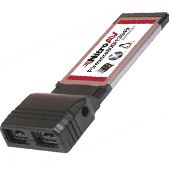 The NitroAV FireWire 800 ExpressCard 34 has two FireWire800 ports (i.e. two 9-pin connectors) and an AC/DC port. At the fairly reasonable price of $89.95, it comes bare, i.e. with no cables, no AC/DC adapter and no instructions.
An AC/DC adapter is needed for either the NitroAV card or the external hard drive case because the ExpressCard 34 slot does not provide enough power for an external hard drive. When ordering the NitroAV FireWire 800 ExpressCard 34, an AC/DC adapter is an option.
Cables to match the particular FireWire peripherals, depending on what's needed, have to be purchased if they did not come with the external hard drive. With the FireWire 800 protocol one can get theoretical transfer rates of 100, 200, 400, and 800 Mbps.
The NitroAV FireWire 800 ExpressCard 34 easily inserts into our 15" MacBook Pro's ExpressCard 34 slot. It locks into place with a click when fully inserted. Removal first requires dismounting the attached drive and turning the card off in the menu item, then it is pressed in further and it unlocks with a click. As we've stated before, we aren't fond of this locking system because it is too easy to accidentally unlock and dislodge the card when plugging a cable into it.
How Fast Is It?
In our review of Trans International's miniXpress case with a 2.5" 160GB Seagate drive rotating at 5400rpm, we measured its data transfer speed using three tests and its FireWire 400 and USB2.0 ports. Using the NitroAV FireWire 800 ExpressCard 34 we ran the same three tests with the miniXpress' FireWire 800 ports. Here are the results in megabytes per second (MB/s),
| Test (Higher is faster) | Hard Drive | |||
|---|---|---|---|---|
|
Seagate
miniXpress |
Seagate
Internal |
|||
| . |
FW 800
|
FW 400
|
USB 2.0
|
SATA
|
| QuickBench 2.1.2 Extended Test | ||||
| - Write (MB/s), Avg. of 30-100MB runs |
43
|
22
|
18
|
41
|
| - Read (MB/s), Avg. of 30-100MB runs |
42
|
27
|
21
|
38
|
| Xbench 1.3 Drive Test (256k blocks) | ||||
| - Sequential Write (MB/s) |
42
|
22
|
17
|
34
|
| - Sequential Read (MB/s) |
42
|
26
|
19
|
40
|
| - Random Write (MB/s) |
21
|
13
|
12
|
24
|
| - Random Read (MB/s) |
19
|
15
|
11
|
20
|
| Duplicate 500 MB Folder (MB/s) |
13
|
10
|
4
|
14
|
The external 160GB 5400rpm Seagate SATA drive in a miniXpress case tested marginally faster than our MacBook Pro's internal 100GB 7200rpm Seagate SATA drive using the NitroAV FireWire 800 ExpressCard 34 in four of the seven test results. The internal drive was marginally faster in three of the results. Essentially, the two are the same speed. The FireWire 800 protocol is clearly much faster than FireWire 400 or USB2.0.
The miniXpress using the NitroAV FireWire 800 ExpressCard worked as a startup drive and produced no difficulties with sleep, logout/login or restarts in several days use.
In Summary
The NitroAV FireWire 800 ExpressCard 34 for $89.95 works great with our miniXpress external drive and it provides our 15" MacBook Pro with two very fast FireWire 800 ports. The only drawback, aside from the generic issue with the locking system for ExpressCards, is the additional need to carry an AC/DC adapter for the external drive while on the road. [Bill Fox]
Saw something? Send a tip or a correction
The archive ran on reader tips. What did you see, where, and do you want the credit? Something wrong on this page? Say so and it gets fixed.