Brief Hands-On Report--Mac OS X 10.5.1 is Out, Fixes Potential Data Loss Issue
The 10.5.1 Update is recommended for all users running Mac OS X Leopard and includes general operating system fixes that enhance the stability, compatibility and security of your Mac.
Here are more details from Apple on the bug fixes:
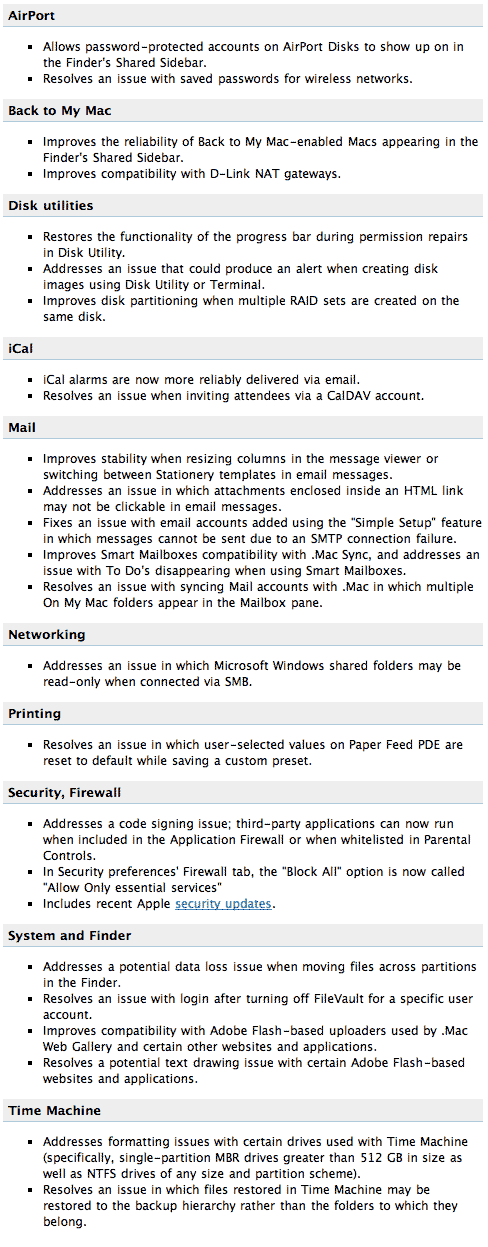
Here are the security fix details:
Application Firewall--CVE-2007-4702--The "Block all incoming connections" setting for the firewall is misleading. This update addresses the issue by more accurately describing the option as "Allow only essential services", and by limiting the processes permitted to receive incoming connections under this setting to a small fixed set of system services: configd (for DHCP and other network configuration protocols), mDNSResponder (for Bonjour), and racoon (for IPSec). The "Help" content for the Application Firewall is also updated to provide further information.
Application Firewall--CVE-2007-4703--Processes running as user "root" (UID 0) cannot be blocked when the firewall is set to "Set access for specific services and applications." This update corrects the issue so that any executable so marked is blocked.
Application Firewall--CVE-2007-4704--Changes to Application Firewall settings do not affect processes started by launchd until they are restarted. This update corrects the issue so that changes take effect immediately.
None of these issues affect systems prior to Mac OS X v10.5.
We downloaded and installed 10.5.1 on several Macs including: 15" 2.4GHz MacBook Pro Core 2 Duo, 24" 2.8GHz aluminum iMac Core 2 Duo, 1.66GHz Mac mini Core Duo, 12" 1.4GHz PowerBook G4, 1.4GHz PowerMac G4 Cube and a Dual 2GHz PowerMac G5. All installations completed with no issues and none were encountered in several hours use.
Our problems with Leopard have been limited to our 15" 2.4GHz MacBook Pro, the only Mac on which we used a safe Archive and Install of Leopard. We had occasional kernel panics on wake from sleep but this issue was resolved with new FirmTek firmware/drivers v5.3.1. We still had, prior to installing 10.5.1, an occasional blank screen on wake from sleep and frequent unexpected quits of Adobe Dreamweaver CS3 usually following wake from sleep. Neither of the latter issues have occurred since installing 10.5.1 but it is too soon to tell if either has been resolved. [Bill Fox & Dana Baggett]
Saw something? Send a tip or a correction
The archive ran on reader tips. What did you see, where, and do you want the credit? Something wrong on this page? Say so and it gets fixed.