Hands-On Report--4GB RAM in a 15" 2.4GHz MacBook Pro Core 2 Duo LED
Our latest MacBook Pro (reviewed here) came with 2GB of RAM but given that RAM prices of third party vendors for the Intel-based Macs are quite reasonable, we decided to max ours out at 4GB. We ordered a 4GB kit from TransIntl.com, a long time Macs Only! advertiser. TransIntl has a special price of $208 for a 4GB Kit consisting of two 2GB DDR2 667MHz SODIMMs or $148 for a 3GB Kit for older MacBook Pros and MacBooks.
Installation of RAM in a MacBook Pro is quite easy. Just turn it off, remove the battery, remove three tiny philips-head screws, remove the RAM cover, snap out the old 1GB RAM modules and snap in the two new 2GB ones. In removing the RAM modules, one must take care to push the two clips holding the RAM modules on either side outwardly so the module pops up slightly for removal. Then, just reverse the process to close and finish up. Apple has a specific article on How to install memory.
With 4GB of RAM we can set Adobe Photoshop CS3 to use up to 3.079GB for maximum performance on very large images. We can also open every application in Adobe Creative Suite 3 Web Design Edition (Dreamweaver, Fireworks, Flash, Illustrator, Photoshop Extended and Acrobat) plus Adobe Lightroom, Apple Mail, Safari and all four Microsoft Office 2004 applications at the same time and still have plenty of free RAM (~1.4GB) to work with.
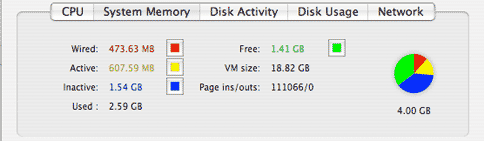
For those with new MacBook Pros who work a lot with video or large digital images or just like to have all of the applications that you use open without worrying about running out of RAM, a 4GB Kit may be just up your alley. For those with older MacBook Pros, a single 2GB RAM chip or 3GB Kit will max out your system at 3 GB. Check out TransIntl's offerings. [Bill Fox]
Saw something? Send a tip or a correction
The archive ran on reader tips. What did you see, where, and do you want the credit? Something wrong on this page? Say so and it gets fixed.