Hands-On Review: A Weekend with the 8GB iPhone--Woohoo!
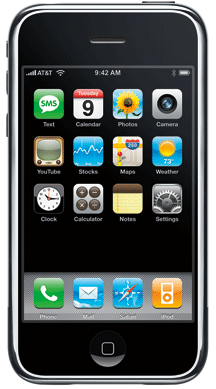
As we noted in Saturday's brief article, we picked up an 8GB iPhone Saturday morning at our local Apple Store which had a "good supply" according to the store's staff. The local AT&T stores were out an hour or two after the 6pm PT Friday kickoff. Friday and Saturday night after 9pm, Apple's iPhone Availability Web page showed a supply of iPhones across the U.S. at each Apple retail store. Sunday night, the Web page showed only five Apple Stores in California with a supply for Monday and a similar scarcity growing across the country.
Why the 8GB model? We have all of our contacts, calendars, music, photos, podcasts, videos, TV shows and movies on our 30GB 5G iPod with video and they take up roughly 19GB. So, no matter which iPhone we picked it won't all fit but we thought we wanted to get as much as possible on our iPhone. In addition, the additional $100 cost of the 8GB model over the 4GB model is kind of a resale insurance policy in case the 4GB model proves out to be too small by most people's standards. But after reasonably judiciously picking which music, photos, podcasts and videos we are likely to want to actually listen to or look at, we still have well over 5GB of space left on our iPhone and could easily pick up a GB or so more. In retrospect, we could have saved $100 and bought the 4GB model. For most people, the iPhone has enough memory at 4GB.
Our iPhone was quickly activated and sync 'd via iTunes 7.3 and the included cable/cradle attached to our MacBook Pro. It found AT&T's EDGE network at home, a place where our Moto RAZR cell phone can't connect to its T-Mobile network. EDGE worked fine for us, although more than a tad slow. It is very similar to dial up internet speed. Most web pages downloaded in 10-20 seconds and those that didn't were usually festooned with high bandwidth ads. YouTube videos usually started playing within 10 seconds or so and were smooth with the video stream coming in faster than it played. Mail worked fine with no noticeable slowdown. Many people are spoiled by the super speed of high bandwidth cable internet so their expectations are too high and they over-react to the speed of EDGE. EDGE really is useable but a 3G network capability would be great as evidenced by how well the iPhone works with Wi-Fi.
Connecting the iPhone to our AirPort Wi-Fi network proved to be more of a challenge than necessary since it was created by the simple lack of essential information. Our AirPort wireless network is WPA2-protected, hidden and is access controlled. The latter requires that a wireless device's MAC address (AirPort ID) be listed in the AirPort Base Station's configuration. Finding the iPhone's AirPort ID was not easy since it is not listed under Settings/Wi-Fi and since access control is not covered in the folding info pamphlet "Finger Tips" included with the iPhone. Nor is access control covered in the Wi-Fi section of the iPhone User's Guide, a PDF file that is not included with the iPhone but can be downloaded from this Apple iPhone Support Web page. After we struck out with the guide, a lengthy search located the iPhone's AirPort ID under Settings/General/About/Wi-Fi Address. With Wi-Fi, the iPhone works great with all of the speed shown in Apple's ads.
What about the screen? Tapping the screen to zoom in works fine but the really neat function is the two-finger pinch and separate gestures that zoom out or in making text or an image as complete or as large as one wants on the iPhone's screen which is simply outstanding. The screen is very clear and very bright, readable for most actions in broad daylight. Its size and clarity make reading Web pages and email easy.
What about the keyboard? Well, what can we say here? It's not the keyboard but the operator, we think. It will take us some practice with the keyboard to get proficient. We hit the wrong key a lot, frequently getting the key to the left of the one we want. We also accidentally brush the keyboard too often and create unintended entries. Fortunately, we are getting better and aiming our fat finger just to the right of the key that we want is working pretty well.
What about the battery life? It is much better than we expected. We easily got through two separate days with our iPhone turned on and connected to our Wi-Fi network, roughly 10 hours each. We made and received a few short calls, surfed the Web every now and then, checked our email about every hour, sent a few emails and listened to about an hour of music with the external speaker. With this light use, the battery life is not a problem--we still had almost half of the charge remaining at the end of each day. It seems that one could charge the iPhone over night and carry it around all day without the need for charging again until evening. We'll need more experience over a week or two to be sure. One may need to keep an extra charging cradle at the office.
Some people seem to be constantly on their cell phones, either talking or texting, so their battery "mileage" will definitely vary. Other heavy uses like constantly dealing with email and Web surfing during a day-long boring meeting or taking a trans-oceanic flight listening to music and podcasts or watching movies will take a much greater toll on battery life but we have not yet experienced these situations to know for sure.
Computer charging can be problematic. After the first day's use we put our iPhone in its charging cradle attached to an external monitor that in turn was attached to our MacBook Pro. During some evening work, the iPhone was fully recharged and we left it that way when we put our MacBook Pro to sleep for the night. However, in the morning the iPhone was half discharged. It seems that connected that way, the iPhone does not get any (enough?) juice with the MacBook Pro in sleep mode, at least when the iPhone is connected to Wi-Fi. It's probably best to connect the iPhone's charging cradle to an electrical outlet if you don't want to turn the iPhone completely off.
Accessories anyone? We have three at the moment. We had previously ordered a side-opening (horizontal) Designio Leather Case from Boxwave and it was waiting for our iPhone. It is nicely done and fits just loosely enough to get the iPhone out easily when receiving a call but it lacks a belt clip. One can use it in a pants or jacket pocket but we want to clip our iPhone horizontally on our belt. In addition, it would be nice to have a small pouch for the headphones so we are looking for another case.
Speaking of headphones, the jack of our Bose QuietComfort 3 noise reducing headphones that we use for airline travel does not fit in the iPhone. The iPhone's headphones jack has four sections and seats deeply into the iPhone while the Bose's jack has only three sections and is bent at a 90 degree angle so it cannot seat properly. Hopefully, Bose will make an adapter or the iPhone cannot replace our iPod while traveling by air.
Our JBL On Stage II speaker system works with the iPhone. When first plugged into the On Stage, the iPhone protests with a dialog box that the attached device was not designed for the iPhone and asks if we want to set it to airline mode. We dismissed the dialog box and the On Stage II works great. We've misplaced the On Stage II's remote controller so we don't know it it works but we would guess not.
Finally, we have a miniSync USB-iPod adapter that works to charge and sync our iPhone. It's a 36' cable with a USB connector on one end and an iPod connector on the other. The cable retracts into a small reel. The USB connector fits into the iPhone's tiny AC adapter as well so we won't have the carry the iPhone's charging cradle and cord when we travel.
In summary, does the iPhone replace our need to carry around a cell phone, iPod, PDA and notebook? Yes, it does. Well, at least for the most part. We don't have a PDA and if we don't need to carry a bunch of electronic documents or presentations or work with applications at local meetings, it will replace having to take our MacBook Pro.
What is the coolest application so far? This is hard to say because Mail and Safari work really well, as do the iPod and phone functions. But we'd pick Maps. It works just like the demo in Apple's ad to find things, to map your route and even to get a traffic load report on interstate highways.
Does the iPhone need anything? GPS service, 3G network speed and Bluetooth syncing are the major needs but we agree with Apple's decisions and would not sacrifice battery time for either of them. If you know where you are, you really don't need GPS service with the Maps application. As we stated previously, EDGE's speed is sufficient for most Web work that is likely to be done away from a Wi-Fi connection. On the minor side, we'd really like to be able to use one of our own custom-made ring tones, i.e. the opening bars of Bobby Fuller's "I Fought the Law" or of The Surfaris' "Wipe Out." [Bill Fox]
Saw something? Send a tip or a correction
The archive ran on reader tips. What did you see, where, and do you want the credit? Something wrong on this page? Say so and it gets fixed.