Hands-On Review--Apple AirPort Extreme 802.11n Base Station, How Fast is It?--Part I, "n-only" at 2.4GHz
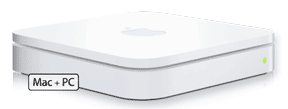 One of the things that we got partially right in guessing what Apple would release at Macworld was implementation of the new wireless "N" Wi-Fi protocol, even though the protocol is still in draft. It wasn't in Steve Jobs' keynote address and it hasn't been implemented on the Mac mini or the low-end 17" iMac, but all other Macs with Core 2 Duo processors on the market since last fall have an AirPort card capable of running the new, super-fast Wi-Fi. In addition, Apple released the second generation AirPort Extreme Base Station (Extreme N) that runs "N" Wi-Fi for $179.
"N" Wi-Fi is called "the next great leap in wireless technology" by Apple. It is based on the IEEE 802.11n draft protocol which includes multiple-input, multiple-output (MIMO) capability, i.e. multiple data streams through multiple antennas (3). Apple claims it boosts performance up to five times and range up to two times that of the previous Extreme G Wi-Fi.
An Extreme N Base Station was ordered through the online Apple Store right after it was announced as shipping in February--we received a February 28th shipping date. On January 31st, the shipping date was moved up two weeks to "on or before February 15"--it actually shipped on February 2nd. We received it February 5th and have been using it since.
In the box comes the Base Station, a CD and a brief printed manual along with the one-year limited warranty and regulatory certifications. We'll skip the unboxing description of our Extreme N and a display of its internals since they can be found on this iFixit Web page. iFixit also provides some benchmarks but for some reason they do not comport with our experience.
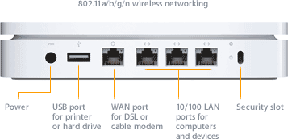
Our Extreme G Base Station has 5 ports (left-to right--external antenna, WAN ethernet, LAN ethernet, 56K modem and USB) plus the power port. The new Extreme N has has 5 ports (left-to right--USB, WAN ethernet and 3 LAN ethernet) plus power the port. The antenna and modem ports have been replaced by LAN ethernet ports. In addition, on the Extreme N the USB port can be used with a network hard drive as well as a printer.
Setting up
The network in our two story building is a combination of wired and wireless connections. Internet is obtained via cable and distributed via a D-Link 524 router (its wireless capability turned off) through ethernet wiring to most rooms. For mobility, we have an AirPort Express Base Station and an AirPort Extreme G Base Station near both ends of the lower floor. They are set up for roaming, i.e. both have the same network name (say "AirPort"), have the same WPA Personal password and are set up as bridges, i.e. do not distribute IP addresses. Our wireless network is closed with MAC address access control and protected by WPA security. We get excellent wireless reception (3-4 arcs in the menu icon, 12-15 bars in Internet Connect) on PowerBook G4s, MacBook Pros and an iMac Core 2 Duo throughout the structure.
For this review, our new Extreme N Base Station was set up in the same lower floor room as our Extreme G Base Station. It has its own wired ethernet connection via a D-Link 10/100 ethernet switch to the D-Link router for Internet and is configured as a bridge with its own network name.
The software installed off the CD includes a new AirPort Utility (replaces AirPort Admin Utility) and AirPort Disk Utility. While we had already applied the latest Airport Extreme update and had enabled our MacBook Pro C2D and 24" iMac C2D for 802.11n capability with the $1.99 enabler, the AirPort Extreme Update 2007-001 and enabler appeared to be installed again.
AirPort Utility is much easier to use for simple networks than AirPort Admin Utility. It allows one to easily choose the security type (WEP or WPA2), whether it's connected to a home router or to a cable or DSL "modem", how one is connected to the internet and how to secure an attached USB disk. To set up a closed network, MAC address access control, Radio Mode ("n" only or "b,g" or "a" compatible and 2.4GHz or 5GHz) enable the Bonjour broadcast of an attached printer, enable the Bonjour broadcast of its configuration, and many other details, one has to select "Manual Setup" under the Base Station menu.
We manually set our Extreme N Base Station's radio to "802.11n only (2.4GHz)" to use it in it's fastest mode. We also set it up as a closed network with MAC address access control and WPA2 security. [See Part II (2/20/07) for "n-only" 5GHz and "b/g" compatibility modes.]
How far does it go?
We tested the Extreme N Base Station's signal at approximately 3', 12', 40' and 60' inside our building with our 15" MacBook Pro C2D. The locations of the distance measurements, except for 3', were all on the second floor with the Extreme N located on the first floor. About sixty feet was as far as we could get in the building from the Extreme N. The signal had to pass through 3 walls, a floor and an outside courtyard to do so.We used AirPort's menu icon (# arcs), Internet Connect's meter (# bars) and iStumbler 98 (% signal strength) to determine signal strength. Here are the results:
|
Distance (feet)
|
Measurement
|
||
|
Menu Icon (arcs)
|
Internet Connect (bars)
|
iStumbler (%)
|
|
|
3
|
4
|
15
|
81-85
|
|
12
|
4
|
15
|
65-68
|
|
40
|
4
|
12-15
|
43-48
|
|
60
|
2-3
|
4-8
|
17-31
|
The signal at about 60' was plenty good enough for email and general web surfing even though its strength fluctuated a lot. However, given the attenuation we observed, we doubt that we would get a usable signal at 300' or even 100' as some have reported. If we placed the Extreme N Base Station in the center of the lower floor instead of near one end, it would easily cover both floors of our entire building with a signal as strong as the combined AirPort Express and AirPort Extreme G Base Stations.
How fast is it?
We compared the speed of the Extreme N and Extreme G Base Stations by clocking the speed of transferring a 211MB folder of 9 files from our MacBook Pro C2D to our iMac C2D while both were connected via either the Extreme G or the Extreme N Base Station. The MacBook Pro C2D was 3' away from the Base Station while the iMac C2D was 12" away on the second floor. We timed three transfers (runs) for each Base Station. Here are the results:
|
Base Station
|
|||
|
Run
|
Extreme N
|
Extreme G
|
Percent Improvement
|
|
1
|
163
|
363
|
|
|
2
|
157
|
391
|
.
|
|
3
|
161
|
378
|
|
|
Average
|
160
|
377
|
58
|
The performance of the new Extreme N Base Station running 802.11n only at 2.4GHz is over twice as fast as that of the older Extreme G Base Station running 802.11g only.
Some have tried testing the speed of enabled "N" Wi-Fi capability in their Core 2 Duo Macs using internet download speed meters such as Speakeasy.net. However, after multiple runs we found that Speakeasy.net clocked the download speed of our Internet cable modem connection as identical whether our MacBook Pro C2D is wired directly via ethernet or wirelessly using the Extreme G Base Station or the Extreme N Base Station sitting 3' away.
AirPort Hard Disk--How fast is it?
Apple's AirPort Extreme N Base Station has a new feature. It can share a hard disk connected to it via USB 2.0 across a network. To test this capability we plugged a 250GB SATA hard drive in an eSATA/USB 2.0 enclosure into our Extreme N Base Station's USB port. A dialog box popped up on our MacBook Pro that asked to assign a password and type of password, to enable guest access or not and to advertise the disk globally using Bonjour. We assigned the disk its own password, denied guest access and did not initially enable global Bonjour advertising. Doing the latter, we discovered, meant that the disk could not be located on our network and accessed unless the computer is connected to the Extreme N Base Station. Enabling global Bonjour advertising allowed any Mac anywhere on our network to locate and access the AirPort Disk via the network browser in the Finder.
The included AirPort Disk Utility can be used to enable discovering an AirPort Disk automatically and to enable a menu icon to see available AirPort Disks. We enabled both.
The AirPort Disk, in playing with it, seemed slow so we ran QuickBench 2.1.2 (Extended Test average of 50-100MB) on it with our MacBook Pro 3', 12' and 40' from the Extreme N Base Station. For comparison, we also ran QuickBench on the same hard drive by ethernet and connected directly to our MacBook Pro with a USB 2.0 cable. Here are the results:
|
Connection Type
|
Sustained Read (MB/sec)
|
Sustained Write (MB/sec)
|
|
USB 2.0 Direct
|
22.5
|
17.9
|
|
Ethernet
|
6.6
|
2.6
|
|
AirPort n 3'
|
4.4
|
2.0
|
|
AirPort n 12'
|
1.9
|
1.2
|
|
AirPort n 40'
|
0.5
|
1.0
|
The AirPort Disk as a shared network disk is very slow when compared to the disk being directly connected to the computer. At best, i.e. with the wired ethernet connection, it tested at 71 percent slower for sustained read and 85 percent slower for sustained write. Going wireless with 802.11n, the performance degrades significantly with the distance of the MacBook Pro C2D from the AirPort Extreme N Base Station.
The speed aside, the ability to easily install a common network drive on a home or small business network is a welcome addition to the AirPort Base Station's capability.
Printing
We have two HP printers on our network(s), a 3030 all-in-one Laserjet and a 2605n color Laserjet. The 3030 is attached by USB, originally to our Extreme G Base Station but now to our Extreme N unit. The 2605n is attached by ethernet. Contrary to some reports about problems printing to HP printers, we had no problem printing to either printer from either a wired connection, a wireless Extreme G connection or wireless Extreme N connection. However, from Macs not using the Extreme N Base Station we had to delete the 3030 in the Print & Fax preference pane and re-add it since we moved its location from the Extreme G Base Station to the Extreme N unit. We discovered later that we could manually enable Bonjour broadcasting of the printer with AirPort Utility which may have eliminated these steps.
In Summary
For those of you looking to increase the range and speed of your AirPort wireless Wi-Fi connection, Apple's new AirPort Extreme N Base Station will do exactly that. We got a roughly 2X range improvement that is on par with Apple's claims. We also got a slightly better than 2X performance increase, an improvement that is at the lower end of Apple's claimed up to 5X performance increase but still very significant. The size and shape of the new Base Station is also welcome as is its new capability to support a USB 2.0 network hard drive. This new capability comes at a cost that will not affect most, i.e. the loss of an external AirPort antenna and the loss of a 56K dial-up modem.
On balance, we are very happy with our AirPort Extreme N Base Station--we found no glitches. The new AirPort Utility software is even easier to use, a bonus.
See Part II (2/20/07) for "n-only" 5GHz and "b/g" compatibility modes. [Bill Fox--Images courtesy of Apple, Inc.]
Saw something? Send a tip or a correction
The archive ran on reader tips. What did you see, where, and do you want the credit? Something wrong on this page? Say so and it gets fixed.