Hands-On Review--Kensington Ci70 Wireless Desktop Set
Intro.
We're fans of wireless devices. We started using Apple's white wireless keyboard and white wireless mouse not long after they were first introduced in September 2003. Except for the tendency of our wireless mouse (not a Mighty Mouse) to burn out its AA batteries every month, we liked them a lot. If we had turned them off every night, we might have gotten longer service but we eventually bought rechargeable batteries to feed its insatiable appetite.
We automatically included the optional sleek wireless keyboard and wireless Mighty Mouse when we ordered our 24" Aluminum 2.8 GHz CTO iMac Core 2 Duo on the day they were introduced, August 7. But the new wireless keyboard would have delayed shipment of the entire order by three to four weeks so we switched back to the wired version of both. While that saved us $50 on our initial order and allowed it to be shipped right away, obtaining the new wireless keyboard and wireless Mighty Mouse subsequently through The Apple Store would cost $148. So, we decided to explore other alternatives that might be compatible with our latest and greatest iMac (see our Hands-On Review).
Preferably, we wanted a wireless keyboard with a numbers keypad. We haven't used a keyboard with a desktop Mac without one since our original 512K Mac circa 1984 which came with a keyboard that intentionally mimicked the touch and feel of the IBM Selectric, then the gold standard for commercial electric typewriters. The number keys ran across the top of the keyboard as they do now on laptops.
Our search for an alternative wireless keyboard and mouse didn't include an exhaustive review of every one on the market. The new (released in June 2007) Kensington Ci70 Wireless Desktop Set caught our eye, perhaps because of its silver motif. At a SRP of $80 for both keyboard and mouse (street price is typically less), the set meets our budget.
Specifications.
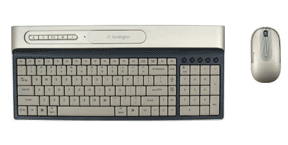
The Kensington Ci70 keyboard and the new Apple aluminum USB keyboard are the same thickness. Measuring from the top of the key caps to the desk on which they sit, both are 3/4" thin. Both are also about the same size. The Ci70 keyboard is 16" wide while the new Apple USB aluminum keyboard is 17" wide. The Ci70 keyboard is 5" deep, front to back (excluding a 2" raised ledge with a mouse dock and "secondary function keys," about which more below) while the new Apple USB aluminum keyboard is 4.5 inches deep front to back. The Ci70 keyboard can sit flat on the desk or optionally tilted up one half inch with two flip-down feet. The new Apple USB aluminum keyboard is tilted up to accommodate the two USB terminals, one on either side underneath it.
The Kensington Ci70 mouse measures 4.5" long x 1 1/8" high x 2.5" wide and weighs 4 oz with two AA batteries while the wireless Mighty Mouse measures 4 3/8" long x 1 1/4" high x 2 3/8" wide and weighs 8 oz with two AA batteries. The silver-colored Kensington wireless mouse has two buttons and a scroll wheel.
The keyboard and mouse communicate with the iMac on the 27 MHz radio frequency via a USB receiver 2.5 inches long and 3/4" wide, about the size and shape of a few sticks of chewing gum, that slips into any USB slot on our iMac. For storage, the receiver fits into a slot on the underside of the Ci70 mouse. The mouse and slim keyboard can be easily tucked into a brief case or backpack for transport. Kensington includes a 5ft USB extension cable to facilitate moving the receiver to an optimum location but we don't need it.
The color of the keyboard is called "Titanium" by Kensington. While it is not a perfect match with the new iMac aluminum color, neither is the new Apple USB aluminum keyboard. The keyboard accent color is gray blue and the keys are a matte putty color with dark gray blue characters. It's easy on the eyes and is without reflections.
Keyboard layout.
The layout of the keyboard includes a numbers keypad on the right. Across the top of the keyboard at the top left is an Escape key followed by function keys F1 through F12 and Print Screen, Scroll Lock, Insert and Delete keys.
On the bottom left, there's an Apple logo/Command key, a Control key, a Windows logo/Command key (which functions as a duplicate of the Apple logo key when running Mac OS X 10.4.10) and an Alt/Option key. On the right side of the space bar is another Alt/Option key, a Menu key (that didn't work for us), and a Control key. At the lower right corner are four directional keys.
On the right edge of the keyboard from top to bottom are the Home, Page Up, Page Down, and End keys.
Above the numeric keypad are five small, round pencil eraser sized rubber audio/video keys: Back, Play/Pause, Forward, Decrease and Increase Volume keys running left to right. They work! Cool!
The keyboard's back ledge includes a dock for the mouse. When placed in the dock, the mouse goes into sleep mode, saving battery juice. The dock for the Ci70 mouse is covered by a sliding door when not in use. To the left of the dock are five dedicated "secondary function keys": Eject (a Mac-only key that ejects media such as CDs), Spotlight, E-Mail, Web (opens to the Apple.com start page in a separate browser window) and a Music key that opens iTunes. These special function keys are activated by downloading and installing the special Ci70 Mac keyboard software from this Kensington Web page. The dock's door slides to the left and covers the "secondary function keys" when the mouse dock is in use.
The keyboard and mouse each take two AA batteries which come with the set. There's also a LED low battery indicator light on the keyboard back ledge and another on the mouse scroll wheel. Kensington estimates battery life at "up to six months," a huge difference from our experience with Apple's Bluetooth wireless keyboard and mouse.
Hands-On Use.
The Ci70 keyboard and mouse became active when the USB receiver was plugged into our new 24" iMac. Well, as soon as the iMac went through a recognition sequence to determine that the keyboard was a North American format. The Kensington download was installed later so we could use the special function keys. Kensington claims up to a 5ft radius for use of the USB wireless receiver. Our keyboard and mouse were closer than that and worked without a hitch. Line of sight to the receiver is not needed.
In use, the Ci70 keyboard keys have a short stroke, not unlike the new Apple USB aluminum keyboard. But the Kensington key caps are concave and fit the shape of our finger tips better than the flat key caps of the new Apple keyboard. The Kensington keyboard action is light and fast. It's compact size fits nicely in front of the iMac.
The Ci70 mouse is terrific. It has a rubber band on its lower half that our fingers can grip perfectly. The location is narrower than its width at its widest point. It has two Teflon type pads on its underside that enable it to slip across our mouse pad effortlessly, perhaps because it is shorter in height and lighter in weight than the Apple white wireless mouse. And our wrist can lie flat on the desk while using it. Click the scroll wheel and Dashboard opens. Groovy! The Ci70 mouse goes to sleep quickly when it isn't in use and it immediately awakens if you depress one of its two buttons.
After becoming accustomed to the Kensington Ci70, we used our Apple white wireless keyboard and wireless white mouse on the same keyboard mouse pad. The Apple duo felt kludgey. Longer throw keyboard keys and a heavy, thick-feeling not-so-slippery mouse. Sorry, Steve, there's no comparison--you can't go home again (with apologies to Thomas Wolfe).
Finally, Kensington offers a 90 day satisfaction guaranteed, no-questions-asked return policy and a five year warranty.
In Summary.
We think Kensington has a clear winner in its Ci70 Desktop Set keyboard and mouse and it's available now. The set is a great companion in looks and function for the new aluminum iMacs at less than half the price of Apple's wireless counterparts, i.e. when both are eventually available. [Dana Baggett]
Saw something? Send a tip or a correction
The archive ran on reader tips. What did you see, where, and do you want the credit? Something wrong on this page? Say so and it gets fixed.