Hands-On Review--Logitech diNovo Edge Keyboard, Aluminum iMac meets its Mate
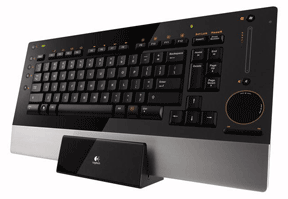 So, we have this computer product. It features a laser-cut single sheet of high-gloss black Plexiglas acrylic with brushed aluminum trim. It is very thin. And it comes with its own black microfiber polishing cloth. Sound familiar?
Is it a knockoff of the mid-summer 2007 aluminum iMacs? No. This device appeared in October of 2006. Perhaps it influenced the design of the aluminum iMacs? Well, not likely but it certainly has a simpatico style.
It's the Logitech diNovo Edge keyboard. If you slip it into its display base aka charging station so it stands vertically (ahem...on Edge!) in front of a new aluminum iMac, its sleek distinctive resemblance to the aluminum 2007 iMacs - it has an aluminum "chin" across the bottom (aka wrist rest) and gloss black trim above - is immediately obvious and remarkable. Hey! Wait a minute! How many keyboards have you ever had where the manufacturer offered a "display stand?" None than I can recall.
Its appearance attracted us to it. A classy-looking keyboard that matches up well with the styling cues of our new 24" aluminum iMac. But does it work well with the new iMacs? And is it compatible with Mac OS X 10.5 Leopard? While we'll elaborate further, the short answers are Yes and Yes!
The Logitech diNovo Edge Keyboard is a standard QWERTY 84 key Bluetooth keyboard that functions out of the box once the iMac on board Bluetooth technology discovers it and determines that it is an ANSI North American keyboard. The Logitech-provided USB Bluetooth dongle isn't needed.
Initially, we installed the Edge on our iMac while it was running Mac OS X 10.4.10 Tiger. All went well. A few minutes later, FedEx delivered Leopard! After we installed it using the diNovo Edge, Leopard needed to rediscover the keyboard once. Since then, it has worked flawlessly without any disconnections. Solid.
It has a Windows logo Command key that functions just like the Apple logo Command key on our Apple keyboards. If you know anything about the history of how Windows acquired the touch and feel of the Apple OS, then this key is a metaphor. (Ahem. Only the logo is different.) The Edge does not have a numerical key pad; we'd prefer a NumPad if only for the familiar location of the big Enter key but we'll survive. Road warriors with laptops have long since done so. The Edge includes a clever, round backlit TouchDisc with left and right mouse click buttons for those who prefer touch pads. We don't. But the Edge dimensions - about 16" long and 8 3/8" deep - do appeal.
It is remarkably thin. Logitech tells us it measures 13 mm (or just 0.51 inches) from the top of its Plexiglas housing to the desk. The top edge can be propped up with two little foldout feet to double the height for those who prefer an inclined keyboard.
One reason for its thinness is that - look Ma! - no replaceable flashlight batteries needed. The Edge keyboard is the first wireless rechargeable keyboard of our acquaintance. Logitech says the keyboard is equipped with lithium-ion (Li-ion) batteries that never need replacement. And it appears to have remarkable endurance and recuperative powers. Out of the box, having traveled from its birthplace in China and sitting in storage for awhile, it was charged sufficiently to function for as long as we used it - several hours. Logitech claims that a five minute charge provides a day's use and a two hour charge gives the keyboard enough juice for up to a month!
While its initial appeal is its stunning appearance, this keyboard has been carefully engineered by a company that knows a lot about building computer keyboards to deliver the goods. Logitech's PerfectStroke key mechanism involves micro-scissor design. We're no judge of how it will perform with touch typing but it sure feels good to us. The key caps are concave, not flat, and matte black with white characters. Very legible and non-reflective. While the surrounding black Plexiglas is glossy, we got no reflection from it even using a keyboard light.
Here's a neat feature that works with Macs. A touch-sensitive vertical volume slider control with a sensor located entirely below the Plexiglas keyboard surface that we're told contains no moving parts. Slide a fingertip up or down to adjust volume, and feel only the smooth glossiness of the Plexiglas. A series of LEDs to the left of the volume slider glow and then fade, corresponding to the user’s fingertip motion. Cool.
A sleep button in the upper left corner with a crescent moon shape character invokes the familiar Mac Restart, Sleep, Cancel, Shut Down window. Yeah! F12 when pressed lightly brings up DashBoard and when held down, ejects media from the SuperDrive.
There are some other buttons that are intended to work with Windows that don't work out of the box with Macs, including some cool hot keys that glow a soft orange when the Fn key is pressed. And Logitech's Command Center software doesn't recognize the Edge as Mac-compatible to program them. Frankly, that's OK with us. We don't use F keys either. But, if you're of a mind to program any or all of them, you can do it with a $15 shareware program called ControllerMate. A Mac blogger, Derek Punsalan, has a video tutorial on his web site that shows you how. He also provides a video intro to the diNovo Edge that's worth watching. Just remember that the images don't do this keyboard justice.
We recently favorably reviewed the Kensington Ci70 Desktop Set, a wireless keyboard and mouse. We liked the keyboard (and loved the mouse). We'll hand off the Kensington set to someone else. We've bought another Kensington mouse, a black Kensington Ci75m Wireless one this time - to mate up with the diNovo Edge. Life is good.
Finally, let's talk price. When this ultra-thin, high-concept, minimalist design keyboard first came to our attention, we dismissed it as beyond our pocketbook at $200 MSRP. But street prices for the Logitech diNovo Edge keyboard are now much lower and Logitech has been offering significant rebates when purchased through third-party vendors. We hate rebates but we love this keyboard. [Dana Baggett]
Saw something? Send a tip or a correction
The archive ran on reader tips. What did you see, where, and do you want the credit? Something wrong on this page? Say so and it gets fixed.