Brief Hands-On Report--Aaron Harnly's Letterbox 0.22 for Leopard Mail is Out
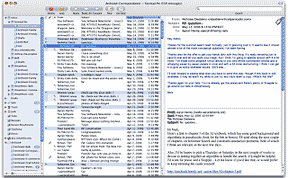 One of the applications, actually a plugin, that I lamented as being killed by Mac OS X 10.5 Leopard was Letterbox by Aaron Harnly. Letterbox moves the viewing pane in Apple Mail from below a mailbox's email list to the side of the list. The view becomes 3 columns--mailboxes list, email list, email content. In doing so it takes advantage of the aspect ratio of most monitors, allowing viewing of more of the email list and more of an email's content.
I got hooked on this view using Mozilla's Thunderbird and Apple Mail in Tiger with Aaron Harnly's plugin. The latter worked perfectly. Recently, he released several versions for Leopard, the latest being 0.22.
I downloaded Letterbox 0.22 from Harnly's Web site and installed it in Mail running Leopard 10.5.1. It works perfectly and I've not encountered a problem in several days of use.
There is also a competing plugin called WideMail by Dane Harnett which I have not used. Why Apple does not provide this most efficient view by default is a mystery to me. [Bill Fox]
[1/18] Deciding whether to get an Apple MacBook Air
Apple's new MacBook Air may be just what I have been waiting for! I'm thinking hard about getting one.
As long time readers know, my first personally-owned portable Apple computer was a PowerBook 2400c. Actually, I still have two, one fully upgraded with a 320MHz G3 CPU running Mac OS 9.1 and the other for spare parts. The 2400c served as my road computer until replaced for that purpose by a 12" 867MHz PowerBook G4. I also still have the 12" PowerBook G4 but its CPU has been upgraded to 1.4GHz and it runs Leopard. Each was the road warrior's best companion during their time.
The only faults with either the 2400c or the 12" PowerBook G4 are that the small size of their screens at 10" and 12" respectively, the 2400c does not run Mac OS X and they are not Intel-based.
I hauled around the fabulous 17" PowerBook G4 (1GHz and 1.5GHz models) for several years but ultimately tired of their size and weight. When Apple moved to Intel CPUs, I discovered that a MacBook Pro was nearly as powerful as my Quad-Core PowerMac G5 and it drove my 30" Cinema Display so I got a 15" model and sold my 17" PowerBook G4 and PowerMac G5.
My current 15" 2.4GHz MacBook Pro Core 2 Duo is terrific but much more than I need while on the road. I would really like to shed some weight and volume so I am considering the MacBook Air for the road along with going back to a Mac Pro in my office, an expensive proposition but computers are the tools of my trade.
I am still contemplating this move. While the MacBook Air initially knocked my socks off and I almost ordered one immediately, it actually has some serious compromises that need to be carefully explored. I started writing this article Tuesday evening to try to convince myself one way or the other.
First, let's look at the MacBook Air's main positives from my perspective. It weighs only 3lbs and is significantly smaller and lighter than my 15" MacBook Pro. It has a reasonable 13.3" screen, a full-size backlit keyboard, an optional 64GB solid-state drive and a five-hour battery. Plus, the aluminum-skinned MacBook Air at 0.76"-0.16" thin is really, really cool.
Its principal compromises to me (see this APC article for a list of ten) are:
1. No ethernet port for wired internet/network connections;
2. No ExpressCard slot for a cell phone wireless card;
3. A non-replaceable battery; and
4. Does not drive my 30" Cinema Display.
An ethernet port is essential since there are many hotels that supply internet only via a cable and many businesses that eschew wireless connections for security reasons. But not having an ethernet port is easily overcome with Apple's $29 USB-Ethernet adapter or by toting an AirPort Express Base Station. Weight, volume and security issues make the adapter the best course for me.
A road warrior needs to be able to access the Internet via a 3G broadband wireless cell phone network since Wi-Fi is not always available. An ExpressCard is the easiest and lightest way to get 3G internet. Fortunately, this deficit can be overcome with a 3G USB EVDO modem. They are still a bit bulky but the Franklin CDU-680 is marginally acceptable. An ExpressCard is also an easy way to add FireWire 800 and eSATA connectivity to external hard disk drives and other devices but this is not really necessary for a true ultra-portable and the MacBook Air can connect via fast 802.11n Wi-Fi for file transfers.
The non-replaceable battery is a more of a glitch with no existing complete workaround. When the MacBook Air is new, the major issue is that even a full five hours is not quite long enough for a trans-Pacific flight, something I do several times a year. Five hours is close in terms of the hours actually worked but batteries never live up to their claimed life and then lose capacity over time. While I certainly do not look forward to losing one of my main business tools for a week while the battery is being replaced at Apple, that can be timed to not be a real problem. Anyway, I still have my 12" PowerBook G4 as a back up. Maybe someone will come up with a battery pack that connects using the MagSafe airline seat power adapter.
I love my 30" Cinema Display but it is really more than I actually need, so the MacBook Air not driving it is only a minor annoyance. I could sell it and buy a perfectly adequate 23-24" display that would work with both the MacBook Air and Mac Pro if I decide that it is necessary to use the MacBook Air with a larger screen.
Another minor annoyance is that I will have to buy another MagSafe airline seat power adapter at $49 since the MagSafe connector for the MacBook Air is different than the one for the MacBook Pro.
If I get a MacBook Air, I am thinking of getting the 1.6GHz Core 2 Duo model instead of the 1.8GHz model. I have been using a 1.6GHz Mac mini Core Duo with a 24" Dell LCD screen for a year and it is perfectly adequate for general work. The MacBook Air will be much faster than the Mac mini for the same GHz (i.e. a late Intel Core 2 Duo CPU vs an initial Core Duo CPU) and this will save $300.
I will definitely get the 64GB solid-state drive. Not because I am a sucker for cutting edge technology but because it will be much faster and use less battery power. I used a Sharp ultra-portable one time that had a 1.8" 20GB hard drive and it was very, very slow. I'll just keep my key applications and data that I need for the trip on the drive so 64GB will be plenty of capacity. The music and video I need are on my iPhone.
The MacBook Air is $2876 as I would configure it and trimmed out with the MagSafe airline adapter and USB Ethernet cable accessories. I am nearly convinced that the MacBook Air is terrific and will not present any major issues but I am still going to ponder it until I can actually get my hands on one--that's another couple of weeks since I couldn't make it to Macworld 2008. [Bill Fox]
Saw something? Send a tip or a correction
The archive ran on reader tips. What did you see, where, and do you want the credit? Something wrong on this page? Say so and it gets fixed.