Funnel Web 1.7 Review
Review: Funnel Web v1.7.1
Standard & Pro Editions
Company: Active Concepts,
Inc.
Price: $199 ($149 competitive upgrade) and $399 (Pro edition, $199 for upgrade)
Pros: Easy installation and setup, vast number of summary statistics and great graphs, high server log compatibility, easy processing of multiple files, very fast, excellent documentation.
Cons: None that I could find.
Rating: Outstanding, 5 out of 5
Funnel Web provides summary statistics and graphs of the traffic at web sites from log files produced by the web server. I have used Funnel Web to analyze the log files of Macs Only! nearly since Funnel Web was first introduced last summer. Active Concepts, Inc. provided an evaluation copy of v1.04 which I reviewed favorably last fall. My major recommendations in that review were (1) to include output which counted unique visits as well as total requests and total volume and (2) to permit the analysis of multiple selected files rather than having to concatenate them first. I am very pleased that these features have been included along with many more in the various updates of Funnel Web to v1.7.1. Furthermore, there is now a professional ("Pro") version as well. The principal features of the Pro version are: realtime updating of log analyses, handling high load (millions of hits per log) and multi-domain reports. Active Concepts provided the updated Standard and Pro versions (1.7.1) for this review. [Disclosure: Active Concepts, Inc. has been a sponsor of Macs Only!]
Installation and Setup
Funnel Web's installation procedure is snap, a single double-click on the installer. Eight items are installed in a folder on the selected hard drive--the Funnel Web application, a Users Guide, a Logs folder, a Reports folder, an AppleScript folder, release notes, Internet Config 1.4 and the Solo Bug application. The Logs and Reports folders contain a sample log file and a set of sample reports. The AppleScript folder contains a script for scheduling the running of Funnel Web. Solo Bug is for easily reporting any bugs or problems that one may have with the application, a nice feature.
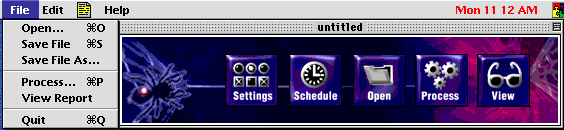
The Funnel Web Pro floating window shown above (the standard edition is identical except for a red cast rather than blue) has five buttons to activate its principal functions. The functions are also available from the File and Edit menus on the menubar. Funnel Web is configured or set up through the Settings and Schedule buttons. The Open button is used to select the files to be processed and the Process button is self-descriptive. The View button opens your web browser to view the summary statistics and graphs.
Pressing the settings button pops up the window
shown below.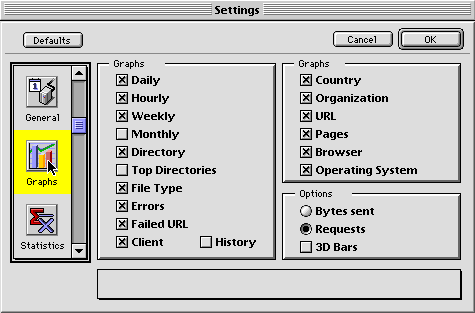
The settings window shown above has seven (six for the standard edition) configuration windows similar to the one above which allows one to select from among 17 different graphs (less "History" in the standard edition) and whether bytes or requests are graphed and whether the graphs are 2D or 3D. The configuration control added for the Pro version allows selecting realtime updating and reports from multiple or single domains.
The statistics configuration window shown below
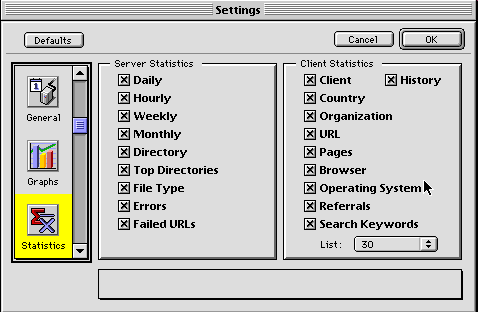
allows one to select from among 19 summary statistics (again less "History" in the standard version) and the top 10, 20, 30, 40, 50 or all categories. Funnel Web provides a very large number of summary statistics and graphs but the set up is very simple.
Output
Output is in .html and .gif files that are viewed on your web browser and that are equally excellent on Netscape Communicator 4.x and Microsoft Internet Explorer 4.x. The WebReport page provides the three summary tables shown below with links to each of the analyses and graphs.
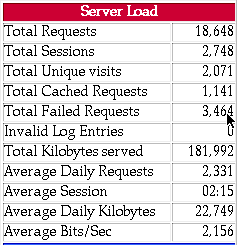
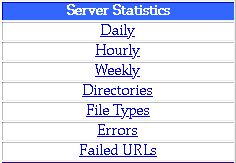
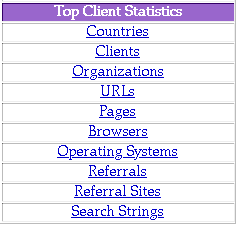
Three types of graphs are used: line, bar and pie. Examples are shown below.
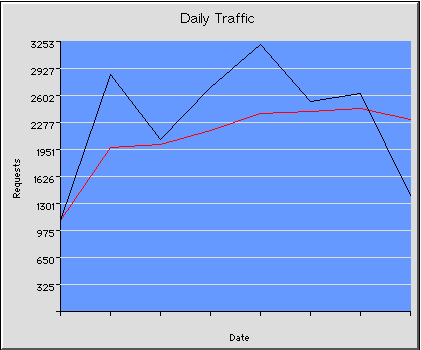
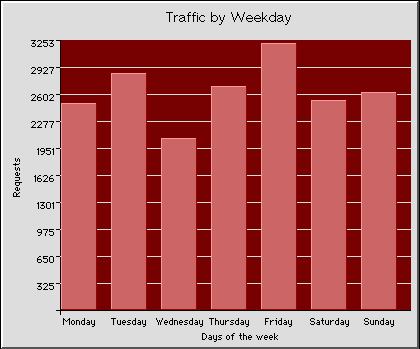
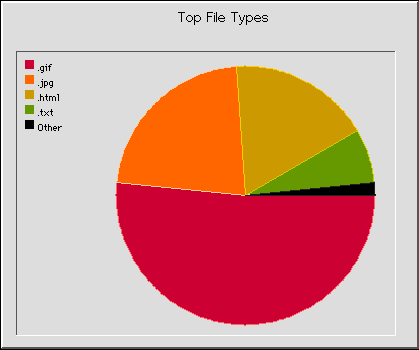
Underneath each graph is a table of the data used in the graph. The data shown above are from the sample log file provided with Funnel Web Pro 1.7.1.
Use
As mentioned above, I have used Funnel Web almost since it first came out to track the traffic on my web site. My web host server provides me with daily log files. Early Funnel Web versions would only process a single log file at a time. If I wanted to summarize the data for a week or month, I had to use a text editor like BBEdit to concatenate the daily files into one before running Funnel Web. I ran into problems processing the very large monthly files both in terms of capability (memory usage) and speed. I am pleased to report that those issues are history!
Funnel Web 1.7.1, either edition, is a delight to use. Any number of log files may be selected, i. e. monthly, weekly, Sundays, quarterly -- it doesn't matter, Funnel Web summarizes and graphs their data. Processing my web site log files is a breeze and fast. On my files, Funnel Web 1.7.1 processed an average of over 4,000 requests per second. That means that 1 million requests are processed in around four minutes. Producing the output took the standard edition of Funnel Web 1.7.1 an average of another 5% in time. The Pro edition took about another 50% or so because of the extensive sorting needed for the added options.
Documentation
The documentation is a ~1 MB DOCMaker Stand-Alone file Users Guide. It is comprehensive, easy to read and understandable. Not being a network or server administrator, I found the early versions documentation to be rough going but I managed. The current documentation is excellent, at least for the features I use and am able to implement. The User Guide has 16 chapters that are well-illustrated with color screenshots and drawings. There are Quick Start and FAQ Chapters plus a chapter on each feature.
Conclusions
Funnel Web has come a very long way since it's introduction last Summer. The new Pro version has a number of features that I did not cover and that will appeal to corporate clients, such as the ability to summarize internet usage by staff members. The ease of installation, configuration and use is excellent. The number of data summaries, graphs, appearance, and speed is outstanding. It appears stable as I've not had one crash while using version 1.7 for a little over a month now. The documentation is super. I could find absolutely nothing wrong with version 1.7.1 nor other features or changes to recommend. All thumbs up, which for me is more like ten!
Copyright © 1998 by Bill
Fox.
All rights reserved--no commercial use permitted without attribution.
Of course . . .
. . . and I am proud to be an Evangelista! . . .
Saw something? Send a tip or a correction
The archive ran on reader tips. What did you see, where, and do you want the credit? Something wrong on this page? Say so and it gets fixed.