Hands-On Review: TechTool Pro 3.0.2
Click On Images Above! |

Hands-On Review: TechTool Pro 3.0.2 By Bill Fox Micromat. Price: $99 list, $49 upgrade Pros: Super comprehensive, easy to install and use, works as advertised Cons: None Rating: Outstanding, 5 out of 5 Exclamation Points: TechTool Pro 3 is the latest comprehensive disk management and troubleshooting TechTool Pro 3 (TTP3) checks the computer's hardware, even some attached devices like a scanner; checks, repairs, recovers and rebuilds files and structures on hard drives and their partitions (volumes); checks for and eliminate viruses; and checks for and repairs software conflicts. It now does virtually everything that many other applications do but in one application. The system requirements are: a color-capable Mac, Mac OS System 7.5.5 or later, 5 MB RAM above system use, a CD drive and a hard disk. A 140-page manual comes in the box with the TTP3 CD. The manual is excellent. Much of it (95 pages) is devoted to a feature by feature reference section. The explanations are fuller than in TTP2's manual and most sections have usage notes and a short FAQ derived from Micromat's tech support experience over the years. The manual includes a complete glossary and index as well as many troubleshooting tips. The CD that comes with TTP3 v3.0.2 will boot any Mac that runs System 7.5.5 or later. The CD contains a system folder for Mac OS 7.5.5, 7.6.1, 8.1 and 9.0.4. To choose the system to boot from, simply hold down the 1-key for 7.5.5, 2-key for 7.6.1, etc. Also on the CD is the manual as a PDF file, Adobe Acrobat Reader 4.0, TechTool Pro 3.0.2 and the TTP 3.0.2 installer. Installation Installation was quick and smooth. The installer made a folder in a location of my choice and placed the application, Read Me and application support files in it. The TechTool Protection control panel and Protection Extension were placed in the system folder. The control panel sets the TechTool diagnostics schedule, virus check schedule and TrashCache. Files trashed and emptied can be saved by TrashCache for a user-selected period of time giving one an additional safeguard against deleting needed files. TTP3 has a brand new interface and several new features (a virus checker and a conflict reporter) along with a variety of other tweaks. For example, the critical "Rebuild Volume" function, a subfunction under the Volume Structure index entry in Version 2, has been renamed "Directory Maintenance" in Version 3, moved to the "top level" in the index and a graphic portrayal of the the directory structure has been added (see image below), perhaps done to compete better with Alsoft's DiskWarrior. Nevertheless, the directory is what usually goes bad on a disk and making the directory maintenance/rebuild/replace a primary selection is a welcome change.
Use TTP3's interface consists of several floating windows in comparison with the one wind I tried each one of the tests (except the SCSI scanner tests) on my PowerBook (FireWire) as did Dana Bag The new Virus detection/repair feature checks for some 45 different viruses and trojans. All of the recent ones for the Mac that I recall are listed. TechTool Pro Version 3.0.2 updated the virus database from Version 3.0.1 but so far there has not been a monthly update like for Virex or Norton Antivirus. I suspect that Micromat will update the database when new viruses are discovered rather than on a specific schedule. Since there are no viruses on my hard disk and I am not about to introduce one, the performance of this feature cannot be checked. The new Software Conflicts feature accesses a TechTool database to find known minor, major and serious conflicts within software on your hard disk. This procedure is different from the application Conflict Catcher which determines through a series of trials which software is conflicting. Since I have no conflicts, I can not check this feature at this time. If you lose a hard drive and it cannot be resurrected by rebuilding the directory (Directory Maintenance), then TechTool Pro 3 should shine. It has a number data protection/recovery features which begins with the Protection Data file(s) created as an option at startup or shutdown. Fortunately, I have never had to use this feature although I have received numerous emails touting both TechTool and Norton Utilities over the other. Conclusions First, I need to expose my bias. TechTool Pro has been my general maintenance application of choice since I bought version 1.0 in 1997 and favorably reviewed version 1.0.4. Even before that I had used the original TechTool, a small freeware utility from Micromat that tested the system file, rebuilt the desktop file and inventoried the system folder and hardware. I still do. Micromat has affirmed this decision over the past three years with the release of TechTool Pro 2, quick responses to unforeseen issues, reasonably rapid updates for Mac OS version changes, reasonable upgrade pricing policies and now the release of Version 3. Apple provides a special version of TechTool Pro with it's AppleCare Protection package. TechTool Pro 2 culminated with v2.5.5 to bring full compatibility with Mac OS 9.0.4 and the Macs released this summer. One thing that really distinguishes Micromat is that every one of TechTool Pro's point upgrades has been provided simultaneously as a free download and a minimal cost bootable CD. The point upgrades have been in response to upgrades in the Mac OS and have even provided new features, all for free. TechTool Pro 3 follows in the excellent tradition of its predecessors but is better and more feature rich. The manual is significantly improved and the features that could be checked work as advertised. Installation is simple and the use of TechTool Pro 3 is easy. With the addition of virus and software check/repair features TechTool Pro 3 became the most comprehensive all around Mac disk maintenance and troubleshooting application available. You may not need another. If you do not have TTP3, it is definitely worth the price. If you have TTP2, then the improvements, additions and a bootable CD are worth the upgrade price. All in all, TechTool Pro 3 and the company that makes it, Micromat, are outstanding. . . [Go to Macs Only!'s Daily News]
MY LAWYER MADE ME POST THIS: 8-/ Apple, Apple Logos, Macintosh, and Mac OS Logos are registered trademarks of Apple Computer, Inc. All other trademarks mentioned belong to their respective owners. |



 application from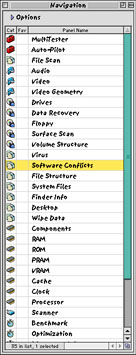
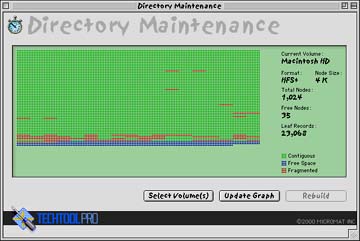
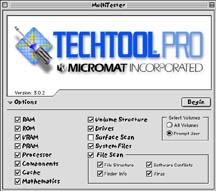
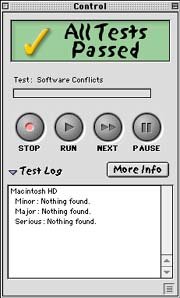
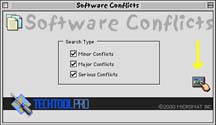 ow (Simple, Standard or Expert interface) of TTP2. Launching TTP3 brings up the MultiTester window (top image) or Navigation window (middle image above right) or both depending on how one sets the preferences. The MultiTester window is the equivalent of TTP2's Simple Interface (one click for almost all tests) and the Standard interface if the option triangle is clicked as above. The Navigation window is an index of TTP3's 35 features (panels), organized into eight groups with each represented by a specific icon. The index for TTP2 is alphabetical. Clicking a feature on the Navigation list brings up a third window type, one that corresponds to the selected feature--e.g. see the Directory Maintenance window above left. Some feature windows have a button (yellow arrow on image to right) which opens a fourth window, a controller for the test or suites of tests to be run which also reports the results log (image below left). A "More Info" button brings up a familiar fifth window containing the Test Report summary for all tests, details and advice. The various windows may be overlapped or tiled in TTP3's preferences.
 gett on his iMac 350SL. "File Scan", the new panel with v3.0.2, allows a variety of file tests to be done with one click. They all worked as advertised. Disk optimization is accomplished in a completely safe manner by copying and rewriting the files. If the process quits in the middle for some reason, e.g. a power failure, no file is lost due to the optimization process. Of course, it can take some time to optimize a hard disk. For example, it took 3-4 hours to optimize the 80 per cent full 6 GB hard drive in my PowerBook. However, I use the PowerBook daily for all my email plus downloading, installing and uninstalling a myriad of applications and utilities so it was pretty fragged.
Saw something? Send a tip or a correction
The archive ran on reader tips. What did you see, where, and do you want the credit? Something wrong on this page? Say so and it gets fixed.