Review: Macsense XRouter Pro vs Linksys EtherFast Router
Click On Images Above! |

Hands-On Review: SOHO Router Comparo -- Macsense XRouter Pro vs Linksys EtherFast Router By Bill Fox Macsense. Price: $166 (MIH-130) street Macsense Pros: Mac support, Mac documentation, Mac firmware updater, UDP over ethernet LAN, lifetime warranty Linksys. Price: $90 (BEFSR-11) & $148 (BEFSR-41) street Linksys Pros: lower price, UDP works over AirPort, models with 1, 4 or 8 ports, smaller size
What is a router? The principal functions of a small office and home router are to distribute a cable or DSL internet connection simultaneously to computers connected via ethernet on a network and to serve as a firewall for a single computer or a network. The latter can be especially important for a cable internet connection. Hardware routers have long been the workhorse communication devices in major networks. These stand alone devices have also been fairly expensive so software routers have ruled on small office and home networks. A software router is just that, software. It runs on a dedicated "gateway" computer adding routing capability to it for use with the network. Examples of software routers are Sustainable Softworks' IPNetRouter, Vicom's SurfDoubler/Internet Gateway and Apple's AirPort AP. They cost $90 up and Apple's is free with an AirPort Card or Base Station in the AirPort Software v1.2. The dedicated gateway computer can be used like any other computer while simultaneously performing its routing functions but, of course, it must be left running for any other computer on the network to access the internet. Hardware routers for small offices and home use have come way down in price and now cost about the same as software routers. The key advantage of a hardware router is that it does not require a dedicated gateway computer. A hardware router is silent and can (and should) be left on all the time. With hardware routers come switch ports instead of hub ports for the network. Switches perform the same major function as a hub but are better than hubs. Like routers, switches have been a lot more expensive than hubs but today they command only a modest premium. Switches provide the same rated bandwidth (10 mbps or 100 mbps) to each port while hubs share available bandwidth among its ports. Switches have full duplex capability allowing the rated bandwidth to flow in both directions simultaneously but can be set for half duplex. Switches usually auto-sense between standard ethernet (10 mbps) and fast ethernet (100 mbps). This description is not meant to be exhaustive only illustrative. In many SOHO cases, though, there won't be any real difference between the observed performance of switches and hubs of the same speed. What you get The Linksys EtherFast Cable/DSL Router comes in three models: a single 10/100 mbps LAN port, a 4-port 10/100 switch and an 8-port 10/100 switch. The Macsense XRouter Pro comes in one model with a 4-port 10/100 "switched hub". The switched ports support full and half duplex on both routers. The routers have a full complement of LEDs (Linksys 16 and Macsense 12) that glow green, orange or red to indicate what's working and what's not. The Linksys router's LEDs are more conveniently clustered while the Macsense's are spread out but that's mostly a matter of personal preference. Both routers are made in Taiwan. The technical features are nearly identical. They have a DHCP server (dynamic routing), support PPPoE, a virtual web server, a DMZ host feature, static routing and a firewall. In addition, the Macsense XRouter Pro supports RIP (Router Information Protocol), an advanced feature for multiple routers that few will use in the SOHO environment. Finally, the Macsense XRouter Pro supports UDP for streaming QuickTime video for all computers on a physical ethernet network. UDP is the best protocol for receiving streaming QuickTime video. The alternative is HTTP which is a lower quality. The Linksys EtherFast Router only supports UDP on one computer on an ethernet net work, whether physically connected by wires or wirelessly via AirPort. The Macsense router does not support UDP via AirPort at all. Neither router is perfect with UDP so there is a clear difference in this feature. Each router comes with an AC adapter power brick with AC cord and a user guide or manual. The Macsense XRouter Pro also thoughtfully includes a Cat-5 ethernet patch cable to hook up the router to the cable or DSL modem. You need to buy one, about $5, for the Linksys EtherFast router. In addition, Macsense supplies a CD with a "getting started" file and a .pdf file of its manual. The Macsense User's Manual is 5"x7" with 39 pages and, most importantly, it has separate TCP/IP configuration sections for the Mac OS (2 pages) and Windows (3 1/2 pages). But actually, there is nothing to the Mac set up. The manual has a good understandable introduction and chapters on easy installation, advanced configuration and troubleshooting. There are three appendices that include specifications, a hardware description and a glossary. The manual is comprehensive, has sufficient illustrations and is written for easy comprehension by a networking neophyte. Macsense provides a lifetime limited warranty! The Linksys User's Guide is 6"x8" with 45 pages, none of them mention the Mac. However, the only thing missing is the Mac's TCP/IP control panel configuration which for most people will simply be: Connect via set to "Ethernet Built-in" and Configure set to "Using DHCP Server". There are also irrelevant appendices on installing the Windows' TCP/IP protocol and pinging your ISP with DOS. The user guide is not as simply written as Macsense's manual but it is better done for people a bit knowledgeable about networking. The user guide contains a hardware description, how to configure the router's simple and advanced features, troubleshooting, a FAQ and several technical appendices. In addition, Linksys provides more detailed on line help. Linksys provides a limited one year warranty. Set Up, Configuration and Use For most people there are only three major steps: hook up the router to the cable or DSL modem and to the computer or computers or network of computers; plug in the router's AC power adapter; and configure the TCP/IP control panel on all computers. The default settings (dynamic routing) in both routers do not necessarily need to be changed except to use some of the advanced features or to switch to static routing (why?) or to enable UDP for one computer with the Linksys router. Some internet service providers require PPPoE (Point to Point Protocol over Ethernet) for a broad bandwidth connection. If so, both routers have instructions for enabling this protocol. For the default DHCP (dynamic routing, i.e. the router automatically assigns IP addresses to each networked computer) routing, each Mac's TCP/IP control panel is set to "Ethernet Built-in" in the "Connect via:" popup menu and to "Using DHCP Server" in the ""Configure:" popup menu. Everything else is left blank. Each router uses a web browser to configure the router. Simply enter "192.168.1.1" in the browser's location (Netscape) or address (Internet Explorer) window and hit return. This brings up a login window; the ID is left blank and both have "admin" as the default password. The default password can and should be changed for security reasons. All of the advanced features can be accessed if one knows what one is doing and both router's configuration screens are equally easy (or difficult as the case may be) to use. As mentioned in the previous section, UDP is the better streaming QuickTime protocol. The Macsense router supports UDP on all computers in a hardwired ethernet network. The Linksys router supports UDP on one computer on a hardwired network or AirPort with a workaround. To provide UDP to one computer using the Linksys router, click on the "Advanced" tab of the router's configuration screen. Then click on the ""Forwarding" tab. In the first line enter 554, 554 and the one computer's last number (1-3 digits) in its IP address (check its TCP/IP control panel for its assigned IP address) in the three different fields. Then enter 6970, 6999 and the same IP address number in the second line and click "Apply" and then "Continue". This is a pain, I know, but it works with AirPort as well as on a wired ethernet network. I could not get UDP to work through AirPort from the Macsense router but there may be a similar workaround that I am not aware of. [Update: Roy Gosewehr wrote that he gets UDP on his iBook running on an AirPort Base Station that is configured identically to ours.] The firmware for routers is routinely updated by the manufacturer. For example, the Linksys router shipped with v1.30 and it is now up to v1.36. The firmware is easily updated with a TFTP client application. Macsense provides a Mac TFTP client application via download from its web site. Linksys only provides a Windows client. Fortunately, there is a shareware client and instructions by Kem Tekinay, MacTFTP, that is available for download. Please pay the shareware fee. Updating the firmware is simple: launch the client, type in the router's IP address 192.168.1.1, select the firmware file and click start. It takes seconds. Close MacTFTP and reboot the router. Each router was used for about a month. Both worked flawlessly. Conclusions The salient differences between the Macsense XRouter Pro and the Linksys EtherFast Router are Mac support, warranty, UDP support for streaming QuickTime video, price, models, design and size. The Macsense router is the clear winner for Mac support and warranty. UDP is a toss up depending on which availability is more important to you. [Update: Roy Gosewehr gets UDP via AirPort on his Macsense XRouter Pro.] The design and size is a matter of personal preference. The Linksys router is the clear price leader and has more models (1,4 or 8 ports versus just 4 ports) to choose from. Personally, a multi-port switch separate from a 1-port router is handy for configuration flexibility and our primary computer is a PowerBook (FireWire) connected via AirPort so the Linksys EtherFast router best fits our needs, not to mention our pocketbook. However, many others may have different requirements that point to the Macsense XRouter Pro. The fact that Macsense supports the Mac should carry a lot of weight for close comparisons. . . [Go to Macs Only!'s Daily News]
MY LAWYER MADE ME POST THIS: 8-/ Apple, Apple Logos, Macintosh, and Mac OS Logos are registered trademarks of Apple Computer, Inc. All other trademarks mentioned belong to their respective owners. |

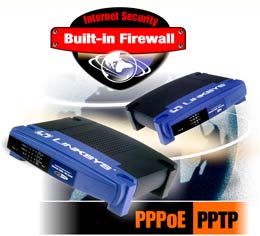 In early September we bought a single-port Linksys EtherFast Cable/DSL Router (BEFSR-11)--shown at right--for $85 and a Linksys EtherFast 10/100 5-port Auto-Sensing Switch for WorkGroups (EZXW55W) for $45. Both were special sale prices at the time. The router and switch were hooked up between Macs Only!'s cable modem and Macs Only!'s local area network. They replaced the functions of a Power Mac 7300 running IPNetRouter and a 10 mbps hub on Macs Only!'s network. We posted reports on the Linksys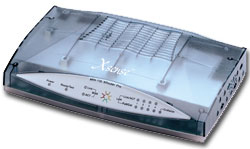
Saw something? Send a tip or a correction
The archive ran on reader tips. What did you see, where, and do you want the credit? Something wrong on this page? Say so and it gets fixed.