Review of ProMax's DH-MAX DualHead Display Card
Click On Images Above! |

Hands-On Review: DH-MAX AGP DualHead Display Card By Bill Fox ProMax Systems, Inc. Price: $299 list Pros: Provides dual monitors to the G4 Cube and saves a slot in Power Mac G4s, excellent resolutions Cons: No OpenGL driver yet, performance lagging some with v1.0 driver
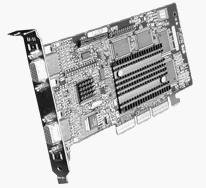
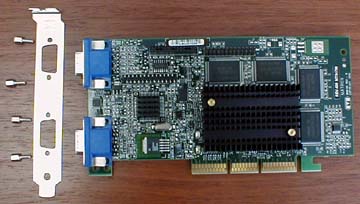
What You Get The DH-Max comes with an S/Composite video adapter cable, a CD, a printed installation guide and a static-guard wrist strap. The video adapter cable plugs into one of the two VGA ports on the DH-Max card and has both S-Video and Composite Video port adapters. The CD contains the DH-Max driver extension and a PDF of the installation guide. The 12-page installation guide provides specifications, software and hardware installation, software configuration, technical support information and return/warranty information. The DH-MAX is a Matrox G400 Millenium AGP card with a Mac driver written by ProMax. It fits in the single AGP slot of any Power Mac G4 with an AGP slot, including the G4 Cube. It has two 15-pin VGA ports for connecting two analog monitors simultaneously and, with the adapter cable, one monitor can be an NTSC monitor or TV. The board has 32 MB of fixed high-bandwidth SGRAM and a 300 MHz RAMDAC. The DH-MAX supports resolutions up to 2048x1536 at millions of colors. It has a unique 256-bit DualBus Combined With 128-bit Memory Bus that results in fast graphics and the acceleration of QuickTime/QuickDraw 3D/Open GL according to the literature. ProMax states that the DH-MAX adds productivity to these applications: Final Cut Pro, Adobe Premiere, Media100, Avid, Photoshop, ProTools, and others. Installation and Use First one inserts the CD and installs the driver, an extension called "ProMax DH-Max Accel 1.0". Then all non-ProMax video drivers should be disabled. In fact, there was a note in the box specifically stating to make sure that all ATI extensions are disabled. Installation in a Power Mac G4 is simple. Just remove the existing graphics card from the AGP slot and press the DH-MAX in its place. Installing the DH-MAX in a Cube is a bit more involved. First one has to remove the three screws holding the ATI Rage 128 Pro card, lift the riser board holding the graphics card out of its slot, lift the assembly free of the Cube's case without detaching any wires and remove the ATI card from the slot on the riser board. The photo at right shows the em To get the DH-MAX to fit, one has to remove the end plate on the card by removing the four small female/male bolts as shown at left. Then it has to be inserted back end (to the right) first, moved forward with the ports sticking out of the port slot in the Cube's case and snapped into the riser board. Finally, the riser board with the DH-MAX is pressed back into its slot. It is a tight fit but it works as shown below right. A 90 degree VGA adapter We only have one 90 degree VGA adapter so we attached a monitor to the single adapter and the DH-MAX. The picture was excellent and all of our standard applications (browsers, Outlook Express, Microsoft Office 98, Corel WordPerfect 3.5e, Adobe Acrobat Reader) looked and worked fine with general use. We attached two monitors to the DH-MAX installed in our Power Mac G4/400. The main monitor is a 19" DRT and the other is a ViewSonic 150 15" flat panel LCD. Both worked fine in extended and mirror modes despite the guide stating that flat panel monitors are not yet supported. To check on performance our usual video tests were run or attempted. Quake III Arena quit on launch with the error message that OpenGL could not be initialized. G4 TimeDemo wouldn't run claiming there is no 3D hardware. Of course, the DH-MAX is a 3D card but there is no OpenGL driver yet. ProMax is working on it. Even so, Unreal Tournament ran on QuickTime RAVE, albeit quite slowly. Here are the results compared with an ATI Rage 128 and an ATI Radeon, both single head cards:
na = not available The ATI Rage 128 is the OEM card for our Rev.1 Power Mac G4/400 and the Radeon is the latest and greatest Mac 3D graphics card. The tests were run with v1.0 of ProMax's DH-MAX driver. A new version v1.1 which should provide additional speed is nearly complete. We will rerun the tests when the new driver is available and when an OpenGL driver is available. Conclusions If you need to use two monitors and want to save a valuable PCI slot in your Power Mac G4 or if you own a G4 Cube, then ProMax's DH-MAX AGP DualHead Display Card is for you. In fact, it is the only alternative video card for the Cube that is currently available. An excellent array of resolutions are available for the main monitor, up to 2048x1536x70Hz with a standard aspect ratio (4:3/5:4) and up to 1920x1200x90Hz with a wide screen aspect ratio (16:9/16:10). The secondary monitor can display up to 1280x1024x75Hz with a standard aspect ratio and 1280x720x100Hz in wide screen. Super performance is only critical in 3D rendering and 3D games and the DH-MAX does not meet these demands with the current driver. The potential is there, however, once an OpenGL driver is out. For other uses, the DH-MAX is certainly more than adequate and will likely improve when v1.1 of the driver is out. . . [Go to Macs Only!'s Daily News]
MY LAWYER MADE ME POST THIS: 8-/ Apple, Apple Logos, Macintosh, and Mac OS Logos are registered trademarks of Apple Computer, Inc. All other trademarks mentioned belong to their respective owners. |

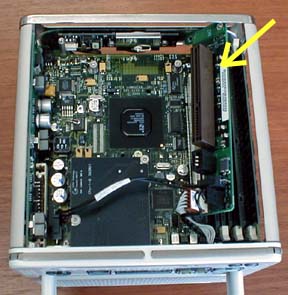
 pty Cube with a yellow arrow pointing at the riser board.
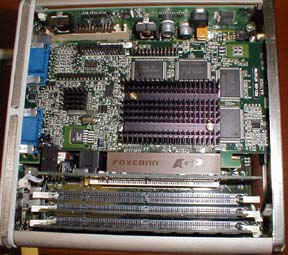 The VGA ports are at left.
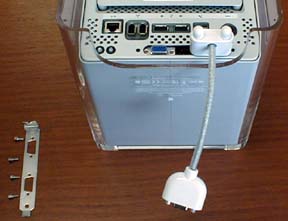 comes with the Cube to make it easier to attach a VGA monitor cable as shown at left (The female/male bolts should be reinstalled). However, two such cables are needed with the G4 Cube. ProMax does not have a replacement end plate for the Cube. However, the DH-MAX seemed to be suffciently tight with the 90 degree adapter attached.
 Saw something? Send a tip or a correction
The archive ran on reader tips. What did you see, where, and do you want the credit? Something wrong on this page? Say so and it gets fixed.