Hands-On Review--Our iPod
- What You Get: The first thing everybody will notice is the iPod's fabulous packaging--we certainly did as did Brian Nakamoto whose comments we carried Saturday. The iPod comes in a 6" cube. Here are photos by Chris Neuman--note the ad in the right side bar for a leather iPod sleeve with belt clip.
The iPod comes with ear bud head phones, little pads/covers for the ear buds, an AC adapter and a special FireWire cable that the iPod and only the iPod must use. The FireWire cable is used to connect the iPod to a Mac as well as to the AC adapter. The AC prong assembly snaps off the AC adapter so an extension cord can be attached but one was not included with the iPod. We are sure they are available at Radio Shack or other electronic components store. The 10-hour rechargeable lithium polymer battery is internal and the iPod can not be opened by any obvious means to change it or anything else. Our iPod came about 25 per cent charged.
A folded Getting Started sheet, license and warranty sheets and a CD complete the package. There is no manual but iTunes 2 has iPod Help files and there are a slew of iPod articles in Apple's Knowledge Base--just search "iPod". The CD has iTunes 2 for OS X and Mac OS 9.2.1 and a PDF info file but no software updater/restorer like the one Apple posted and then pulled.
- Setting It Up: We connected our iPod to our TiBook running Mac OS X 10.1 and the previously installed iTunes 2.0.1 launched automatically. It took just over 35 seconds to download our library of 52 MP3 files, some 212 MB. The battery began recharging when we plugged it in.
iTunes 2 serves as the iPod control panel. It shows how full the iPod's 5 GB disk is, has iPod Help in the Help Menu and has a button to open the iPod's preference panel. From iTunes 2.0 we opened the iPod's preference panel and checked "Enable FireWire disk use" to allow it to act as a FireWire hard drive. As nice a music player as the iPod is, the hard disk feature is what sold us. We'll come back to this.
We worked for quite some time to fit the pads/covers on the ear buds since they hurt our ears without the covers. It was no easy task but we finally succeeded in stretching the covers over the buds without ripping them. With the covers, the buds were comfortable for several hours but we have a set of folding iCool head phones that work super with the iPod.
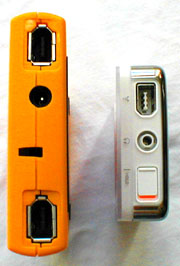 Finally, we learned the iPod's controls. Fortunately, this was the easy part. Press the "Play" part of the control ring to turn it on when disconnected from the FireWire cable, press the "Menu" part of the control ring to get the menu and to go back through menus, spin the wheel to scroll up and down the menu and press the button to select an item or to move forward through the menus. The left and right parts of the control ring move one forward and back through a song. Once a song is playing, the wheel is spun to adjust the volume and the "Hold" switch on the top next to the audio jack (see photo at left) is slid to lock in the settings. We couldn't figure out how to turn the iPod off so we consulted the Help menu--hold down "Play" for a few seconds. We set the backlight to come on for 2 seconds when using the controls.
- Music Player Use: We listened to our whole 52-song collection for 2-3 hours while working and walking around. The iPod didn't skip a beat and the sound was as good as a CD using either the ear buds or the iCool head phones. The battery lost one segment of four on the indicator which supports Apple's contention of a 10-hour battery. The iPod is a fine music player.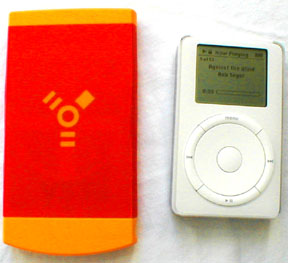
- Hard Drive Use: We were primarily attracted to the iPod because it combines a tiny FireWire 5 GB hard drive the music capability in a package much smaller and lighter than our 4 GB VST slim drive that we carry for a back up when traveling--see photo above and at right. With the FireWire hard disk feature enabled, the iPod mounts on the desktop with its own icon just like any other FireWire drive when connected to a Mac with the FireWire cable. The iPod has only one FireWire port (see photo above left) so it must be the only device connected or the last one in a daisy chain. One must remember to unmount it before disconnecting it from a computer. Unmounting is accomplished by dragging its icon to the eject icon in Mac OS X (or trash in Mac OS 9.2.1) or using the eject button on iTunes 2's interface at lower right.
Will the iPod boot a Mac? We installed Mac OS X 10.0.3 on it from a CD and updated to Mac OS X 10.1 with its CD. The iPod booted our TiBook (Rev.A) and our G4 Cube, both as the only device and daisy chained off our VST drive. We encountered no problems in using the iPod as our boot drive over several hours of use, including downloading and installing the three recent 10.1 updates and installing applications.
- Summary: We think the iPod is a superb music player and a terrific tiny, bus-powered FireWire hard drive. At $399 it seems a bit rich if viewed as simply a music player, even if it is the best on the market, but that is the price for the iPod's drive alone.
Dana Baggett noted that Apple has posted an iPod Reaction page. Let's hope that sales match the raves.
Saw something? Send a tip or a correction
The archive ran on reader tips. What did you see, where, and do you want the credit? Something wrong on this page? Say so and it gets fixed.