Hands-On Review--Apple's iPod mini
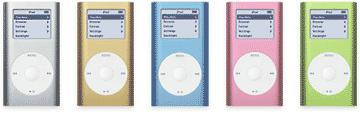
Apple's iPod mini is clad in anodized aluminum and comes in five colors: silver, gold, blue, pink and green. Apple expects silver to be the most popular color, perhaps because it matches the latest PowerBooks and Power Mac G5s. We bought a silver one for that reason but we think all of the colors are attractive. If green had been available we might have had a difficult choice.
The mini's out-of-the-box experience is similar but not quite like the orginal iPod's. Apple has clearly found a way to provide very similar but less expensive packaging, in part by using pressed paper inserts rather than foam. The Mini comes protectively sheathed in a clear plastic wrapper with "Don't steal music." printed on it in four languages.
Also included are FireWire and USB cables, the usual white square AC adapter, ear buds and 2 sets of foam covers, a white belt clip that the Mini simply snaps into and a small "box" that contains a Quick Reference, User's Guide, one-year warranty, user license, iTunes Music Store flyer and a CD. On the CD is the iPod mini software v1.0, PDF's of a tutorial and user guide and iTune 4.2. Note that the mini does not use the regular iPod software.
There are two additional Apple mini-specific accessories available, a mini-dock and an arm band "clip". The iPod remote controller and in-ear headphones also work with the mini as does many third-party iPod accessories. We wanted to buy a set of in-ear headphones but the Tysons Corner Apple Store did not have any in stock.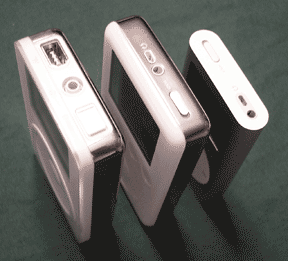
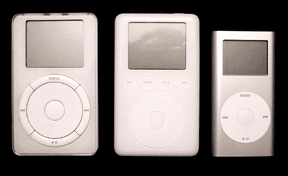
Our first impression of the iPod mini is that it is small, marvelously small, even when compared to the latest generation iPod. At 2" x 3.6" the mini is slightly larger than a standard business card and only a half inch thick, about the thickness of the stainless steel part of the iPod. The mini's screen is smaller at 1.67" diagonally instead of 2". It is also much lighter at 3.6 oz vs about 6 oz depending on the iPod model.
We own an original 5-GB iPod and a third generation 30-GB iPod. They are shown in the two photos along with our new mini. The mini is remarkably smaller.
 The mini has the same headphone jack, sliding "Hold" switch and proprietary FireWire power/communication jack as the current iPod but the controls are a new design, the best yet in our opinion. The scroll wheel is touch-sensitive solid state but the button in the middle and the four "buttons" on the wheel are mechanical, the latter are actuated by rocking the wheel at one of four locations. We like the mechanical buttons on the 1st and 2nd generation iPods better than the solid state buttons on the 3rd generation iPods.
We plugged our new iPod mini into the FireWire port on our PowerBook G4. iTunes launched and updated our mini with the mere 182 MP3 and AAC song files (about 910 MB or 12.4 hours) that we have--the mini will hold about 3.8 GB of data. We set the preferences so that we can also store regular files on our mini. Then, we launched iSync and added the contents of our Address Book. In just a couple of minutes we were all set.
The iPod mini's screen, although smaller than an iPod's, shows the same information. The font is smaller but readable, thankfully, without our 2.00 reading glasses. We plugged our 30-GB iPod's remote into the mini and it controlled the mini as designed.
How does the mini sound? Just like either of our iPods as best that we can tell. We're not entirely tone deaf but we have blown out each eardrum, one twice, over the years while skin diving. We listened to our song collection alternating between the mini and regular iPods over a couple of hours and could tell no real difference. If anything, the bass seems to be a tiny bit stronger on our mini but maybe we're imagining it.
We ran into one MP3 song that wouldn't play while listening to our song collection on the mini, Dan Fogelberg's "Leader of the Band". It plays fine on either iPod and our PowerBook but on the mini it went through the motions of playing but there's no sound as if it's a blank file. The other songs ripped from his album play fine. We deleted the song from iTunes and updated our mini to delete the song. Then we re-ripped it and updated our mini again. Now it plays fine.
Afterward, a friend pointed out that we could have simply added or deleted a character to the song's title in iTunes and updated our mini to delete the old file and reinstall it. Or we could have set the mini in iTunes for manual updating instead of automatic. Oh well, the file now plays. This was the first time we have encountered this problem.
The iPod mini's snap-in belt clip works easily. It has a half-inch rubber nib inside to keep the mini from slipping up or down lengthwise. However, we're a bit leery of the mini accidentally being dislodged. Perhaps, if we were a bit thinner....
In summary, the iPod mini is terrific. It's small and light enough to go virtually everywhere with us, virtually all of the time, and it's every bit as good at playing songs as it's big brother (...er, sister...?) iPod. If one has a humongous CD collection and wants to carry the whole collection around, then the iPod is ideal. The same is true if one uses the iPod as an external bootable hard drive with lots of applications. However, if one only wants to carry around less than 50 hours of songs and a GB or two of files, then Apple's new iPod mini is ideal.
Saw something? Send a tip or a correction
The archive ran on reader tips. What did you see, where, and do you want the credit? Something wrong on this page? Say so and it gets fixed.