Hands-On Review--ChessMaster 9000
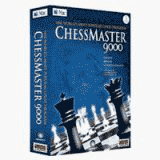 Feral Interactive brought the top computer chess game to the Mac in ChessMaster 9000. It offers a lot more than just playing against a few computer algorithms like the chess game included free with Mac OS X. ChessMaster 9000 is a teacher, consultant, opponent and pathway to online play.
Installing ChessMaster 9000 is simple but takes awhile. It uses a Vise installer rather than simply copying a folder from the CD to one's hard drive. One must leave the ChessMaster 9000 CD in one's optical drive in order to play as Feral's guard against rampant piracy.
When launched one for gets an options screen that allows the setting of several video parameters, checking for updates and obtaining support. After dismissing the options screen, and the movies, one has to login--set up a new user and select one's rating as a player if the first time. For novices there is a button that helps one to select their initial rating. Then, one gets the main menu screen that offers four rooms (Game, Class, Tournament and Kids), the Library, the Database and CM Live for online play.
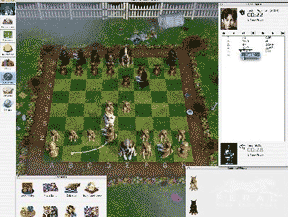 ChessMaster 9000 plays in a window rather than taking over the entire computer and screen. This allows one to easily access other applications while playing. Two that are touted by ChessMaster 9000 are iTunes for listening to music while playing and iChat.
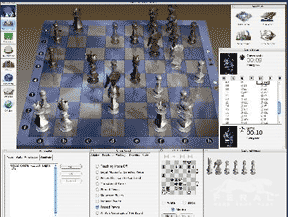
The graphics of the chessboard and player pieces are superb. There are over 60 sets and boards to choose from.
While we are not a novice when it comes to playing chess, we found the built-in algorithms to be particularly challenging, even at the beginner level. Then again, we haven't played much in many years. One feature that we made great use of was ChessMaster 9000's Mentor menu. We set the Blunder Alert and frequently used Advice, both obtained in writing and as a voice. The Blunder Alert immediately notifies one of better moves when one moves one's pieces into danger. The Advice feature works well but takes time. One can set the amount of time devoted to determining advice but if it's relied on too often one will run out of time.
 Those who want to really learn the intricacies of chess will make many visits to the Classroom, Library and Database. These features are useful to novices through Grandmasters. In the Classroom there are tutorials on just about anything one can think of related to chess, from the basics of moving pieces to how to set up a kingside attack. One of the neatest features of the Classroom is practicing ones opening moves--ChessMaster 9000 has over 2,200. The Library contains over 800 classic games from chessmasters that span 400 years of play. The Database Room has some 500,000 games including grandmaster-level games from 2001 and 2002--these games may be searched for almost any feature.
The Kid's Room is where we spent much of our time, we are not ashamed to admit. It's designed to teach true novices how to play chess and contains some artificial players that can be beaten by novices.
We think ChessMaster 9000 is terrific for true chess aficionados, whether novices or experts. It does have a few limitations. We first tried out version 1.0.1 and it had a few unexpected quits that were annoying. Fortunately, v1.0.2 is on its way. We used a beta of 1.0.2 and no longer encountered the unexpected quits. Online play at this time is just against other Mac users. Regardless, we think ChessMaster 9000 is the very best chess game available for the Mac and highly recommend it. Feral Interactive's ChessMaster 9000 is $39.99 from Amazon.com. [Bill Fox]
Saw something? Send a tip or a correction
The archive ran on reader tips. What did you see, where, and do you want the credit? Something wrong on this page? Say so and it gets fixed.