Hands-On Report--Apple iPod Updater 2006-03-23 with Volume Limit
iPod Updater 2006-03-23 delivers:
New iPod Software 1.1.1 for iPod
New iPod Software 1.1.1 for iPod nano
For all other iPod models, iPod Updater 2006-03-23 contains the same software versions as iPod Updater 2006-01-10.
Important: After downloading the iPod Updater software, connect your iPod to your computer and launch the iPod Updater application. If iPod Updater determines that your iPod needs to be updated, click the Update button to install the latest software on your iPod.
Features of iPod Software 1.1.1 for iPod and iPod Software 1.1.1 for iPod nano:
Volume limit
Bug fixes
The "Volume Limit" is a new control listed under Settings on the main menu.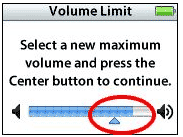 One can use it to limit the maximum volume that the iPod can play. Concerned parents can also lock the maximum volume with a "combination" numeric code. The details on how to use the Volume Limit setting are on this Apple Web page.
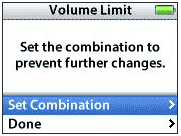 We downloaded iPod Updater 2006-03-23 and updated our iPod with video and iPod nano. The new Volume Limit setting worked as advertised.
When we first checked the Volume Limit setting on our iPod with video we noticed that it was not set all the way up but at about 15% less than maximum. Our iPod nano was set at maximum when we first checked. We left both limits at maximum since we normally set the volume at just over half maximum with earbud headphones and at about 3/4 maximum on an airplane--we don't have small children to be concerned about. [Bill Fox]
Saw something? Send a tip or a correction
The archive ran on reader tips. What did you see, where, and do you want the credit? Something wrong on this page? Say so and it gets fixed.