Hands-On Review--160GB miniXpress External Drive
We are always looking to reduce the size and weight of computer gear that we have to carry on the road. When we needed a larger capacity 2.5" external hard drive to act as a boot drive and backup drive, Trans International's miniXpress with a 160GB 2.5" SATA hard drive caught our eye.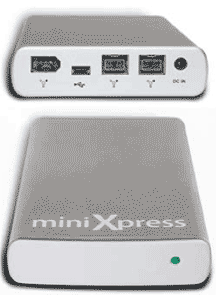
At 5.125"x3.125"x0.8125" (our measurements) and 5oz, the miniXpress is among the smallest of the 2.5" external hard drive enclosures and it really can fit in a shirt pocket although we wouldn't want to walk around with one there. With an Oxford 924 FireWire/SATA bridge, it accepts SATA drives and boots a MacBook Pro. A close competitor on size will not boot a MacBook Pro because its FireWire bridge is not compatible with Intel-based Macs and it does not accept SATA drives.
The case of the miniXpress is made from aluminum rather than plastic so it facilitates heat dissipation. This is important because the 160GB SATA drives run on the very warm side when under a heavy load.
The ports on the miniXpress are generous: 2 FireWire 800, 1 FireWire 400 and one mini USB 2.0. Unfortunately, the 15.4" MacBook Pro does not have a FireWire 800 port and there are not yet any FireWire 800 ExpressCard 34 adapters [Update: A reader noted that one does exist and we have ordered one.]--there are FireWire 800 ExpressCard 54 adapters but, of course, they don't fit. There is an eSATA ExpressCard 34 as we reported on yesterday but MacBooks can not yet boot from an eSATA drive. Hopefully, someone will make a FireWire 800 ExpressCard 34. [Update: A reader noted that one already exists and we have ordered one.]
Trans International offers the miniXpress with either of two 160GB 2.5" SATA drives, the Seagate Momentus ST9160821AS and the Hitachi Travelstar 5K160. Both drives rotate at 5400rpm and use the new perpendicular data technology. The Hitachi is $40 less than the Seagate and is offered in a bundle with the miniXpress case for $328. If you want the Seagate, you have to order the bare miniXpress for $99 and the 160GB Seagate for $269.
How Fast?
We speed tested both drives in the miniXpress case using FireWire 400 with three tests: QuickBench 2.1.2, Xbench 1.3 and duplicating our test 500MB folder. We also tested the miniXpress with the Seagate drive using the USB 2.0 connection instead of FireWire 400.
For comparison, we also ran the tests on our internal MacBook Pro drive, a 100GB Seagate Momentus 2.5" SATA that rotates at 7200rpm, and an 80GB Toshiba MK8032GAX 2.5" ATA6 that rotates at 5400rpm in an external OWC On-the-Go FireWire 400 case. Here are the results:
| Test | Hard Drive | ||||
|---|---|---|---|---|---|
|
(Higher is faster)
|
Seagate
miniXpress |
Hitachi
miniXpress |
Toshiba
On-The-Go |
Seagate
Internal |
|
| . |
FW 400
|
USB 2.0
|
FW 400
|
FW 400
|
SATA
|
| QuickBench 2.1.2 Extended Test | |||||
| - Write (MB/s), Avg. of 30-100MB runs |
22
|
18
|
22
|
22
|
41
|
| - Read (MB/s), Avg. of 30-100MB runs |
27
|
21
|
27
|
24
|
38
|
| Xbench 1.3 Drive Test (256k blocks) | |||||
| - Sequential Write (MB/s) |
22
|
17
|
21
|
21
|
34
|
| - Sequential Read (MB/s) |
26
|
19
|
27
|
24
|
40
|
| - Random Write (MB/s) |
13
|
12
|
19
|
12
|
24
|
| - Random Read (MB/s) |
15
|
11
|
13
|
12
|
20
|
| Duplicate 500 MB Folder (MB/s) |
10
|
4
|
10
|
7
|
14
|
Comparing the second and fourth columns, the Seagate and Hitachi SATA drives are pretty well matched in performance using FireWire 400 in the miniXpress case. They are both a little faster than the Toshiba ATA6 drive (column 5) in the OWC On-the-Go case. But the fastest, as expected, is the internal Seagate 7200rpm SATA drive on a SATA interface. Column 3 shows that USB 2.0 doesn't compare well with FireWire 400 on the Mac despite USB 2.0 having a higher theoretical speed.
In Summary
The miniXpress case with 2.5" 160GB SATA drives is an excellent external FireWire drive for emergency booting our MacBook Pro and for backing it up. It is small and light and has FireWire 800 for those with a port on their 17" MacBook Pro or PowerBook. We hope a FireWire 800 ExpressCard 34 will hit the market soon. [Update: A reader noted that one already exists and we have ordered one.] The aluminum case did a great job of dissipating the heat generated by these drives.
In the end, we decided on the Seagate drive because of its longer warranty (5 years), our good experience with Seagate drives and because it ran a bit cooler than the Hitachi. But if you want to save $40, the Hitachi drive bundled in the miniXpress from Trans International for $328 is the "best value" option.
The miniXpress from Trans International comes with cables for all three interfaces (FireWire 800, FireWire 400 and USB 2.0), an AC adapter (needed for USB 2.0 and some older Macs with FireWire) and a CD with backup software and an OEM copy of Intech's SpeedTools that includes QuickBench 2.1.2 used in our tests. [Bill Fox]
Saw something? Send a tip or a correction
The archive ran on reader tips. What did you see, where, and do you want the credit? Something wrong on this page? Say so and it gets fixed.