Hands On Review--QuickerTek Wireless "n" Upgrades for Mac
With the advent of Apple's faster Airport Extreme "n" Base Station which we reviewed last February (also here), our New England staff has waited impatiently for any third party solution that would enable their Macs to be retrofitted to be n-capable. Being thrifty Mainers, they have been "making do" with an early 2006 20" iMac Core Duo and a Dual 2 GHz Power Mac G5, both of which are "b/g" Wi-Fi capable, plus a vintage Titanium 500 MHz PowerBook G4 that shipped in 2001 with an original Airport "b" Wi-Fi card. All have been working flawlessly with the AirPort Express network. But, the new Airport Extreme "n" Base Station offers the prospect of a faster wireless connection to the cable internet modem installed there. Plus the new draft "n" Wi-Fi standard reaches further, as well as being faster, eliminating the need for two Base Stations.
The gear
We spotted the QuickerTek nQuicky 802.11n Wireless USB adapter on line, a one-size fits all solution that QuickerTek notes is "For all Macs with USB. Yes, all." We ordered a couple to ship "soon." But, after discussion with the helpful QuickerTek sales staff about our particular Macs, we learned of other QuickerTek Wireless N adapters that were more specific solutions for our equipment and that are also currently shipping. So, we ordered one each of three different types:
- For our Early 2006 20" iMac Intel Core Duo, we ordered the Ncard for iMacs.
- For the Dual 2 GHz Power Mac G5 we ordered the nQuicky PCI upgrade kit.
- For the Titanium PowerBook G4, we ordered the nQuicky PCMCIA/CardBus Upgrade kit.
We note, incidentally, that at no time did we indicate our interest in reviewing the QuickerTek products nor did we seek a discount from the posted retail prices. Our experience, therefore, should be typical of any consumer.
While waiting for them to ship, we ordered and installed an Apple Extreme "n" Base Station. All Macs are running Mac OS X 10.4.10.
Early 2006 20" iMac Intel Core Duo Installation and Speed
 The Ncard for our Early 2006 20" iMac Intel Core Duo arrived first at a cost of $99.95 plus shipping/handling. The kit included installations tools. Although QuickerTek describes the installation difficulty as a Level 3 and "Not for the tool belt challenged," we decided to give it a try as the alternative involved shipping the iMac to QuickerTek's offices in Wichita, KS, at our expense round trip and paying an added fee for installation there. Plus the loss of the use of the iMac in the meantime was not acceptable to us. We gathered around for the anticipated iMac autopsy necessary to replace the Airport card only to discover that the tiny Torx wrench enclosed with the card was not the right size for the Torx screws on the bottom of our iMac. QuickerTek claims on its Web site that no additional tools are needed other than the ones they provide. Not so in our case. Further, while we have several sets of Torx wrenches, none happen to fit our iMac. The autopsy had to be postponed 24 hours until we obtained the right size, which turned out to be a No. 9.
Back for another try 24 hours later, we opened the iMac case very carefully following the printed QuickerTek directions. We readily found the existing Apple Airport "g" card and noted that the QuickerTek N replacement - not Apple-branded - called for attachment of two antennas. But, there was only one antenna inside the iMac. A quick call to QuickerTek support indicated that we needed an additional $50 external antenna. When we asked why it wasn't shipped with the QuickerTek Ncard in the first place, we were told that some iMacs do have two internal antennas and don't need the external QuickerTek one. Disappointed by the delay, we ordered the $50 external antenna. It shipped quickly, along with the other "n" adapters at $149 each plus shipping/handling.
Back a few days later for a third iMac autopsy, we successfully installed the Ncard and attached the internal and external antennas to it. By this time, we'd had some practice! We discovered in the process that the tiny Torx wrench provided by QuickerTek was needed for card removal and installation. We never did need/use the small Phillips screw driver. Perhaps some other iMacs use Phillips screws where ours used Torx.
One advantage of the Ncard upgrade is that it utilizes Apple's own software. We did not have to install any proprietary drivers. The iMac sees the card as an Airport "n" card. System Profiler identifies it as a Broadcom BCM43xx 1.0 (4.80.79.1).
Using Apple's Network Utility we determined that the iMac's original "b/g" Airport card link speed was 54MB. After installation and with the "n" base station set to "n-only" and 2.4 GHz, the link speed indicated 130MB. When we set the "n" base station at "n-only" and 5 GHz, the iMac link speed jumped to 270! But, we later found out that neither of the two other QuickerTek nQuicky adapters could connect to the "n" network at the 5 GHz setting.
Dual 2 GHz Power Mac G5 Installation and Speed
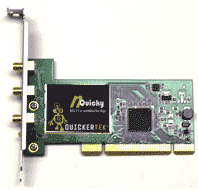 By comparison with the iMac autopsy, installation of the nQuicky PCI Upgrade card on the Dual 2 GHz Power Mac G5 was a breeze since we had a PCI slot available. Insert the card in the slot, attach the three (!) stub external antennas to it, and we were almost done. Next we turned off the Apple Airport software and installed the QuickerTek software from the provided CD and activated it. With the Power Mac G5 operating on the old "b/g" network, its link speed according to Network Utility was 54MB. With the QuickerTek upgrade card and software, the link speed according to Network Utility measured 300MB! Network Utility identifies the nQuicky PCI card as a Ralink RT2860.
Titanium PowerBook G4 Installation and Speed
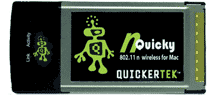 Installation of the nQuicky PCMCIA/CardBus on the Titanium PowerBook proved the simplest yet. Insert the CardBus into its PCMCIA slot = almost done! Turn off the Apple Airport software, install and activate the QuickerTek software. Finished. The vintage PowerBook G4 now indicates a link speed of 300 MB versus the former link speed of 54 MB as measured by Network Utility. Users of the Titanium claim it has new life. Network Utility identifies the nQuicky PCMCIA card as a Ralink RT2860.
In summary
The QuickerTek "n" Wi-Fi adapters were easy to install once we had the right Torx screw driver and right antenna adapter. In the end, each cost $149 plus shipping and handling and they are working as advertised. QuickerTek provides a one-year warranty on parts an labor. [Dana Baggett]
Saw something? Send a tip or a correction
The archive ran on reader tips. What did you see, where, and do you want the credit? Something wrong on this page? Say so and it gets fixed.