Hands-On Review--Adobe's New Photoshop Elements 4.0 for the Mac
We have used Photoshop Elements (PE) to produce images we post on Macs Only! and for re-touching our digital photos since version 1.0 replaced the mostly free Adobe PhotoDeluxe a number of years ago. PE is Adobe's reduced set version of Adobe Photoshop so it is primarily for consumers but also for professionals who work with digital images and do not need the fabulous feature set found in its bigger and more expensive fully professional sibling.
This review is based on a pre-release copy that we have used for several weeks. The only thing missing from the review copy is the new PE 4.0 Help file. PE 4.0 is a Power PC application, not a universal binary, so it will not run natively on MacIntels.
Each version of PE since 1.0 has picked up more of Photoshop's features and has become more Photoshop-like in its use. The shift between versions 2.0 and 3.0 was quite pronounced in our experience. While a load of Photoshop features were added, perhaps to stay ahead of Apple's iPhoto, PE 3.0 also lost some of the ease of use and simplicity of PhotoDeluxe that we enjoyed in prior versions. PE 4.0 also adds some terrific new features but it regains some simplicity of use as well.
According to Adobe's general description,
The #1 selling consumer photo-editing software now lets you effortlessly enhance photos with automatic red eye removal, simple skin tone correction, and new selection tools that make adjusting specific areas of a photo fast and easy. Keep your photos at your fingertips with the enhanced file browser, Adobe Bridge for Photoshop Elements.
Here the details of the new features:
Magic Selection Brush -  Adobe claims the new Magic Selection Brush makes photo correction a snap by taking the pain out of photo selection. So, instead of slow, trial and error outlining and multiple tools, one can just click or brush over the area. The Magic Selection Brush analyzes and selects the rest of the area automatically. There are further options to refine the selection if desired. One just chooses a correction and applies it. Specific parts of a photo can be quickly selected for easy color, lighting, and contrast adjustments.
This is one of the coolest new features.  To illustrate it, we used an image of a 2005 Corvette (top). We touched the head and arm of the driver with the magic brush and used the brightness/contrast controls to "remove" him (middle). We also quickly "scribbled" over the Corvette and used the brightness/contrast controls to make the Corvette stand out a little more from the background to make it easier to select. Then, we used the Magic Lasso Tool to select the Corvette with a little fiddling and remove the background (bottom). It took just a few minutes to produce an image that can be pasted and blended into another background.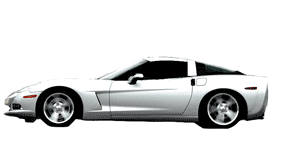
Skin Tone Adjustment - Adobe claims PE 4.0 makes getting accurate skin tones in a photo fast and easy. There are also advanced controls available for even more precise correction.
This new feature worked particularly well on photos of people that were too green or blue. Those that appeared too red took some fiddling with the tan and blush to get a natural look to our eyes. But in any case, this feature is much easier to use than trying to adjust the hue and saturation to get a good resulting skin tone.
One-click Red Eye Adjustment - In previous versions (and in other applications), one had to click on each eye in a photo that exhibited red eye from a camera flash. In PE 4.0, one simply clicks on the photo anywhere and all of the red eyes are eliminated.
This new feature worked as advertised on our digital photos.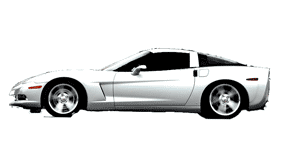
Magic Extractor with Defringe - Adobe states that one can use this tool to easily extract subjects or objects from any photo, with advanced edge defringing, to use them for composites and scrapbooking.
We tested this feature by repeating with the Magic Extractor what we did above with the Corvette using the Magic Lasso Tool. The result was even quicker and easier than using the Magic Lasso Tool. The extracted image is good enough to paste onto a dark background without further work.
Online Printing & Creations - With this feature one can get professional-quality Kodak prints and beautiful hardbound photo books, cards and calendars, delivered directly to one's door. PE 4.0 can also automatically optimize photos for e-mail.
Non-destructive Camera Raw processing with DNG support - PE 4.0 now supports Adobe's Camera Raw plugin so that one can use non-destructive photo processing and fine tune exposure lighting with the raw data from one's digital camera. One can also convert Camera Raw files to the universal Digital Negative (DNG) format for a lifetime of access without worrying about proprietary camera formats. Camera Raw works with over 113 digital cameras.
Adobe Bridge for Elements -- In PE 4.0, Adobe has replaced PE 3.0's file browser with a slimmed-down version of Adobe Bridge that comes with Adobe Creative Suite 2. The "abridged" PE 4.0 Bridge has these features:
- Browse multiple file types -- — Manage, preview, and open JPEGs, Camera Raw, multi-page PDF files and many more in the Adobe Bridge window.
- Organize and rename -- Create and rename files and folders individually or in batches.
- Full Screen Slide Show -- Quickly review, rate, and label your new digital photos in a full-screen slide show.
- Find by Metadata -- Quickly search for all the photos you took with a flash, with a certain shutter speed or f-stop, by the camera make and model, and more. Photoshop Elements 4.0 supports an extensive range of metadata types, including the IPTC set.
- Photo captions -- Apply captions to multiple files at the same time.
- Keywords -- Easily create and attach keywords for the people, places and events in your life. Then find the photos you want in an instant with a keyword search in Adobe Bridge.
- Saved Searches -- Create smart search filters so you can quickly find commonly searched files. Even save your searches as reusable Collections.
Unfortunately, we could not try out the PE 4.0 version of Bridge since we have Adobe Creative Suite 2 installed and the full Adobe Bridge application opened instead when we selected "Browse with Bridge" in PE 4.0's File menu. Perhaps this is a bug in our pre-release version, but it's more likely a feature that connects PE 4.0 to Creative Suite 2. We can say that the full version of Bridge is an excellent tool for managing photos and digital images.
In summary, Adobe Photoshop Elements 4.0 for the Mac is a terrific photo/digital image re-touching application for consumers and professionals alike. Version 4.0 is a significant improvement over version 3.0 and well worth the upgrade price with a long list of new features that work very well. Adobe Photoshop Elements 4.0 for the Mac can be ordered today for $89 or $69 for an upgrade edition. [Bill Fox]
Saw something? Send a tip or a correction
The archive ran on reader tips. What did you see, where, and do you want the credit? Something wrong on this page? Say so and it gets fixed.