Hands-On Review--WiebeTECH mini USB Dock, SATA to USB 2.0 [Updated]
 When we sold our Power Mac G5 Quad, without thinking about it much we copied our startup drive to another 3.5" serial ATA (SATA) hard drive before securely erasing the startup drive's contents, overwriting it and shipping the Quad to its fortunate new owner. But our MacBook Pro does not have a SATA port and all of our 3.5" external FireWire drive cases have ATA/IDE bridges. Living on the "cutting edge" occasionally bites!
We looked but could not find an external drive case with a SATA to FireWire or to USB 2.0 bridge. The FirmTek SATA ExpressCard 34 adapter is not shipping yet (Q3 of 2006) and, anyway, there are very few external SATA drive cases on the market and they are relatively expensive. Our dilemma was solved by a product from WiebeTECH.
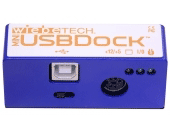
The WiebeTECH mini USB Dock for SATA drives has a SATA to USB 2.0 bridge for $99.95. It comes with an AC/DC power adapter, USB 2.0 A/B cable and a bottom plate for the hard drive with screws and runner feet. The mini USB Dock itself is small, 1.15" x 1" by 2.8" wide), and light (a few ounces). It attaches directly to a bare SATA 1 or SATA 2 3.5" hard drive and connects to the MacBook Pro from a USB 2.0 port via the USB 2.0 A/B cable.
Unfortunately, 3.5" hard drives require more power than the USB 2.0 bus supplies. The 3.5" SATA hard drive is powered through the 12v AC/DC adapter that plugs into an AC wall outlet and connects to the mini USB Dock which also has an on/off switch and three LEDs. The LEDs indicate when the AC adapter is attached and plugged in, when the mini USB Dock is turned on and when the SATA drive is being accessed.
Setup is easy. Just attach the drive bottom plate with four screws, stick on the rubber feet, plug the mini USB Dock into the drive and connect the USB cable and AC adapter. Our only suggestion to WiebeTECH would be to extend the drive bottom plate out from under the drive a bit so that the mini USB Dock could be fastened to it with a screw or two. The USB cable is a bit stiff, as is the AC adapter cord, and with the weight of the AC/DC adapter all act to make the SATA Dock-to-drive connection a bit too tenuous for us. Nevertheless, we have been careful and have not accidentally knocked it loose--yet.
So how well does it work? It works fine when connected directly to a USB 2.0 port on our MacBook Pro. The MacBook Pro sleeps and wakes without any problems and the SATA drive spins up. 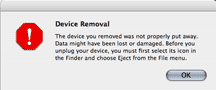 However, it's not a good citizen on the USB 2.0 hub in our 30" Cinema Display. Our MacBook Pro sleeps fine but upon waking we get a Device Removal warning dialog box and occasionally the SATA drive does not mount. Worse, our iPod attached to another USB 2.0 port on the hub always fails to mount after the MacBook Pro awakens when the mini USB Dock is also attached, otherwise the iPod works fine.
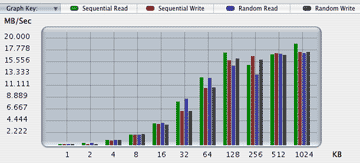
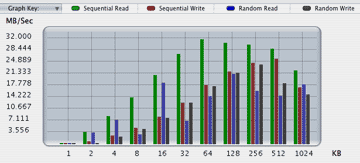
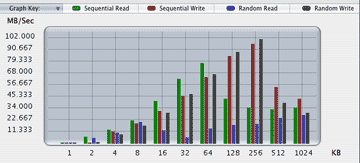
How well does it perform? First, let's make it clear that we are biassed against USB 2.0--Apple's FireWire 400 is a much better protocol. While USB 2.0's theoretical maximum throughput is higher than FireWire 400's (480 Mbps vs 400), USB 2.0 usually (if not always) tests out slower, mostly much slower. If we had a choice, we would have chosen FireWire. We used Intech's QuickBench to test the speed of: a. the 3.5" 7200RPM SATA drive in the mini USB Dock (top), b. an 80GB 2.5" 5400RPM drive in an external FireWire case (middle) and c. the 100GB 2.5" 7200RPM MacBook Pro internal SATA drive (bottom):
SATA Drive
ATA Drive
Note the vertical scales are different on the three graphs. The relatively slow 2.5" 80GB 5400 RPM drive in an external FireWire case (b.) easily beat the fast 3.5" 250GB 7200RPM SATA drive attached via the mini USB Dock (a.). The internal 2.5"100GB 7200RPM drive easily beat both external drives.
Here is table comparing the drives' read and write performance (MB/sec) using Intech's Extended Test:
|
Test*
|
mini USB Dock
|
FireWire
|
Internal
|
|
.
|
|||
|
Read
|
20-21
|
21-22
|
33-35
|
|
Write
|
17-18
|
24-28
|
37-40
|
| . |
Again, the fast 3.5" SATA drive in the WiebeTECH mini USB Dock is the slowest due to the USB 2.0 connection.
In Summary, the WiebeTECH mini USB Dock may be the only solution currently available to connect a 3.5" SATA hard drive to a MacBook Pro. But, at $99.95, it is also on the expensive side with many more elaborate FireWire and USB 2.0 external drive cases costing less. [Ed. Note: Reader Phil Noguchi tipped us to WiebeTech's more expensive $169 FW800/400/USB2 TrayDock with SATA tray. His tip also led us to find WiebeTech's even more expensive $229 FW800/400/USB2 SATADock solution.]
Pros: Attractive design, small, light, good directions, easy setup and connection, excellent 14-day "no questions asked" return policy.
Cons: Subject to accidental disconnection, poor citizen on a USB 2.0 hub, USB 2.0 is slow relative to FireWire, relatively expensive.
The mini USB Dock is currently out of stock until 5/3/06. For future reference, i.e. when a SATA ExpressCard 34 exists, WiebeTECH also makes a mini SATA Dock for a superfast SATA to SATA connection ($74.95). [Bill Fox]
Saw something? Send a tip or a correction
The archive ran on reader tips. What did you see, where, and do you want the credit? Something wrong on this page? Say so and it gets fixed.