Hands-On Review--Kensington SlimBlade Media Notebook Set
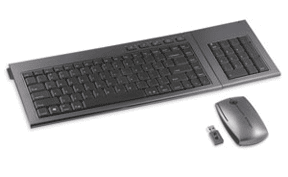 No sooner had we finished our recently posted Hands-On Review of Kensington's "new" Ci70 Wireless Desktop Set consisting of integrated keyboard/keypad and mouse, when we noticed that Kensington is now touting a "new" Slimblade Media Notebook Set. We asked Kensington if we could test drive the Slimblade ensemble. It arrived a few days ago.
The SlimBlade set consists of a keyboard, a separate but attachable numeric keypad, and a mouse all connecting wirelessly to a Mac using a single, micro RF 2.4Ghz USB dongle. Kensington claims a 30 foot range. There are no Mac drivers on the enclosed CD because all of the components function out of the box with a Mac. Nice!
Let's take a closer look at each of the modules.
Keyboard.
The keyboard is about 13" wide (not counting its rubber ears -- see below), 6" deep and only .9" high off the desk at its tallest. Compare that with Apple's newest thin wireless keyboard at 11" x 5.25" x 0.6". It's an 86 key QWERTY keyboard with a layout almost identical to the Kensington Ci70 keyboard. The only difference is that the Slimblade has two Apple logo keys, one on either side of the space bar, a more conventional layout for Mac keyboards; the Menu key on the Ci70 keyboard is missing from the Slimblade. A Windows logo key is located second from the left on the bottom row; it functions the same as the Mac logo keys. The Slimblade has fewer special function Hot Keys, five compared with the Ci70's ten. Only two work when connected to our 24" 2.8GHz aluminum iMac (mid-summer 2007) running Leopard, the CD Eject and Gadget (aka Dashboard) Hot Keys. The accompanying instruction booklet indicates that the other Hot Keys - Media, Back Up, and Search & Organize - are PC specific and only work after installing the PC drivers on the accompanying CD. F12 brings up Dashboard when tapped lightly and when held down, functions as a CD Eject key. So, the Hot Keys are really superfluous for Macs.
The Slimblade is an inclined, weighted keyboard nicely finished in metallic graphite. We thought initially that the keyboard housing was metal but decided after closer examination that at least the underside is plastic. We're pretty sure the top side is metal. It's so well-done it's hard to tell. In any event, it does not have a "plasticky" feel to it like the Ci70. The keyboard and keypad side edges are rubberized, with alignment rubber ears on the keyboard fitting into corresponding slots on either side of the keypad at the top, held together at the bottom corners with low power magnets. Cool.
Keypad.
The keypad has 17 keys including a numlock clear key but we couldn't find a numlock on either keypad or keyboard. It is powered by two AA batteries and connects independently from the keyboard to the single USB wireless dongle.
Mouse.
The Slimblade Media Notebook Set comes with a two button laser mouse, with a 360° scroll ball that permits scrolling vertically and laterally simultaneously. It also is powered by two AA batteries and connects to the same RF USB dongle previously mentioned. The dongle can be stored inside the mouse, which has the added benefit of shutting the mouse down during transport.
Kensington recommends the use of alkaline non-rechargeable batteries. Six AAs are provided in the box. There's a battery life indicator on each of the three components.
There is a download labeled Slimblade Mac Driver 1.0 on the Kensington web site but the description indicates it enables "Media Control functions located on the underside of the Mouse." This mouse has none so we didn't use it.
There are no on/off switches on the three components. Turning off the computer effectively turns them off. Likewise, power up the Mac and these peripherals are ready to go.
In use.
The keyboard has the look and feel of a desktop model. The keys are concave, graphite matte color and good sized with white characters. No glare. Setup was a cinch. A onetime brief keyboard recognition process and done. We suggest it is primarily a Mac keyboard - no drivers needed - with a Windows key to reassure those on the Dark Side that they can use it, too. We used the dongle on a USB extension cable primarily for convenience. Since it was only about six inches from the components, it was hardly a test of the 30' connection claim. We liked the keypad in that its keys are the same size as the keyboard. It is not easy to find Mac compatible keypads, especially those with full sized keys. And the two components mate perfectly. Neat.
We loved the Ci70 mouse and were a bit disappointed that the Slimblade mouse wasn't the same one. It is squarish and low profile. But, it does glide effortlessly over our mouse pad. The 360° scroll ball takes a bit of getting used to but it works.
If there is one criticism, it is that metallic graphite doesn't match any Apple product.
Kensington offers a five year limited warranty. The MSRP is $130 but the "street" price is less. If you were to price comparable components separately, we think they would cost more. Total weight: about four pounds.
Kensington says it will offer a Slimblade Media Remote soon as a compatible added component for the Slimblade set "to control ... Front Row from anywhere in the room."
In Summary.
If you're into compact, wireless, Mac keyboards and really want/need a compatible keypad to accompany it, the Kensington Slimblade Media Notebook Set may be just the ticket. It is well-made, functional and attractive if you like metallic graphite. The mouse is decent. While the target users are laptop owners, it looks and works perfectly on the desktop. We liked the set a lot. Hmm...wonder if we can keep it "for extended testing." [Dana Baggett]
Saw something? Send a tip or a correction
The archive ran on reader tips. What did you see, where, and do you want the credit? Something wrong on this page? Say so and it gets fixed.