Review of Thrustmaster Fusion Digital Gamepad on iMac

Hands-On Review: Thrustmaster Fusion Gamepad on iMac
By Chris Conlon, Guest Reviewer
Thrustmaster Price: $24.95 List, $19.99 Street
December 23, 1998
Thrustmaster's Fusion Gampad is a good example of the advantages and frustrations Mac gamers face with the fledgling USB interface.
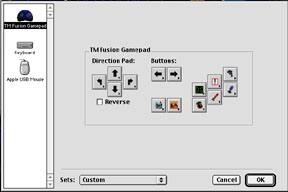
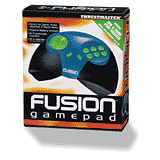 The Fusion's box comes emblazoned with a sticker touting "iMac drivers included." That's true, but only to a point. Like most other USB controllers on the market for iMac so far, Thrustmaster only includes the Input Sprocket needed to activate the controller in Input Sprocket-aware games. A separate control panel would be needed to map the controls of the pad to keyboard equivalents in most older games. Thrustmaster did not respond to e-mail support requests that asked whether such a control panel would be forthcoming. I'm not holding my breath. Documentation for Mac users consisted of a single sheet of installation instructions. That's a good thing; because the Fusion is easy to set up. A much larger user guide is included for Windows and non-English speaking users. Unlike Ariston's USB gamepad and joystick, Thrustmaster does not bundle any Mac-compatible game demos to get you started.
The interface for the Fusion is like most other Input Sprocket controllers. After installing the extension included on the CD-ROM that ships with the gampad, simply start up the game and configure the controller from inside the preferences or controls menus. I tested the Fusion with Ambrosia's Slithereens, Future Cop: LAPD, Marathon Infinity and MacMAME. Thrustmaster incorporates 10 buttons and a unique directional control pad.
 The controller shape is reminiscent of the old Atari Jaguar game pads _ a large, easy-to-hold design that provided solid game play. The Fusion has an odd blue, black and fluorescent green color scheme that should appeal to some iMac gamers' sense of style. The controller looks more solid than it feels. I expected it to be a bit heavier and have a less hollow feel.
The Fusion is not a pure USB solution. Its main interface is a standard PC game port, but it includes a PC gameport to USB adapter. The adapter could provide a unique opportunity to enterprising hackers, who conceivably could use it to make a host of PC gameport controllers available to USB-based Mac gamers with their own drivers sets. The adapter allows Thrustmaster to maximize exposure with Windows users but proved infuriating when it came unplugged from the PC gameport connector after I accidentally stepped on the cord during game play. I hope Thrustmaster's future USB products offer a native USB-based solution and forgo the adapter.
Electronic Arts' excellent Future Cop: LAPD, with its fast-paced and demand action, put the controller to the test. Quickly noticeable is the odd feel of the d-pad _ a self-centering ball-like device with a divot that fits the player's thumb. I didn't mind the direction pad, but my wife's small hands could never get used to it. It takes more pressure to move the ball pad in one direction or another than simply depressing a regular cross-style pad.
My biggest problem was with the buttons. While they feel solid, they are too small and their positioning could be out of reach for those with smaller hands. Those with larger hands may have a hard time differentiating between each of the six main action buttons at first. Two trigger buttons I assigned to strafing in Future Cop also have a peculiar location. While most controller companies place these "L" and "R" buttons on the top of their pads, Thrustmaster's are underneath. This takes some getting used to, but after some practice and a lot of patience, the all of the buttons became somewhat easier to use.
It took a while, but the gamepad performed well for the more arcade-like games that don't require full 3D movement. Slithereens and Future Cop felt like I was playing them on a Playstation. While Input Sprocket is still in the early stages of implementation, on MacMAME, my limited tests of the pad with the arcade emulator showed promise. I would not recommend the pad for playing Unreal or Marathon Infinity. First-person shooters that allow you to look up and down practically require the 3D movement that a keyboard-mouse combo allows.
Conclusions
The Fusion is a fair choice for iMac gamers considering the limited USB gamepad options currently available and its low street price. However, shortcomings like its small buttons and higher-than-average learning curve should give potential buyers pause. If price is no barrier and adapters aren't a bother, iMac gamers may want to wait for the long-delayed USB Joyport adapter from Kernel Productions. Like Kernel's ADB-based Choicestick Mark V, the Joyport promises the ability to use Playstation, N64 and other controllers with your favorite Mac games. Ariston's Hermes gamepad is the only other Mac USB-compatible gamepad I know of that has hit the streets. It carries a higher price tag than the Fusion, but Ariston promises a keyboard mapping control panel in the future.
Copyright © 1998 by Bill Fox
All rights reserved--no commercial use permitted without attribution.
Of course . . . . . . and I am proud to be an Evangelista! . . .
Saw something? Send a tip or a correction
The archive ran on reader tips. What did you see, where, and do you want the credit? Something wrong on this page? Say so and it gets fixed.