Hands-On Report--MicroNet MiniMate External FireWire Drive with a 20" 2GHz iMac Core Duo
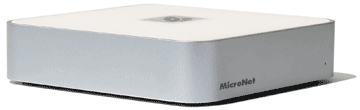
The MicroNet MiniMate fits our requirements perfectly so we bought a 7200 RPM, 80GB model for less than $110. Other sizes--160GB, 250GB, 400GB--are available for those who need more space. The external dimensions of the MiniMate are identical to the Mac mini, a form factor that happens to fit very nicely on top of the pedestal foot of the iMac Core Duo. The periphery of the underside of the MiniMate has a series of vent slots for convection cooling and the bottom has a rubberized non-slip surface. It has silver metal sides that match the iMac pedestal perfectly and a white top that is the same shade as the iMac Core Duo.
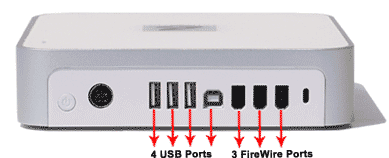 The MiniMate ships with a 7 inch FireWire cable and a 9 inch USB 2.0 cable. These turned out to be the perfect lengths to plug into the horizontal strip of ports on the back of the iMac Core Duo. By plugging both the USB and the FW cables into the iMac, the drive functions as a FireWire drive and acts as a hub with two live FW and three live USB ports. The drive supports booting Mac OS X with FireWire. Unfortunately, no enclosure-only version is available for those who already have a bare hard drive.
We positioned the MiniMate a quarter turn to the left to better accommodate the cable connections to the back of the iMac Core Duo. Doing so has the added advantage of positioning the on/off switch where it can be easily reached on the right side, of making connecting other cables is more convenient and of presenting a clean face to the front, i.e. hiding the logo. A black logo on the white top of the MiniMate disappears from view under the iMac itself. An activity light intended to be viewed through a pinhole on the front now turned to the left side is easily visible by reflection from under the drive. A very neat and practical place for an iMac external drive. It even stays in place on top of the pedestal when you turn the iMac.
Now to get the MiniMate working. Although we intend to use the MiniMate drive to back up personal files on the iMac Core Duo, we want to install Mac OS X (Intel) on it to be able to boot from it as well. According to Apple Article ID: 303220, An Intel-based Mac can only install Mac OS X on a disk with the 'GUID_partition_scheme.', the Intel-native partitioning scheme. The MiniMate comes with the Power PC Apple partition scheme installed so we re-formatted it with the GUID partition scheme using Disk Utility.
To install Mac OS X, we put the Mac OS X 10.4.4 Install Disc 1 that came with the iMac Core Duo in its SuperDrive. By the way, we picked up a helpful tip from MacFixIt that we're delighted to pass along.
Helpful tip: You can install Mac OS X on an external drive without having to restart from the install DVD by going to /System/Installation/Packages on the DVD with Spotlight and double-clicking on the OSinstall.mpkg file.
The installation went well and we ejected the disc and booted our iMac Core Duo from the MiniMate external FW drive.
Here's the best part. The MiniMate now acted as if it were a new Mac and activated the SetUp Assistant. After the rudimentary registration preface, we were asked if we wanted to transfer all our data from another Mac or another partition. We chose partition, hoping that meant our iMac Core Duo's internal hard drive. It did! We were also asked to select which files to transfer; we chose all of them. In a very short time, the transfer was accomplished.
How's its speed? The MiniMate external FW drive scored 38 on Xbench 1.2's Disk speed test. By comparison, the 2GHz iMac Core Duo's internal drive scored 92 on the same test. But relative to our iMac G5 (Rev. A) internal drive's score of 43 and our Mac mini Core Duo's 30, the MiniMate does reasonably well.
In summary, we are quite pleased with our 80GB MiniMate. It fits very well aesthetically with our iMac Core Duo, runs completely silently and well after a month of use, gives us three extra USB 2.0 ports and two extra FireWire 400 ports and is a reasonable cost at only $110.
After searching for a Universal Binary application that will permit us to keep the two drives synchronized, we settled on SuperDuper! v2.1. Stay tuned for a future Macs Only! Hands-On Report. [Dana Baggett]
Saw something? Send a tip or a correction
The archive ran on reader tips. What did you see, where, and do you want the credit? Something wrong on this page? Say so and it gets fixed.