Review of webSavant

Hands-On Review: 
Savant Interactive, Inc. Price: $349 list
December 24, 1998
Pros: Easy to use, very comprehensive, enough depth to really learn, A/V technology works well for learning, much cheaper than classes, serves complete novices to near expert veterans
Cons: I can't even manufacture any, uhh...can't ask questions?
Rating: Outstanding, 5 out of 5 Exclamation Points: ! ! ! ! !
Do you really want to learn how to create and maintain an outstanding web site? Even if you already have one there may still be a lot to learn that can improve your site or your efficiency and effectiveness as a webmaster. webSavant from Savant Interactive, Inc., is a set of interactive web authoring tutorials that really fills the bill.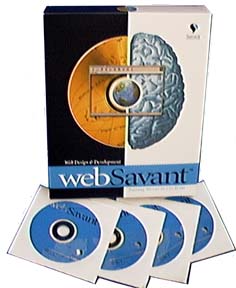 The tutorials are presented as audiovisual interactive lessons not just text with graphical images.
webSavant is currently available only for the Macintosh, both 68K and PowerPC based systems. However, a Windows version is in the works. The Mac system requirements are pretty minimal: System 7.1 or higher, 8 MB of available RAM, a CD drive and a monitor capable of 256 colors at a 640x480 resolution.
What you get
In the webSavant box is four CDs, a printed Table of Contents, a registration card and a special offer for the full version of BBEdit. QuickTime 3.0 is bundled on CD Disc 1 and it needs to be installed to run the tutorials. Also bundled on CD Disc 1 is a Toolkit folder that contains some 21 useful applications from Acrobat reader to Stuffit Expander. Two applications are a demo of the full version, BBEdit and Debabelizer, but the freeware BBEdit Lite which I use is included. Netscape Communicator is webSavant's browser of choice and version 4.05 is included on CD Disc 1. webSavant teaches you how to use these applications to produce and maintain your web site.
webSavant has 18 Chapters or tutorials. They are:
| 1. Introduction | 10. Creating Web Graphics |
| 2. Getting Started with HTML | 11. Web Page Design Tips |
| 3. Basic Page Layout | 12. Getting Your Site Online |
| 4. Graphics in HTML | 13. Web Video |
| 5. Hyperlinks | 14. Web Audio |
| 6. HTML Colors | 15. JavaScript |
| 7. Tables | 16. CGI Scripts |
| 8. Frames | 17. Publishing PDF Files |
| 9. Forms | 18. Macromedia Flash |
Each of the tutorials is comprehensive. For example, Chapter 15 on JavaScript includes individual lessons on: Introduction, Getting Started, MouseOver (Rollover) Image Swap, Bullet Point Highlights, Swapping Multiple Images, Swapping Images Across Frames, Changing Pages in Multiple Frames, Pull-down Menu Site Navigation, Opening Custom Browser Windows, Dynamic Messages and Form Data Validation. The eighteen tutorials provide a total of 130 comprehensive lessons.
webSavant's web site has a lot of details on what is covered on the CDs, more than I have seen for any other product. Check it out.
Installation and Use
First insert CD Disc 1 and copy the Toolkit folder to your hard drive. Then install the individual applications that need to be installed. This way one can easily flip between the tutorial and the actual application to try things that are presented in a lesson. That is all there is to installation.
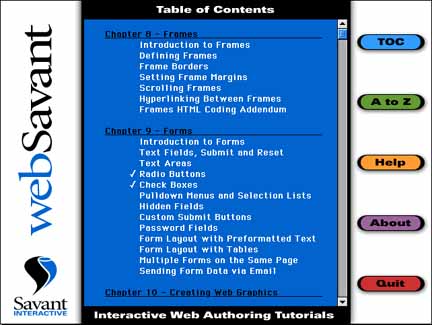
webSavant is not a "book." It is a set of audiovisual interactive tutorials that appear in a QuickTime 3 window. There are basically three windows. The first is shown below with the Table of Contents (TOC) button clicked. It lists the chapters and lessons available. The second button (A to Z) is a subject index. The functions of the other three buttons are obvious.
Clicking on one of the lesson listings places a check mark in front of it and opens the lesson window shown below. The lesson window is a desktop. While the instructor speaks delivering the lesson, a QuickTime 3 movie illustrates the lesson in Netscape, BBedit, Fetch or other application in the Toolbox Folder following along with the instructions as they are delivered.
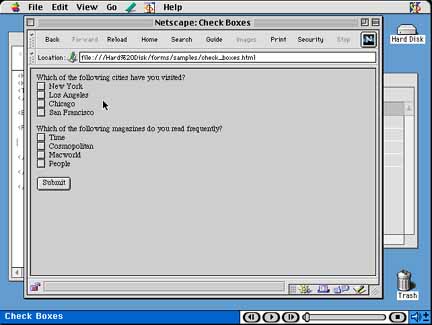
A controller is available at the bottom of the lesson window shown above. The controller allows one to fast forward, back up, pause and end the lesson. The sound level can also be controlled. After pausing the lesson, one can go to the actual application without quitting webSavant and practice what has just been covered and then return to the lesson and continue. I found this to be a very effective way of learning.
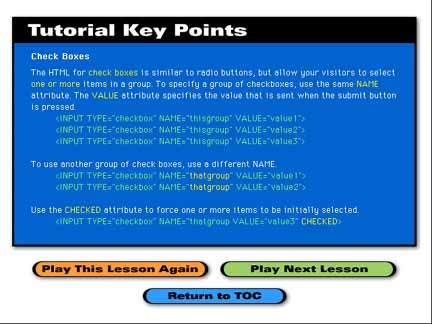
At the end of each lesson a summary is displayed in the Key Points window as shown above. There are button to replay the lesson, move to the next lesson or return to the table of contents window.
I found webSavant to be a very effective way to learn, much better than just reading books which is the way I learned to develop, post and maintain web sites. It is more like taking a class in web design and management but better in many respects because the lesson speed can be individually tailored to ones own need and because it can be repeated as often as needed wherever and whenever needed. Of course, one cannot ask questions of the instructor.
I spent a number of hours (I didn't keep count) over several weeks viewing and working with the entire set of tutorials and lessons. There was nothing that I didn't understand and nothing that was glossed over to the point of being unhelpful. I actually learned a lot from webSavant, not that I am a world authority, but adding video, audio, PDF files and javascripts and using CGI Scripts are no longer complete mysteries. After the lessons, I could accomplish each of those functions. There are also a number of great tips on how to increase the "visibility" of a web site to search engines.
Conclusions
I think webSavant is an outstanding learning tool. I thoroughly enjoyed the lessons and learned easily from them, probably far more than I am likely to ever use routinely. webSavant is much better than a book, a set of books, a video tape or even a class, in most respects, for learning how to setup and maintain a web page or site. It seems that webSavant is primarily for the serious and budding web designer and/or webmaster. However, complete novices who just want to learn how to do a simple personal page should easily learn how to do so. Some of us grizzled web veterans can learn some things from webSavant as well -- at least I did. I have no reservations in recommending this product.
Copyright © 1998 by Bill Fox
All rights reserved--no commercial use permitted without attribution.
Of course . . . . . . and I am proud to be an Evangelista! . . .
Saw something? Send a tip or a correction
The archive ran on reader tips. What did you see, where, and do you want the credit? Something wrong on this page? Say so and it gets fixed.