Review of FriendlyNET 10/100 Cable/DSL Router FR3004LC
Click On Images Above! |

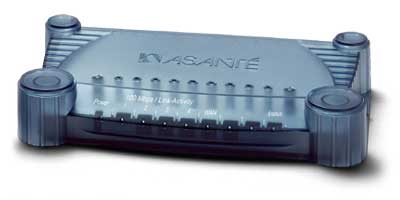
ADV: Appleisp - G4 OSX Server Hosting 19.95/mo, Unltd. Natl. Remote Access 17.95/mo, Server Colocation w/ Back Ups 249.95/mo, Dedicated Server Purchase & Leasing. Hands-On Review: FriendlyNET 10/100 Cable/DSL Router By Bill Fox Asante. Price: $200 list; $170.00 with $30 rebate (Model FR3004LC) Pros: @Home configuration, group access control, group configuration for UDP Cons: Comes without an ethernet cable, no crossover switch, print server Wintel only Hardware routers are becoming more prevalent in the small office and home office (SOHO) environments. Several manufacturers produce such routers that cost less than $200, some with only one switched port cost less than $100. Asante Technologies, Inc. manufactures the FriendlyNET series of SOHO networking equipment which includes the 10/100 Cable/DSL router with 4 10/100 switched ethernet ports, a COM port and an integrated print server and parallel port (Model FR3004LC). We previously reviewed the LinkSYS and Macsense cable/DSL routers. Asante loaned us an FR3004LC, their latest model, for this review. Why a hardware router? A router sits between a cable or digital subscriber line (DSL) modem and a computer or network of computers. If it is used with one computer, the router serves as a firewall between the computer and the internet. A firewall is an especially important function for a cable connection since anyone on the same cable loop can "see" any computer not protected by a firewall. If a router is used with a network the router will distribute the internet connection to all computers on the network as well as act as a firewall. Hardware routers used to be really expensive so a computer running a software router like Sustainable Softworks' IPNetRouter or Vicomsofts' Internet Gateway served the purpose for a little less than $100. Hardware routers have come way down in price and are silent, i.e. they have no fan and no spinning hard drive, and have switched ports. A switch is better than a hub for bandwidth management on the network and because it allows duplexed 100mbps communication, i.e. 100 mbps both ways at the same time. What you get Asante's FriendlyNET FR3004LC router comes with an AC adapter, a CD, a 4-page Quick Start Guide and a 40-page User's Manual. Unlike the LinkSYS and Macsense routers, the FriendlyNET router does not come with an ethernet cable. The CD includes a number of applications (Acrobat Reader, Better Telnet, Iomega Tools, Apple Disk Tools and WhatRoute) and PDF files of the guide, manual and a FAQ. It also includes the print server driver which, unfortunately, is Wintel only. The Quick Start Guide is fine for a simple set up. The User Manual covers all the additional advanced features of the FriendlyNET router, including setting up the network print server and using the console mode with the COM port which are Wintel only. The software has a 6 month limited warranty and the router has a one year warranty along with one year of free telephone support and unlimited web support. The Model FR3004LC router is attractively cased in translucent graphite plastic with little towers at the corners to make it easily stackable. It is 5"x8-1/2" and 1-3/8" high. As such, it is a little smaller than the LinkSYS and Macsense routers. However, the inner case is metal making it a bit heavier than the others and less at the mercy of the cables plugged into it. The FriendlyNet router has a WAN port to connect the cable or DSL modem , four switched 10/100 mbps duplexed fast ethernet ports, a com port and a parallel port. The latter two ports can not be used by Macs at present so the less expensive model FR3004 is more appropriate since it doesn't have the COM and parallel ports. To connect the FriendlyNET to a hub or switch, one must use a crossover cable or connect to the uplink port since it does not have a switch allowing a patch cable to connect to a regular port like the LinkSYS router does. The FriendlyNET router is configured using a web browser just like the LinkSYS and Macsense routers. It supports Dynamic IP, PPPoE (Point to Point Protocol over Ethernet), Static IP, Cable (@Home-type), Dial-up (3004LC only via serial modem) and SDN (3004LC only via serial modem), the latter two only from a PC. My Road Runner cable service just uses routine dynamic IP. Other cable services like @Home are more complicated and the FriendlyNET handles the protocol automatically when chosen in the configuration panel, a plus over the other routers. The FriendlyNET router also provides easy access control by assigning users to any of 3 groups or default to allow/block access to specific TCP and UDP ports (limit browsing, reception, send email, read news, etc.), another plus over the other two routers. Finally, the router supports DMZ (placing a computer outside the firewall) just like the other two. Set Up and Use I just unplugged my LinkSYS router and plugged the cable modem into the FriendlyNET's WAN port using an ethernet patch cable and then connected my network switch from the uplink port to one of the four switched ports on the FriendlyNET router with another ethernet patch cable. After resetting my cable modem so that it could grab the router's MAC address, it worked perfectly with the default settings. QuickTime streaming video could not access UDP with the FriendlyNET's default configuration like the LinkSYS router. The Macsense router did allow streaming video by UDP in default mode. The LinkSYS router allows one computer to be configured to obtain UDP and the FriendlyNET allows an entire group of computers to use the UDP port. UDP is a better quality protocol for QuickTime streaming video than HTTP. Conclusions Asante's FriendlyNET router is outstanding. It allows a broader set of connection protocols than the LinkSYS and Macsense routers. If one has @Home cable internet service, the FriendlyNET may be especially attractive. The group configuration is better than the single computer configuration of the LinkSYS, especially for UDP when viewing QuickTime streaming video. The only detractions are the lack of an ethernet cable in the box and the lack of a crossover/patch cable switch. The FR3004LC is not for Mac users since the print server doesn't work with Macs. However, the less expensive FR3004 without the print server is perfect. The Asante FriendlyNET router is a notch above the two others that we have reviewed. It would be even higher rated if the print server worked with the Mac. [Update (12/19): Several readers claimed that the print server works on Macs using LPR and postscript printers. Unfortunately, having no postscript printers we were unable to confirm this partial printing capability.] . . [Go to Macs Only!'s Daily News]
MY LAWYER MADE ME POST THIS: 8-/ Apple, Apple Logos, Macintosh, and Mac OS Logos are registered trademarks of Apple Computer, Inc. All other trademarks mentioned belong to their respective owners. |

Saw something? Send a tip or a correction
The archive ran on reader tips. What did you see, where, and do you want the credit? Something wrong on this page? Say so and it gets fixed.