Hands-On Review of Connectix's DoubleTalk
|
Hands-On Review: DoubleTalk
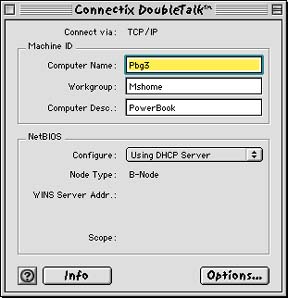
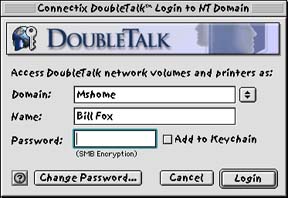
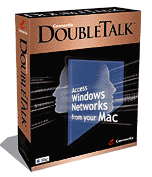 By Bill Fox Connectix. Price: $99 list Pros: Easy to set up and use, familiar to Mac users, works very well, network doesn't need to support AppleTalk, no problems encountered with Mac OS 9.1 Cons: Unidirectional Rating: Outstanding, 5 out of 5 Exclamation Points: Mac users in an enterprise environment have had a tough time surviving during the last five years or so with the wholesale adoption of Wintel computers and Windows NT networking in the enterprise and now education environments. Connectix has been a hero to Mac users with its incredibly excellent software Virtual PC. Windows NT does have AppleTalk Services for the Macintosh (SFM) and the IT departments of many organizations do a good job of implementing it to support Macs on the company network. However, many either don't implement SFM or poorly support SFM if they do. An alternative in those cases has been DAVE by Thursby Software ($149) which makes a Mac look and function exactly like a Wintel on the network or PC MacLAN by Miramar Systems ($199) which does the same for a Wintel on a Mac network. Connectix just released its solution, DoubleTalk, at Macworld Expo in San Francisco. DoubleTalk allows a Mac to connect to any PC running any version of Windows (95, 98 or ME, including NT and 2000) on an ethernet network and to transfer files with the PCs, print to a PostScript printer on a Windows network and log into and access password-protected resources managed by a Windows server. The Windows network does not need to support AppleTalk. DoubleTalk will work with any operating system that uses SMB (Server Message Block). Connectix provided an evaluation unit of DoubleTalk to Macs Only! for this review. What you get The DoubleTalk box contains a CD ROM, a printed user guide, a serial number card, a reference card for the Connectix web site and an instruction sheet for avoiding a conflict with Connectix Virtual PC's networking. The CD contains the installer, a Read Me file, a Known Issues (14 of them in v1.0) file, the user guide as a PDF file and a folder with an extension for use only with Mac OS 9's Multiple Users with restricted or panel users. The 60-page printed user guide is a high quality booklet with five chapters. It is simply written and well illustrated and contains a FAQ, a list of error messages and a glossary. Installation and Use The installer places a control Panel, an extension and a control strip module in their appropriate locations in the system folder. A folder containing two applications (DoubleTalk Setup Assistant and DoubleTalk Login Assistant for NT servers) and several other files is placed in the application support folder in the system folder. The DoubleTalk Setup Assistant launches after installation and allows a choice of the home/small office or corporate/institutional configuration and several details needed to commune with PCs like the workgroup name. The results are entered by the Setup Assistant in the control panel shown at right. We installed DoubleTalk on a Power Mac 8500, choosing the corporate/institutional configuration and on a PowerBook 2000 (FireWire), choosing the home/small office configuration. The 8500 is connected via ethernet cable to a Windows NT server network that contains mostly Wintels (90%). The PowerBook is connected by AirPort to a small LAN consisting of 6 Macs and a Compaq Presario 633 MHz running Windows Me. The DoubleTalk login dialog box (shown at right) was used to connect our 8500 to the Windows NT network. The login window appears at startup unless disabled (unchecked) in the DoubleTalk control panel. If disabled at startup, the login window can be launched from the alias under the Apple Menu or the control strip module. After logging in, opening the Chooser, selecting the AppleShare icon in the upper left window and highlighting [DoubleTalk] in the lower left window all of the network's shared resources appeared in the right window. We connected to the shared resources, i.e. shared servers and PostScript printers with no problem. Printing worked normally with PostScript printers (Laserwriter 360 and HP 8000 series). We tried copying a 52.6 MB folder of 39 files to and from a shared NT server using DoubleTalk and NT's AppleTalk Services for the Mac. Here are the results:
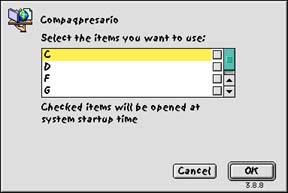
DoubleTalk's copy speed is similar to using NT's AppleTalk Services for the Mac on the same network, maybe even a bit faster in the slower upload direction. Then we used DoubleTalk to connect our PowerBook 2000 to a shared drive on our Compaq Presario. This was accomplished by simply opening the Chooser, selecting the AppleShare icon and "[DoubleTalk]Mshome" and then double-clicking on "Compaqpresario" in the right window (see image at right). The subsequent window presents a list of shared volumes on the Compaq, one or more of which can be selected and mounted on the PowerBook's desktop (see image below right). Copying files to and from the Compaq was no problem. We checked the copy speed between the PowerBook and Compaq using DoubleTalk and between the PowerBook and a Power Mac G4 on the same network using File Sharing's TCP/IP option. A 39.3 MB file was used. Here are the results:
The copy speed between the PowerBook Conclusions Connectix's new DoubleTalk is a super addition to the suite of Mac software available to provide interoperability among Macs and Wintel computers on a network. The setup and use of DoubleTalk is easy and will be familiar to Mac users, more so in our opinion than other interoperability solutions. DoubleTalk needs AppleTalk enabled on the Mac that it is installed on but uses the TCP/IP protocol to communicate over an ethernet network with the Wintel PCs so the network does not need to support AppleTalk. DoubleTalk is a one way solution, i.e. a Mac see all Wintel PC shared resources and can get files from and send files to those Wintel PCs but the PCs can't see the Mac. The one way nature of DoubleTalk should not present a problem in most cases. Its ease of setup and use along with a reasonable $99 price makes DoubleTalk a sure winner among its peers. Connectix has hit another grand slam home run for the home team. Mac OS X secrets revealed right here! |

Click On Images Above!
Saw something? Send a tip or a correctionThe archive ran on reader tips. What did you see, where, and do you want the credit? Something wrong on this page? Say so and it gets fixed. |

 Both the 8500 and the PowerBook were running Mac OS 9.1.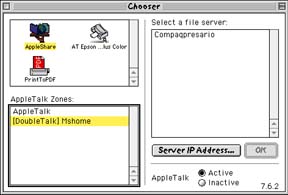
 2000 and Compaq using DoubleTalk was comparable but a bit slower than between the PowerBook and G4 using File Sharing and TCP/IP.