Hands-On Review of PowerLogix 800 MHz PowerForce 100 G4 in a Cube
|
Hands-On Review:
800 MHz PowerForce G4 Series 100 By Bill Fox PowerLogix. Price: $437.95 at OWC with a CubeOwner.com discount. After a long (way too long!) plateau at 500-550 MHz, aftermarket G4 processor upgrades are beginning to hit the streets at 800 MHz and 1 GHz. Only one company, PowerLogix, has managed to bring them to market for Power Mac G4s with AGP slots and 100 MHz system buses. Called the PowerForce G4 Series 100, PowerLogix is shipping 1 GHz models for the Power Mac G4 tower and Cube and an 800 MHz model for the Cube. Other models including dual processors and 133 system buses are in the works. We already reviewed PowerLogix's 1 GHz model but the 800 MHz model looked to us to be the value model. So we bought one from OWC and installed it in one of our three Cubes for this review.
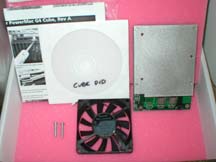
What you get. (see top photo) The PowerForce G4 Series 100 for the Cube has a silver heat sink plate attached. It comes with a very quiet Panasonic Panaflo 80x80x15 mm fan that is installed with two bolts on a bracket already built into the lower end of the Cube's chassis. Also included is a DVD with a QuickTime movie covering every installation step and a printed installation sheet with photos of every step. Installation of a CPU upgrade in a Cube seems daunting at first but PowerLogix provides an excellent QuickTime movie and printed instruction sheet. Most people should be able to do it but a service technician can do it for you if need be. We covered the installation details in our 1 GHz review so we won't repeat them here. We have now done it five times and it took just over 20 minutes to install the last one, our 800 MHz model. Installing one in a Power Mac G4 tower is much simpler. Processor Speed was tested with a variety of benchmarks available for Mac OS X. We ran the benchmarks on our Cube with the original 450 MHz CPU and the new 800 MHz PowerForce G4 Series 100 upgrade. For additional comparisons, we ran the benchmarks with PowerLogix's 1 GHz G4 upgrade in another Cube and an 800 MHz G4 LCD iMac. Our test computers are all running Mac OS X 10.2.1. Here are the results shown as relative to those for the 450 MHz Cube (higher is faster):
*Excluding Classic Mode launch which was probably affected by the fast hard drive used in the 450 and 800 Cube results. The Cube with the 800 MHz PowerForce G4 Series 100 upgrade averaged 80 percent (range of 31 to 168 per cent) faster than with the original stock 450 MHz CPU. The increase is about the same as the 78 per cent increase in clock speed. It betters the 800 MHz iMac but not by much. The 1 GHz upgrade averaged 30 percent faster than the 800 MHz upgrade. The bottom line is that the PowerForce upgrades perform as expected from their clock speed. Graphics Speed was also tested with a variety of graphics benchmarks on the same computers. Each computer had Apple OEM GeForce2 MX graphics for these tests. Here are the results (higher is faster):
The 800 MHz CPU increased the Cube's graphics speed by an average of 41 percent (range of 15 to 61 per cent) over the 450 MHz CPU. The significant increase illustrates how the graphics speed is still highly dependent on the CPU when using Mac OS X, even in Mac OS X 10.2.1 with the Apple's Quartz Extreme special OpenGL drivers. More on Quartz Extreme later. The graphics speed for the 800 MHz Cube is better than the iMac with the same graphics chip set and CPU speed but less than the 1 GHz Cube as expected. Quartz Extreme, does the graphics card make a difference? Mac OS X 10.2.x has special OpenGL drivers that offload some of the graphics work from the CPU to the graphics card supposedly to speed up 2D graphics performance in Mac OS X. According to Apple, Quartz Extreme is supposed to be evident on Macs with 32 MB of video RAM or more, i.e. an ATI Radeon or better or a GeForce2 MX or better. In the graphics speed benchmarks above we see that the CPU still has a major effect on graphics speed so how about the graphics card? We tested three graphics cards in our 800 MHz Cube: the original Rage 128 Pro with only 16 MB of video RAM, an Apple OEM GeForce2 MX with 32 MB of video RAM pulled from a Power Mac G4 tower and an Apple OEM GeForce3 with 64 MB of video RAM. Only the GeForce cards have enough video RAM for Quartz Extreme to be enabled. Here are the results (higher is better):
If Quartz Extreme has any 2D graphics acceleration effects, they sure do not show up in these benchmarks. In fact, with the exception of high resolution 3D (Quake III Arena frames per second), the scores or times for the stock ATI Rage 128 Pro graphics card with only 16 MB of video RAM are equal or BETTER than those of the two GeForce cards that allow Quartz Extreme to be enabled. We even used a utility to check to make sure that Quartz Extreme was enabled with the two GeForce cards. While this is generally disappointing, Quartz Extreme only accelerates window compositing, e.g. moving or resizing windows, according to Apple. An impressive demonstration of Quartz Extreme's acceleration is shown in the Seybold SF keynote by Phil Schiller, Apple's VP for Worldwide Product Marketing at minutes 12-22. [John Christie] Heat, is it a problem? One of the most attractive features of the original 450 MHz Cube is its silence. It has no fans and a very quiet 5400 RPM 20 GB Maxtor hard drive. The Cube is quietly cooled by a large heat sink and convection. Our Super Cube has a fast but very quiet 80 GB Seagate Barracuda IV hard drive that generates lots of heat and a GeForce3 graphics card that likewise is real heat generator. An 800 MHz G4 CPU might generate more heat than the stock 450 but it is newer and may not. In any case, the upgrade comes with a fan that is installed on a bracket in the lower part of the Cube chassis. The sound made by the fan is barely perceptable in a normal room environment. The GeForce3 card has a small fan so our Super Cube is no longer completely silent anyway but it's not bad. Together, the two fans are noticeable but not really loud like a tower or external SCSI drives. We measured the heat given off by our Cube through the main vent with a Radio Shack thermometer that has a small probe. We located the probe in the center of the vent's center slot while running the tests and for a half hour of Quake III Arena play afterward. The heat emitted by a completely stock Cube (450 MHz CPU, 20 GB hard drive and Rage 128 Pro graphics card) was measured to provide a standard for comparison. Here are the results in deg. F for the 800 MHz upgrade with the Rage 128 Pro, GeForce2 MX and GeForce3 cards and the fast Seagate hard drive:
The fan works wonders. The Cube with the 800 MHz CPU upgrade, fast hard drive and GeForce3 card runs cooler than the stock 450 MHz Cube without the fan. Summary. The 800 MHz PowerForce G4 Series 100 is well worth installing in a Cube. At $437.95 from OWC with a CubeOwner.com discount, the 800 MHz model appears to be the best value CPU upgrade. If you do not play 3D games competitively, the original Cube ATI Rage 128 Pro graphics card appears to be adequate despite it not meeting the 32 MB video RAM requirement for Quartz Extreme. Finally, heat does not appear to be a consideration. Our 800 MHz Super Cube is working perfectly but we can't wait to try out the dual 800 MHz upgrade coming soon from PowerLogix. |
Click On Images Above!
Saw something? Send a tip or a correctionThe archive ran on reader tips. What did you see, where, and do you want the credit? Something wrong on this page? Say so and it gets fixed. |
 October 16, 2002
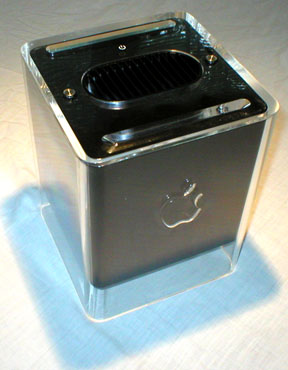 Our main test computer is a wicked black 450 MHz PowerMac G4 Cube running Mac OS X 10.2.1 (see photo at left). With RAM so cheap we have maxed it out at 1.5 GB. In addtition, we have added an 80 GB 7200 RPM Seagate Barracuda IV hard drive and an Apple OEM GeForce3 graphics card that is connected to a 17" Apple LCD. Why a Cube? Because we still think the Cube is the best general desktop computer ever made since we don't need extra PCI add-in cards. While the 17" G4 iMac with a SuperDrive isn't far behind, we like the flexibilty to choose any monitor that the Cube provides. Many agree with us because there is a very active market for Cubes on eBay and prices remain surprisingly high. We have three Cubes and hope that PowerLogix will allow us to keep them current with future upgrades like the dual 800 MHz model due out any time now.