Hands-On Review--Village Tronic MPDD+ Graphics Card
The MPDD+ is offered as an inexpensive graphics card to support a second monitor. It is not intended to be used with 3D games or as the primary graphics card. A second monitor is extremely useful for providing extra screen real estate for a variety of applications, especially those with floating palettes, ranging from Office X to Photoshop and Adobe GoLive.
Here are the technical specifications and resolutions posted by Village Tronic:
Industry standard video connectors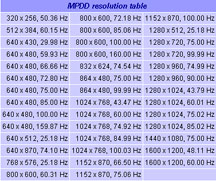
VGA 15 pins, HD Sub-D
- Separate syncs
- DDC2b
Apple legacy connector (2 rows, 15 pins Sub-D)
- Separate syncs
- Composite sync
- Mac Monitor sensing
Memory and graphic processor
- 8 MB of graphic memory
- Memory clock of 110 MHz
- 64 bit data path to the graphic processor
- Max. pixelclock of 170 MHz
The MPDD+ provides many resolutions and a given monitor may not display all of them. With its screen doubler feature the MPDD+ can also double the size of the available screen area through software in either the vertical or horizontal direction or both simultaneously, up to 2560x2048. The software allows panning around the huge available desktop area.
We tested it in our Power Mac G4 533 DP (Digital Audio) with 896 MB of RAM and an Nvidia GeForce3 graphics card attached to an Apple 17" LCD Studio Display. The second monitor attached to the MPDD+ is a Samsung 17" LCD 770FT display.
What You Get: The MPDD+ comes in a small 5x7" box unlike most graphics cards that come in ridiculously huge boxes. The card is packed in a bubble pouch and a CD in a jewel case is also included. The CD contains an installer for drivers and a special Village Tronic MP control panel for Mac OS 7.5.3 through Mac OS X 9.2.2 and PDF manuals for the control panel and the card. No Mac OS X drivers are needed and there is no special control panel for Mac OS X. There is also a note explaining that technical support is available from Harmonic Inversion Technology.
Installation and Configuration: For Mac OS X, just slip the MPDD+ into a vacant PCI slot and hook up the monitor to either the VGA port or legacy Mac video port. After booting, open the Displays preference panel and set the desired resolution and arrangement. The card provides millions of colors through 1024x768. To run our Samsung 17" LCD natively at 1280x1024 the card delivered a maximum of thousands of colors.
Mac OS X 10.1.2 had a bit of difficulty with the second graphics card and monitor. Initially, we got odd resolutions and refresh rates (44 Hz!) on the second monitor. But we persisted in attempting to select 1280x1024 at 75 Hz and thousands of colors and eventually it straightened out. Then we were able to select available resolutions and color depths with no problem. However, if we restarted with the second monitor off we experienced the same problem, a missing cursor or a blank screen on the second monitor.
The MPDD+ would not accept the highest dual screen-doubled resolution 2560x2048 because Mac OS X will not run 256 colors. However, it worked fine in either the horizontal 2560x1024 or vertical 1280x2048 directions alone at thousands of colors.
Under Mac OS 9.2.2, we ran the installer and three extensions and a control panel were installed. The extensions provide QuickTime acceleration, screen panning support for the screen doubler feature and control panel management. None of the resolution/refresh rate problems encountered under Mac OS X were evident under 9.2.2. The screen doubled resolution 2560x2048 in 256 colors worked fine in 9.2.2. We could use either 9.2.2's Monitors control panel or Village Tronic's MP control panel to set up the monitors. The MP control panel allows for several special settings for experts.
Use: We tried out a number of Mac OS X 10.1.2 and 9.2.2 applications and saw no problems or artifacts. We used the monitors in extended desktop mode and in mirror mode and with the screen doubler feature. Each monitor was also set as the "start up" monitor.
The large size (480x272) of the QuickTime Trailer for "The Scorpion King" looked the same to our eyes on both monitors. The MPDD+ would not run the king size version as the main or second monitor, probably not enough video RAM. Excel for X extended across both monitors with a perfect break in the columns. Virtual PC 5 for X could be moved from monitor to monitor or left with half on each of them. We ran several Windows applications with Virtual PC half on each monitor and saw no differences in either half handled by the different graphics cards.
The MPDD+ performed very well in both 10.1.2 and 9.2.2 with all applications and operations.
We ran three benchmarks in Mac OS 9.2.2. The first is our usual scrolling test using Acrobat 5.0 and the 144-page Virtual PC 4 Manual PDF set to "Fit Visible." The second times how fast 1000 windows can be opened and closed. The third tests QuickDraw speed. We also ran the tests on our 500 MHz Powerbook G4 Titanium. Here are the results:
| Test | MPDD+ | GeForce3 | Titanium |
|---|---|---|---|
| Scroll (sec) |
|
|
|
| Let1kWindowsBloom (sec) |
|
|
|
| Walker Atrium Spin (fps) |
|
|
|
As expected, the MPDD+ doesn't touch the GeForce3, currently the fastest graphics card available for the Mac. It is not a slouch either, beating the TiBook in scrolling.
Saw something? Send a tip or a correction
The archive ran on reader tips. What did you see, where, and do you want the credit? Something wrong on this page? Say so and it gets fixed.