Installation and Use
We have used Adobe GoLive 6.0 under Mac OS X 10.1.3 for a week updating Macs Only! on our 500 MHz PowerBook G4. Here is what the new interface looks like:
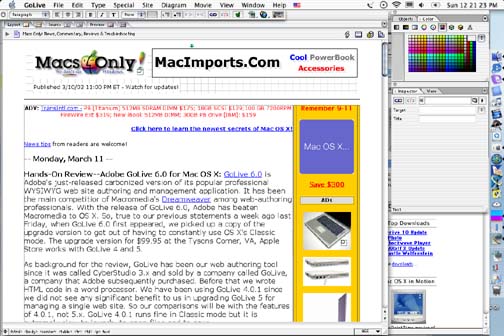
Fortunately for us, it is very similar to 4.0.1 but with a much nicer Aqua look with very detailed icons, 3-D shadowing and all. In 4.0.1 we normally worked with three floating windows open: color, objects and inspector. In 6.0. the object and color floaters are combined into a single window with a tab to choose between them. We like this and now work with just two floaters open. Another thing we like is that one does not need to confirm an entry in the floaters' fields with the extra step of clicking a check mark button.
Using v4.0.1 in OS X's Classic mode is slow. Version 6.0 is much faster in OS X. We measured the time to launch the application, open the current Macs Only! html file and to save it after making a change. Here are the results:
| Task | v4.0.1 | v6.0 |
|---|---|---|
|
Launch App
|
42
|
19
|
|
Open File
|
12
|
2
|
|
Save File
|
4
|
<1
|
|
Display Source
|
6
|
2
|
|
Display Layout
|
10
|
2
|
|
Display Preview
|
12
|
2
|
Aside from the speed improvements, v6.0 also does a better job of opening a file's window to the size it was when it was closed. This saves us a lot of time resizing windows. We also like the new ability to color the background of individual cells differently [Update--Ian Price wrote that this could be also done in 4. "You can also shift-click (on a Mac, anyway) multiple cells, after one is selected, and change the color for all of them." Thanks-ed.].
We noted only two problems in 6.0 in a week's use. First, the "Increase/Decrease list level" buttons on the tool bar only work with ordered lists. We used the same buttons in v4.0.1 to create instantly indented paragraphs like the text quoted from Adobe's press release above. In 6.0 we have to select "Type->Alignment->Increase Block Size" from the menu bar to accomplish the same task. We do not know if this is intended to be a feature or is a bug but it's an inconvenience to us. Second, when we first tried to create the table above, the Table Inspector was blank with the table selected, i.e. none of the table controls were visible. We had to quit and relaunch GoLive to get the Table Inspector to work again. This has happened only once so far.
Saw something? Send a tip or a correction
The archive ran on reader tips. What did you see, where, and do you want the credit? Something wrong on this page? Say so and it gets fixed.