Hands-On Review--Dragon Burn 3.0 for Mac OS X
NTI is not new to the Mac since it has produced Dragon Burn for Mac OS 9 (9.0.4 and higher) but they have been mainly a Wintel software company. They claim a reputation for simplicity in the Wintel world. Dragon Burn 3.0 for Mac OS X is their first application for the Mac's latest operating system. It is built in cocoa, Mac OS X's purely native application interface set that harnesses all the features of Mac OS X's Quartz graphics engine. Dragon Burn's interface complies with the brushed metal theme that Apple has adopted for all but system applications.
Dragon Burn comes with Discus, software for creating CD/DVD labels and jewel box covers.
Here are the key features that NTI advertises:
- Burns CDs and DVDs from layout file or saved image file.
- Supports multiple, simultaneous CD/DVD burning/erasing.
- Create Audio & MP3 CDs from WAV, AIFF, MP3 files and Audio CD Tracks.
- Encode MP3 Files from CDDA, AIFF, or WAVE files to create MP3 CDs.
- Supports CD-Text in Audio CD copy and mastering.
- Dynamic Drive Support(DDS) eliminates the worry about CD drive compatibility by automatically detecting your drive and allowing a basic level of support for your drive even if Dragon Burn does not directly support it.
- ISO 9660 MS-DOS and Joliet, HFS, HFS+ and UDF file system support for CD/DVD data mastering.
- Supports internal and external USB 2.0 and FireWire CD, DVD burners including BURN-Proof, buffer underrun protection.
- Supports track-at-once(TAO), session-at-once(SAO), disc-at-once(DAO) writing.
- Intuitive user interface.
- Trust Smart Decision™ to help you choose the best writing method and speed for each based on the specific layout, interface, burner and media.
The salient features that set Dragon Burn apart from other burning software is:
1. A new multi-burning engine and device manager that allows your Mac to burn or erase several CDs and DVDs at the same time if you have multiple devices.
2. A cocoa-native Mac OS X full Aqua interface with brushed metal theme.
3. Multi-session support for both CDs and DVDs in HFS, ISO and UDF format. Multi-session DVD burning is currently unique.
4. UDF 1.5 file system support in addition to HFS+/HFS, ISO 9660, Joliet and Hybrid file systems.
5. Dynamic Drive Support(tm) automatically detects your burner and allows basic features to work even if not fully suported.
6. Layout filtering.
Here is a table prepared by NTI that compares Dragon Burn 3.0 with Roxio Toast 5.2 and Apple's iTunes/Disc Burner.
Dragon Burn includes the application, a PDF of its User Guide, and the Discus NT 2.74 application and Discus NT Artwork art database. Dragon Burn was easy to install by dragging it's icon to the application folder. Same with Discus.
Launching Dragon Burn yields its start window (below). It allows one select any of Dragon Burn's seven activities: copying discs, making data discs, making audio CDs, making MP3 CDs, making live audio CDs, etc.
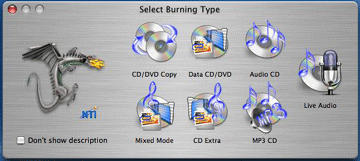
We tried out several of Dragon Burn's features. First, we compared making audio CDs with iTunes 4.01 on a Power Mac G4 Dual 1.42 with it's SuperDrive. Dragon Burn allows audio CDs to be made off another audio CD, from files stored on the hard drive and from iTunes playlists. It works with aif, wav and mp3 files as does iTunes.
Clicking the Audio CD icon opens a layout page. Importing a Beethoven CD's 10 tracks of 78:39 (min:sec) of music into the layout window took 4:48 off the CD. Then, they may be saved as wav, aif or mp3 files. Permanently saving them all to the hard drive as aif files took another 4:40 while wav files took another 4:44. That's about 9.5 minutes in total. Saving (encoding) only the first track as a 192-bit mp3 file took a very long 9:29. By comparison, iTunes took just 1:05 to rip, encode as mp3 and save the same track directly off the CD. It took 5:30 to rip, encode and save the whole 10 tracks as 192-bit mp3 files. iTunes took about the same time, 5:29, to rip and save as much larger wav files and 5:40 for aif files. iTunes is much faster on our Dual 1.42, probably since iTunes takes advantage of the dual processors.
Burning an audio CD from 9 of the 10 tracks in Dragon Burn's layout window with Dragon Burn took 9:36. Burning from files or iTunes' playlists also worked fine. However, burning the same 9 tracks as an audio CD from iTunes-imported aif files took 5:46. Again, iTunes was much faster.
Next, we tried Dragon Burn's Live Audio recording feature using the microphone in our iSight camera. It was straight forward, just select Live Audio in the start window and click on the record button. It worked fine but the fidelity was not as good as we would have liked. Conversation sounded rumbling and music had no range to it. We guess this is to keep the file size as small as possible. We also tried to use it on our 17" PowerBook G4 but no matter what we did we got an error stating that the available disk space was too small. We have 30+ GB unused.
The other features we tried, burning data discs on CDs and DVDs with single and multiple (appended) sessions, worked fine. We looked at Discus but did not try to make or print any labels. However, it seemed straight forward to do so and a very nice extra.
In summary, Dragon Burn 3 for Mac OS X is a nice piece of software. All of its features that we tried worked well. But ripping, encoding, saving and burning speed for audio files is not one of Dragon Burn's strengths, especially when compared with dual-processor aware software like iTunes. And sound quality suffers in its Live Audio feature. Still, Dragon Burn adds measurably to iTunes and Mac OS X's disc burning features with multiple session, multi-device capability plus the label-maker, Discus. At $49.95 for the full retail CD version which includes Discus, the cost is reasonable. NTI also has trial and downloadable versions.
Reader Comments:
From Mel Patrick (9/9/03),
Toast offers "Custom Hybrid" where, if you are a developer, you can have a separate HFS/MSDOS Joliet partition. This allows you to distribute software for both platforms on one CD. For our business this is a much needed and used feature.
Dragon Burn doesn't have this. It will create HFS/MSDOS CDROM's but it simply dumps the files all in the same directory. SO having duplicate folder names is a problem, and on the Mac, you see all the Windows only specific files, not a good thing.
Dragon Burn does not do a verify as Toast does (optionally). It's akin to PC based burning software where you "hope" it got there.
The first issue for custom hybrid formats can be worked around. I burn a Master hybrid in Toast, then make a disk image of the CD with Dragon Burn. From there I can open the same disk image multiple times with Dragon Burn burn to the 4 DVD/CDRW burners connected to my G4 Mac, all at the same time. It works flawlessly and truly feels like a "toaster" with all the different drive speeds...:-)
Toast disk images are different than Dragon Burn disk images. Not surprising but I wish they were compatible.
You can do multiple burns with Toast 6, but you need to "duplicate" the Toast application and then run the multiple copies of it. Dragon Burn is much easier, but again, you get no verification.
Saw something? Send a tip or a correction
The archive ran on reader tips. What did you see, where, and do you want the credit? Something wrong on this page? Say so and it gets fixed.