Hands-On Report--Apple's New Mighty Mouse
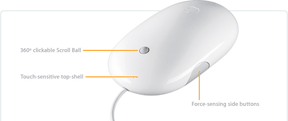 Since we were on travel at the time, we ordered a Mighty Mouse from Apple's online Apple Store with free FedEx Ground shipping. It arrived at Macs Only!'s Global HQ in San Diego, CA, in just two days from Apple's Elk Grove, CA, facility. It was waiting for us when we returned on the weekend.
Our Mighty Mouse was designed by Apple in California but made in Malaysia. It came with software on a DVD, a 7-page guide in English plus Japanese, French and Spanish pages and a one-year limited warranty. One simply installs the software, restarts and connects the Mighty Mouse. It connects via a USB 1.1 cable that works with either USB 1.1 or 2.0 ports.
The software allows one to program the left and right touch-sensitive mouse buttons, the scroll ball "button" and the side squeeze buttons. One accesses the software in the Keyboard & Mouse pane of System Preferences. Clicking on the "Mouse" tab displays the control settings. The scroll ball button's default setting calls up Dashboard. The right click button's default is basically off and the side squeeze buttons' default setting calls up Expose´-All Windows. Clicking the popup menu for each function allows one to customize it. We left all the settings on default except the right mouse click which we turned on by setting it to "Secondary Button."
The 360-degree scroll wheel is tiny. It nicely scrolls window contents horizonally and vertically and, if it is an image, scrolling is 360 degrees. It is easy to use but we found its performance to be uneven. Sometimes it become slightly more difficult to rotate so scrolling is not smooth. Turning the scroll ball makes a light scratching noise, like a pencil on coarse paper.
Pressing the scroll ball like a button instantly brings up Mac OS X 10.4.x's Dashboard. Now, we will definitely use Dashboard's Widgets more often.
Mighty Mouse clicks just like a regular Apple Pro Mouse, i.e. the top shell clicks down in the front from finger pressure. However, the left and right clicks are obtained by simply resting one's finger to the left or to the right of the scroll ball--this is really cool. The top front of Mighty Mouse is touch sensitive so it knows where one's finger is. We had no problem at all with this feature. Our Mightly Mouse makes an audible mechanical click when the top is pressed down.
Squeezing either or both side buttons calls up Expose´-All Windows which makes all open windows small enough to see all of them at the same time no matter how they are layered. We like this much better that calling up Expose´ via the function keys or by mousing over to a corner of the screen. It worked great. We do not find this action to be particularly unergonomic as some have written. The one exception is that our Mighty Mouse produces no sound when its side buttons are squeezed. According to Apple,
Mighty Mouse even sounds as good as it feels. The audio feedback built into Mighty Mouse provides an aural sensation that responds to your movements. When you scroll or click, Mighty Mouse produces subtle sound effects based on your actions.
It is not clear that the side buttons are supposed make a noise and they don't. But maybe our Mighty Mouse is defective because the scroll ball's "scratching" sound can be heard exactly the same whether it is plugged into a USB port or not. We'll check with our local retail Apple Store later this week.
We tried Mighty Mouse with several 3D games: Halo, Doom 3 and Call of Duty. We are not yet as adept with it as our Microsoft 5-button mouse, but Mighty Mouse worked fine except for the scroll ball. The scroll wheel on Microsoft's mouse is used to cycle through the weapons and it does so very precisely. The scroll ball on Mighty Mouse frequently brings up the wrong weapon, the same weapon or skipped multiple weapons.
For general use, the Mighty Mouse is a winner and we are using it as our routine mouse. Scrolling in windows is a snap and it makes Dashboard and Expose´ much more useable. We can not, however, recommend it for playing 3D games. Hopefully, Apple will begin including Mighty Mouse with it's desktop Power Macs, iMacs and eMacs. We would also like to see a Bluetooth wireless version to carry with our PowerBook. Apple's Mighty Mouse is $49. [Bill Fox]
Saw something? Send a tip or a correction
The archive ran on reader tips. What did you see, where, and do you want the credit? Something wrong on this page? Say so and it gets fixed.