Brief Hands-On Report Redux--Universal Workaround for Keynote 3.0 Text-Wrap Bug
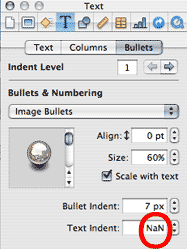
But first, what caused the problem? In Keynote 3.0 there is a field that allows the user to specify the number of pixels that bulleted text is indented. That field did not exist in either Keynote 1.x or 2.x. When importing some of our slides created in Keynote 1.x, Keynote 3.0 assigns the value "NaN" (for Not a Number?) to the Text Indent field (red circle in image at right) which creates the problem. Presentations saved in Keynote 2.0.2 have a blank Text Indent field when opened in Keynote 3.0 and the slide does not exhibit a text-wrap problem.
The workaround is to delete the "NaN" and to assign a number of pixels, like "10 px", in place of "NaN" in the Text Indent field.
Still, if one has a copy of Keynote 2.0.2, the easiest workaround is to open a Keynote 1.x presentation in Keynote 2.0.2 and save it before opening and saving it in Keynote 3.0 because one does not have to fiddle with each affected slide. However, one is risking a blank field causing problems at some time. [Bill Fox]
Saw something? Send a tip or a correction
The archive ran on reader tips. What did you see, where, and do you want the credit? Something wrong on this page? Say so and it gets fixed.