Hands-On Review--Imation Disc Stakka CD and DVD Manager
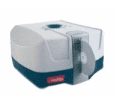 You have a zillion CD and DVD discs--songs, software and movies-- and the collection is growing at an exponential rate---what to do?
If you are like us, you have stacks CD jewel boxes on desks and tables, jewel box trees, CD wallets, CD cases and a large drawer full of jewel boxes. When you want to find a CD or DVD disc that you haven't used in awhile, perhaps because you bought a software upgrade and need the previous version to verify it or you have a new computer and want to reinstall some software from scratch, it takes awhile to look through the collection of discs. Imation has a solution, their Disc Stakka CD & DVD Manager. We received one as a holiday present with more than a subtle hint to "clean up" so we spent a little time over the holidays with the Disc Stakka to write this review.
The Imation Disc Stakka CD & DVD Manager is an automated carousel that stores up to 100 CD or DVD discs in a small 13x13x7" box. The Disc Stakka connects to your Mac via a USB cable for data and power, so there is no additional AC/DC power brick or wall wart to accomodate. It keeps track of one's discs via Imation's OpdiTracker content management software. Is space needed for more than 100 discs? Well, up to five Disc Stakka units can be stacked into a tower with no additional cabling or desk space than the original 13" by 13" footprint.
Setting up our Disc Stakka took only a few minutes. In the box was a CD, a USB cable and a short "Setup Guide." One simply loads the software from the CD and plugs in the USB cable. Version 2.3.2 of OpdiTracker came with our Disc Stakka so we checked for an update using the Update selection from the Tools menu. Version 2.3.23 is the latest so we downloaded and updated OpdiTracker--all very easy so far.
The job of loading CD and DVD discs into the Disc Stakka using the OpdiTracker archiving software is another matter. The downfall of many time-saving organizing systems is the amount of time it takes to actually load the needed information in a database. Unfortunately, the Disc Stakka's "dumb" software at least partly trips up an otherwise excellent product.
Archiving a CD or DVD disc should be no more difficult than simply inserting it in the slot in the Disk Stakka, having the software read its name and the names of files on the disc, storing that information in the database and offering an opportunity to change or supplement the information. Unfortunately, the OpdiTracker software requires that one type in the name of the disc and choose what type of disc it is from a popup menu. Why? The Mac OS X Finder displays the disc name and type when a disc is inserted so why doesn't the OpdiTracker software simply use Mac OS X to obtain the needed information?
Furthermore, the contents of a disc are supposed to be automatically transferred to the OpdiTracker database by using the "Get Contents" button on the dialog box when the disc is first logged in. Nope. Clicking the button simply ejects the disc and pops up a dialog box that asks one to insert the disc--huh?
What about the serial numbers on the disc jewel boxes, wallets and envelopes? We simply typed them into the Disk Stakka OpdiTracker database "Comments" section. We managed to get 50 of our most frequently-used discs loaded into the Disc Stakka in about 40 minutes--it should have taken only five with decent software.
Finally, the OpdiTracker database has the ability to include an image, manually of course, for each disc archived.
To retrieve a disc, one simply highlights its name on the OpdiTracker list and clicks the "Eject" button. With only 50 discs loaded, it is not difficult to find the name of the disc wanted. The OpdiTracker software has a search capability that might come in handy if one have hundreds of discs spread among several Disc Stakkas. One can enter a word in the disc title or content (which doesn't work as we noted previously) or comments and click the "Find" button.
Need the software serial number when the disc is ejected? One can look it up under the comments tab of the database.
OpdiTracker has a neat library-maintenance function. One can record who has removed the disc to keep track of it. In addition, one can set the preferences to require adding this information before one can remove a disc from the Disc Stakka. Unfortunately, once again the "dumb" software gets in the way when returning the disc to the Disc Stakka. If multiple discs have been removed, then OpdiTracker presents a list of all discs out when a disc is inserted and one has to manually select the correct one. Make a mistake without realizing it and the disc will be lost inside the Disc Stakka.
The Disc Stakka has one hardware problem that may be an issue for some. Our G4 Cube will not stay in deep sleep with the Disc Stakka attached. After a few moments of sleep, the Cube awakens. If we disconnect the Disc Stakka, the Cube sleeps fine. This is not an issue for us because our Cube is our network server and it stays awake all the time.
Despite the limitations of its software and its sleep problem, we like Imation's Disc Stakka and have filled the first with our discs. We ordered another to test out its operation when stacked but it arrived DOA so we'll update this review later. We hope that the OpdiTracker software will be updated soon to make better use of Mac OS X and minimize the amount of manual labor involved in archiving discs and returning them to the Disc Stakka.
Imation's Disc Stakka CD & DVD Manager with a free 50-pack of 8x DVD+R (or DVD-R) is available from Buy.com for $128 [currently out of stock]. [Bill Fox]
Saw something? Send a tip or a correction
The archive ran on reader tips. What did you see, where, and do you want the credit? Something wrong on this page? Say so and it gets fixed.