Hands-On Review--Apple's New Aluminum Wireless Keyboard
Apple announced their new aluminum Bluetooth Wireless Keyboard the same day as the new aluminum iMacs, August 7th. We immediately ordered one with a 24" aluminum iMac but when that stretched the shipping date by 3-5 weeks, we deleted the keyboard from our iMac order and ordered it separately. The keyboard finally shipped September 25, some six weeks after our iMac, and arrived September 28 after being shipped by FedEx directly from China.
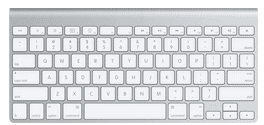
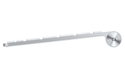 Apple's new Bluetooth Wireless Keyboard is small, thin and light. It is made from anodized aluminum with "chiclet-style" white plastic keys, like those that were introduced with the latest MacBook. The tops of the keys are slightly sculpted out rather then being flat. At the top, or distal end, of the keyboard is the battery cylinder which holds three AA-size batteries. The on-off switch in on the right end. The battery cylinder is about 11/16" in diameter and gives a slight slant to the keyboard when it is placed on a flat surface. The keyboard itself is about 1/4" thick, counting the height of the keys, and about 11" wide by 5.25" deep.
The aluminum Bluetooth Wireless Keyboard is laid out like a MacBook or MacBook Pro keyboard. It lacks the numeric keypad, the document navigation keys and F14-F16 keys of a full-size keyboard. But it has the special Mac feature keys integrated with the function keys: brightness, volume, eject, play/pause, Exposé and Dashboard. To use the features, one has to download and install Apple's Keyboard Software Update 1.2 and be running Mac OS X 10.4.10 or later.
Finally, the new aluminum Wireless Keyboard has a power management system that automatically shuts off when it's not in use and instantly turns on again when a key is struck. This is good because the four AA alkaline batteries in the original white plastic Wireless Keyboard lasted us only 4-6 weeks.
Use
To give you some idea of how different the new aluminum one is from the previous white plastic Bluetooth Wireless Keyboard, here are before and after shots of our set up:
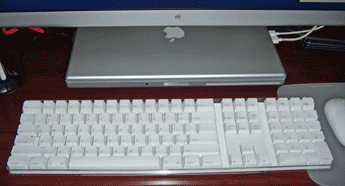
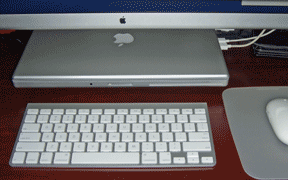
Typing on the new keyboard takes a little getting used to but, after getting used to it, we like it much better for several reasons:
- the short throw of the keys improves our typing speed,
- we almost never get double or triple letters from a single keystroke,
- we almost never get an inadvertent "caps lock" on because of a built-in delay, and
- consistency with the MacBook Pro's keyboard.
We use a MacBook Pro while traveling, so the latter positive is really welcome. There is almost no adjustment to make when going back and forth between them.
Since the new aluminum Wireless Keyboard is so small and light, some will take it along while traveling. We did that last week. It fits very nicely in our bag and its weight is negligible given what we already lug around. However, with our 15" MacBook Pro open on our travel stand, the simple Aviator (reviewed here), we found the Wireless Keyboard to be redundant. Others may prefer typing on it instead of a notebook's keyboard.
As for battery life, the aluminum Wireless Keyboard comes with three alkaline AA batteries. All of the battery life indicator bars in System Preferences are still green after two weeks' use.
We highly recommend Apple's new aluminum Bluetooth Wireless Keyboard with an SRP of $79. (The first two images courtesy of Apple, Inc.) [Bill Fox]
Saw something? Send a tip or a correction
The archive ran on reader tips. What did you see, where, and do you want the credit? Something wrong on this page? Say so and it gets fixed.