Hands-On Review--iToner 1.0.0, Put Custom Ringtones on an iPhone
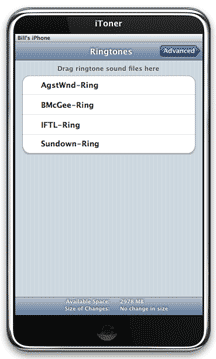
We have been waiting for a simple application that will easily place custom ringtones on an iPhone or for Apple to enable it in iTunes. Ambrosia Software won the race and released iToner 1.0.0 last Friday for $15.
We purchased downloaded iToner from Ambrosia's Web site and installed it on our MacBook Pro. No problems were encountered in the process.
iToner's interface looks like an iPhone. All you have to do is have your iPhone in its cradle attached to a USB port, then drag and drop a ringtone or ringtones onto iToner's interface and click on the sync button. That's it! iToner automatically adds the ringtones to the iPhone and they can be found in the same ringtone list as those that came with the iPhone.
iToner uses MP3 or AAC audio file formats so your ringtones have to be in either format.
We have a large number of MP3 ringtones that we either purchased or made with Apple's Garageband from songs ripped from our CD collection. Using iToner, we placed a dozen on our iPhone in a matter of seconds. All of them work great. Ambrosia claims that ringtones placed on the iPhone with iToner will survive iPhone software updates--time will tell.
At $15, iToner is on the expensive side for its simple functionality. But iToner works great and we are happy to finally have some of our custom ringtones available on our iPhone. [Bill Fox]
Saw something? Send a tip or a correction
The archive ran on reader tips. What did you see, where, and do you want the credit? Something wrong on this page? Say so and it gets fixed.