Hands-On Report--Apple's New MacBook Air
 As frequent readers know, I am going back to a 2-Mac office from just using a MacBook Pro Core 2 Duo for both desktop work and travel. Last week (Tuesday), I posted a note on my impressions of the first part of the 2-Mac office, a desktop dual quad-core 2.8GHz Mac Pro, and on Monday I posted some speed tests on it. I am quite happy with the Mac Pro except that it reboots after sleeping overnight rather than waking from sleep, a 10.5.2 affliction that should be fixed in the next update of Leopard.
My MacBook Air, the second part of my 2-Mac office, arrived straight from China last Wednesday, a day earlier than Apple had projected. I bought a MacBook Air to save weight, both during travel and during meetings around town. At 3lbs, it is 2.4lbs lighter than my MacBook Pro but its minimalist design will "force" me to leave out many peripherals that I rarely (never?) use and allow for use of a smaller and lighter case. I may realize a significant 10lbs of difference. See my previous note on 2/1 for more details.
 I ordered the stock $1799 1.6GHz MacBook Air with the 80GB 1.8" PATA hard disk drive. I had waited for some speed tests of the two drive options to convince me that I had to spend an additional $999 for the 64GB solid state drive. Fortunately, Macworld's review of the 80GB model and BareFeats' tests of both drives led me to conclude that I didn't need to spend the additional $999 even though as a super techno-geek I really wanted the solid state drive--maybe next time when it is larger and more reasonably priced. My decision to get the 1.6GHz model with 80GB hard drive was confirmed by a follow-on set of Macworld speed tests.
I also ordered two peripherals, mostly because of stories on the Web about very slow loading of software on the MacBook Air from a wireless connection to another Mac's optical drive, a key feature of the MacBook Air. I got the $29 USB/ethernet adapter and the $99 external SuperDrive. The former is also essential for when I hit a hotel room that provides internet only by cable and there are still plenty of them. Actually, I prefer the wired connection for security reasons. The SuperDrive is mostly for insurance.
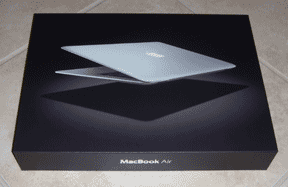
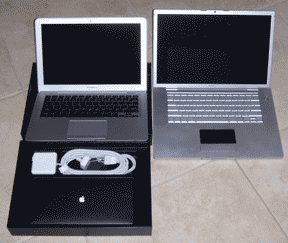
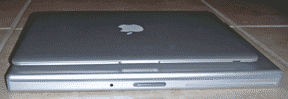
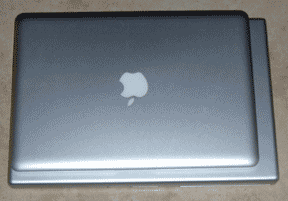 The MacBook Air came in a relatively small box with only the power, DVI and VGA adapters. It is smaller, thinner (of course) and actually seems much lighter than 56% of the weight of my MacBook Pro. It also has a wedge shape that, along with the lesser weight, makes it easier to carry in one hand without fear of it slipping. Given the width of the bezel around the screen as compared with the MacBook Pro, it seems to me that Apple could have made the MacBook Air even smaller, about 1/2" less in depth (i.e. front to back) and 1/2" less in width, but then it may not have been so thin at the edges.
The MacBook Air's LED-backlit glossy screen is as bright, crisp and colorful as the MacBook Pro's. The 13" screen next to the MacBook Pro's 15" is a change in size that I think I can get used to, just as I did when I moved from a 17" PowerBook G4 to the 15" MacBook Pro. I would say, however, that 13" is about as small as my eyes can tolerate for working on documents. Its aspect ratio and higher resolution (1280x800) makes it look much larger that my spouse's 12" PowerBook G4 with a size, aspect ratio and resolution (1024x768) that I find a little difficult to work easily on.
Another good design feature of the MacBook Air is that the power button has the same flat anodized aluminum finish as the rest of the case. PowerBook G4s and MacBook Pros have all had shiny polished power buttons that look out of place to me.
 After marveling at its size, beauty and functional design, I started it up and went through the setup routine. During setup I did not move any data or applications from my other Mac because it would have filled the 80GB drive and then some. I plan to install just a few critical applications. Despite the 1.8" hard drive and 1.6GHz Intel Core 2 Duo processor, the MacBook Air does not feel slow. In fact, it is fairly responsive, much more so that the 1.66GHz Mac mini Core Duo that was my workhorse computer at my former day job.
The MacBook Air came with Mac OS X 10.5.1 so the first order of business after doing the standard setup was to download and install the 10.5.2 update and a few others. I also downloaded and installed Firefox, Camino, MUMenu, WeatherPop Advanced and TypeIt4Me. We have an AirPort Extreme "n" 5GHz wireless network along with cabled ethernet ports in every room. I used the wireless network to download and install the update and those applications.
Then I installed iWork '08 by using the wireless network and the optical drive in my Mac Pro. It didn't seem to take much more time than with a directly-connected optical drive, so I also installed Microsoft Office:mac 2008 and Adobe Photoshop Elements 6.0 by the same method. Again, both sets of applications installed reasonably quickly, i.e. in minutes and not hours as I had feared from all of the negative stories. Perhaps, all the stories about very slow application installations are coming from people who do not have a 5GHz "n" WiFi network. However, I did install Adobe Creative Suite 3 Web Premium via the MacBook Air's external SuperDrive but mostly because I wanted to make sure it worked and it does.
Next, I turned off the AirPort radio and hooked up my MacBook Air via the USB/ethernet adapter. It worked fine so I am all set for wired networks.
Some other good news is that my extra MacBook Pro 85W power adapter works on the MacBook Air and charges the battery faster than the stock 45W power adapter. I just have to elevate the MacBook Air on a Road Tools swivel stand to allow the MagSafe connector to stay plugged in. The same is true for the airline seat MagSafe power adapter that I used with the MacBook Pro or I can just let it dangle off the edge of the seat's tray table.
Finally, I checked to see if my external 320GB Western Digital Scorpio hard drive would boot the MacBook Air via the USB 2.0 port. The good news is that it does, so I have an alternative way to boot the MacBook Air in an emergency. The bad news is that to run on USB 2.0 the drive needs a power brick, one that adds quite bit of weight.
I have been using the MacBook Air for a week now and find it a joy to use and a joy to cart around. The chiclet-style keyboard works fine but the keys seem a little "looser" than the new aluminum Apple wired and wireless keyboards with the same style of keys. Backlighting with the MacBook Air's black keys is much clearer to my eyes than backlighting and the silver keys of the PowerBook G4s and MacBook Pros. I'm just starting to get the hang of the additional gestures provided by the multi-touch trackpad so the jury is still out on it.
So far battery life seems excellent. When set at full conservation (screen dimmed to four dots) but with the AirPort on, battery life is indicated at over 6 hours. Under the same circumstances, the MacBook Pro indicates over 4 hours. I've carried it around all day, using it a bit for email and writing notes and it shows the battery at about 50%. However, the acid test will have to wait for my next long airline trip. I'm sure it will make it coast to coast in the U.S. but probably not across the Pacific.
Unfortunately, Radtech does not yet have a Sleevz that fits the MacBook Air to prevent it from getting mars and scratches, particularly while going through airport security lines. But I have a Brain Cell case made specially for the MacBook Air (size 6X) on order from Tom Bihn that should arrive early this week. I'll use it with a light Tom Bihn Zephyr bag. I highly recommend the Brain Cell and Tom Bihn's line of bags.
The MacBook Air seems to be a hot seller and after a week's use I certainly see why (see also this Forbes article). The MacBook Air naysayers appear to be going the way of the iPod and iPhone naysayers but it's really too soon to call. [Bill Fox]
Saw something? Send a tip or a correction
The archive ran on reader tips. What did you see, where, and do you want the credit? Something wrong on this page? Say so and it gets fixed.