Hands-On Report--Apple's Time Capsule
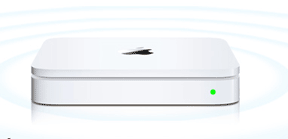 Along with my new MacBook Air (reviewed on 3/4), I ordered a 500GB Apple Time Capsule to backup the MacBook Air via draft "n" Wi-Fi (image courtesy of Apple, Inc.). The 500GB model costs $299 and I'll probably eventually regret it but I passed on the 1TB model to save $200. After all, the MacBook Air has only an 80GB drive and my spouse's 24" white iMac basically only has email to backup from a 250GB hard drive, i.e. once I get around to converting it from Mac OS X 10.4.11 to 10.5.2.
The Time Capsule looks like an AirPort Extreme "n" Base Station but it is 1.2" bigger in width and depth and nearly 2lbs heavier due to the enclosed hard disk drive. The Apple logo on the Time Capsule is a polished silver while it is a white indentation on the AirPort Extreme Base station. Both have the same complement of ports: 1 USB 2.0, 1 Ethernet WAN "in" and 3 Gigabit Ethernet "out" ports. The best difference, aside from the hard drive, is that the Time Capsule does not have a separate power brick, i.e. the AC/DC power adapter is built in.
The Time Capsule replaced the original AirPort Extreme "n" Base Station in my office. I moved the AirPort Extreme "n" Base Station to the other end of the building to improve signal strength in the entire building on both floors and adjacent outside areas.
Setting up the extended "n" Wi-Fi network with the Time Capsule and AirPort Extreme "n" Base Station was a snap. But first I had to install the new AirPort Utility 5.3 on all of my Macs that I may want to access the Time Capsule's settings. AirPort Utility 5.3 comes on a CD with the Time Capsule. Both "n" Base Stations were assigned the same network name and password, "Allow this network to be extended" was checked, the radio mode was set to 5GHz 802.11n only, Channel was set to Automatic, WPA2 Personal security was selected, "Use wide channels" and "Create a closed network" were enabled and Access Control requiring the MAC address of any device connected was set up with Timed Access. I also have a similarly set up "g" Wi-Fi network for two older PowerBook G4s that we have and for visitors who rarely have a draft "n" Wi-Fi card.
As I noted in my review of the AirPort Extreme "n" Base Station (Part I and Part II), the draft "n" protocol broadcasts much further than previous "b" or "g" protocols. With both the AirPort Extreme "n" Base Station and Time Capsule set up, I get full four-arc reception (menu bar icon) throughout the building on both floors and adjacent outside areas. I can now wander about with the MacBook Air and never lose peak reception.
Setting up the Time Capsule to backup the MacBook Air wirelessly via Time Machine was also a snap. While connected to the Time Capsule via AirPort, I opened the Time Capsule preference pane in System Preferences, selected Time Capsule as the backup disk and turned on Time Machine.
The first backup was much faster than I had expected based on reading articles on Time Capsule experiences. It took almost exactly 3 hours to backup about 27GB of data on the MacBook Air. That's 2.5MB per second, roughly equivalent to the speed of duplicating a 500MB folder of files over USB 2.0 to an external hard disk drive but only 23% the speed of FireWire 400 and 17% of eSATA (see this test). So, in my experience, a Time Capsule backup over Wi-Fi "n" is not as slow, relatively speaking, as many other articles have portrayed.
An HP 3030 all-in-one laser printer is attached and shared on the network via the Time Capsule's USB 2.0 port. It works just as well as is did when attached similarly to the AirPort Extreme "n" Base Station's USB 2.0 port.
I also have no problem connecting to Time Capsule's hard disk drive over "n" Wi-Fi from my spouse's 24" white iMac running Mac OS X 10.4.11. Of course, I'll need to install Leopard to use Time Machine and the Time Capsule with the iMac.
In summary, the Apple Time Capsule was easy to set up. It works very well as a Wi-Fi base station, network backup device and USB printer server. [Bill Fox]
Saw something? Send a tip or a correction
The archive ran on reader tips. What did you see, where, and do you want the credit? Something wrong on this page? Say so and it gets fixed.