Cocktail 20.2.4 is Out--The Golden Gate Edition for macOS 27 Fixes a Crash While Rebuilding XPC Caches and a Blank Screen While Clearing System Caches, Is Checked Against macOS 27.2.1, Costs $19 for One Mac in a Sale Maintain Calls Up to 40 Percent Off, and Is Not Yet Native to Apple Silicon, With a Native Build Promised Before General-Purpose Rosetta Ends With macOS 28
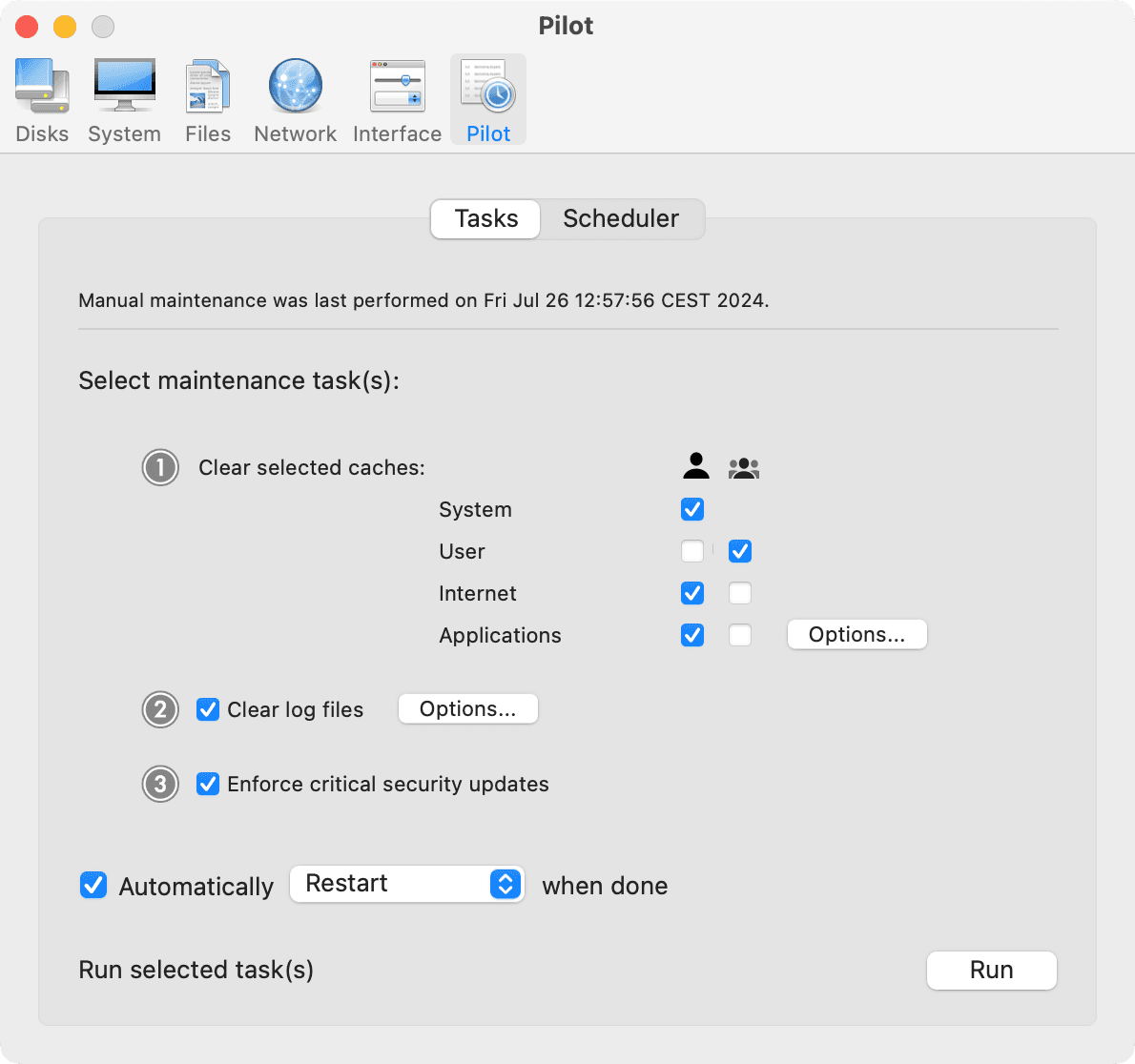
Cocktail 20.2.4, the Golden Gate Edition of Maintain's clean, repair and optimize utility for macOS 27, is out, at $19 for a single-user license on Maintain's Cocktail page, struck from $29. Maintain's own pages give the version and no notes: the disk image on Maintain's server is dated November 12, and MacUpdate's listing of the update, dated November 13, says it fixes a crash while rebuilding XPC caches and a blank screen with an active cursor while clearing system caches, and was "checked for compatibility with macOS 27.2.1," the update Apple's developer releases page dates November 9.
What 20.2.4 fixes
The notes, as MacUpdate carries them, run six lines. Cocktail "may unexpectedly quit while rebuilding XPC caches," which is addressed; clearing system caches could leave "a blank screen with an active cursor"; clearing user caches could, rarely, change some accessibility settings; and the feature that strips localization files now copes with applications "that use incorrectly sealed symbolic links to simulate multiple language packages." The sixth line is "several user-reported issues" the notes do not name. The Cocktail page describes the app's features as "arranged into five categories," Disks, System, Files, Network and Interface, plus a Pilot mode that runs the maintenance tasks with one button.
One edition per macOS, and a license that covers them all
Maintain ships Cocktail as one edition per macOS release, and the Cocktail page offers three: the Golden Gate Edition at 20.2.4 for macOS 27, the Tahoe Edition at 19.10.1 for macOS 26 and the Sequoia Edition at 18.9 for macOS 15. Maintain's page of previous editions runs the line back through Sonoma, Ventura, Monterey, Big Sur, Catalina, Mojave, High Sierra and Sierra, versions 17 down to 10. A license, the Cocktail page says, "will be valid for all current editions of Cocktail," and a license for any previous edition comes without charge on request. Unregistered, Cocktail "runs in demo mode and will expire after the fifth launch."
What it costs
The Cocktail page's store section, headed "Now up to 40% off," lists a Single User License at $19, struck from $29; a Family License for up to five computers in one household at $39, from $59; a Ten-Pack License at $99, from $139; and a Business License for up to one hundred computers at $299, from $399. By our arithmetic none of the four reaches 40 percent: the single-user cut is 34 percent, the family cut 34, the ten-pack 29 and the business license 25.
Maintain promises a native Apple silicon build before macOS 28
The Cocktail page's FAQ answers "Will Cocktail be compatible with macOS 28?" with this: "We're working on native Apple silicon support for Cocktail and expect it to be ready before general-purpose Rosetta support ends with macOS 28. You can ignore any compatibility messages that may appear in macOS." As we read it, the Golden Gate Edition is still an Intel build running through Rosetta, on Macs that are all Apple silicon, since Maintain's September 16 post on preparing for Golden Gate says macOS 27 "will run on any Apple Silicon Mac but will NOT run on any Intel Mac." Apple's Rosetta documentation says Rosetta "will be available through macOS 27" as "a general-purpose tool for Intel apps to help developers complete the migration of their apps," and that beyond that Apple "will keep a subset of Rosetta functionality aimed at supporting older unmaintained gaming titles, that rely on Intel-based frameworks."
What to do now
The download on the Cocktail page is a disk image of about 2.2 MB by the size on Maintain's server, and the FAQ's install is to double-click it and drag the application to the Applications folder; Uninstall Cocktail in the application menu removes the app and restores the default macOS settings. Maintain's home page announces the edition without a date. We have not installed 20.2.4 yet.
Then and now
Our November 16, 2007 report had Bill Fox and Dana Baggett installing Cocktail 4.0 Leopard Edition, "free to registered users," on a MacBook Pro Core 2 Duo; the edition name has moved from Leopard to Golden Gate and the version from 4.0 to 20.2.4. Our February 17, 2003 note listed Cocktail 1.0b4 as donationware that could "update prebinding information" and "manually run Cron scripts"; our November 29, 2006 special had 3.7.4 at $7.95 against a list price of $14.95; and our March 16, 2007 item called it "one of the best general purpose utilities for Mac OS X." A $19 utility that has outlived prebinding, cron scripts and the Intel Mac itself, and is still fixing its own cache cleaner, is one we would keep a license for, native build or not.
Sources
- Maintain, “Cocktail - A perfect mixture for macOS” accessed Nov 16, 2026
The download list: "Golden Gate Edition (macOS 27) v. 20.2.4", "Tahoe Edition (macOS 26) v. 19.10.1", "Sequoia Edition (macOS 15) v. 18.9". "Cocktail's features are arranged into five categories" (the page's sections Disks, System, Files, Network, Interface and Pilot; under Pilot, "Perform essential system maintenance; clean, repair and optimize your system with one click of the button"). "When unregistered, Cocktail runs in demo mode and will expire after the fifth launch." "Your license will be valid for all current editions of Cocktail, and you will also be able to request a license (without any additional charge) for any previous edition by contacting us." Store: "Buy Cocktail - Now up to 40% off!"; Single User License $29 struck, $19, "Covers one computer."; Family License $59 struck, $39, "Covers up to five computers (household use only)."; Ten-Pack License $139 struck, $99; Business License $399 struck, $299, "Covers up to one hundred computers". FAQ: "Will Cocktail be compatible with macOS 28? We're working on native Apple silicon support for Cocktail and expect it to be ready before general-purpose Rosetta support ends with macOS 28. You can ignore any compatibility messages that may appear in macOS."; the install ("double click the disk image (.dmg) file", "drag to your Applications folder"); "You can remove Cocktail by launching it, then selecting the Uninstall Cocktail option from the Cocktail application menu." The page's screenshots at /site/assets/files/1014/, of which 01.png is the picture. Accessed November 16, 2026.
- Maintain, “Maintain - Tailored applications for Mac users” accessed Nov 16, 2026
Under News, undated: "Cocktail (Golden Gate Edition) released. We are pleased to announce that a new edition of Cocktail, with support for macOS 27 Golden Gate, has been released!" Accessed November 16, 2026.
- Maintain, “Cocktail20GG.dmg, the Golden Gate Edition disk image” accessed Nov 16, 2026
The Golden Gate Edition download linked from the Cocktail page. Its HTTP headers on November 16, 2026: Last-Modified Thu, 12 Nov 2026 16:44:35 GMT; Content-Length 2258930 bytes; Content-Type application/x-apple-diskimage. The body's "dated November 12" and "about 2.2 MB" come from these headers. Accessed November 16, 2026.
- MacUpdate, “Download Cocktail for Mac | MacUpdate” accessed Nov 16, 2026
Version 20.2.4, the listing's update date 2026-11-13T08:54:04+00:00 (shown as Nov 13, 2026); operating system "macOS 27 or later"; price 19.00 USD. What's new in version 20.2.4: "Addresses an issue in which Cocktail may unexpectedly quit while rebuilding XPC caches"; "Fixed compatibility of the feature to remove localization files with applications that use incorrectly sealed symbolic links to simulate multiple language packages"; "Fixed a rare issue in which some accessibility settings may change after clearing user caches"; "Resolves an issue where users might experience a blank screen with an active cursor while clearing system caches"; "Resolves several user-reported issues"; "Checked for compatibility with macOS 27.2.1". Accessed November 16, 2026.
- Maintain, “Download previous editions of Cocktail | Cocktail Blog” accessed Nov 16, 2026
"here are the download links to releases that are compatible with all macOS versions from 10.12 to 14": Cocktail (Sonoma Edition) for macOS 14, Cocktail17SE.dmg; Ventura Edition for macOS 13, Cocktail16VE.dmg; Monterey Edition for macOS 12, Cocktail15ME.dmg; Big Sur Edition for macOS 11, Cocktail14BSE.dmg; Catalina Edition for macOS 10.15, Cocktail13CE.dmg; Mojave Edition for macOS 10.14, Cocktail12ME.dmg; High Sierra Edition for macOS 10.13, Cocktail11HSE.dmg; Sierra Edition for macOS 10.12, Cocktail10SE.dmg. Accessed November 16, 2026.
- Maintain, “Prepare for macOS 27 Golden Gate | Cocktail Blog” accessed Nov 16, 2026
Dated September 16, 2026 in the blog's RSS feed. "macOS 27 Golden Gate has a pretty broad range of hardware support, but it does drop support for some Macs. The big dividing line is chip architecture. It will run on any Apple Silicon Mac but will NOT run on any Intel Mac." "Cocktail (Golden Gate Edition) is available for download from our site." Accessed November 16, 2026.
- Apple Developer Documentation, “About the Rosetta translation environment | Apple Developer Documentation” accessed Nov 16, 2026
"Rosetta was designed to make the transition to Apple silicon easier, and will be available through macOS 27 — as a general-purpose tool for Intel apps to help developers complete the migration of their apps. Beyond this timeframe, we will keep a subset of Rosetta functionality aimed at supporting older unmaintained gaming titles, that rely on Intel-based frameworks." Accessed November 16, 2026.
- Apple Developer News, “Releases - Apple Developer” accessed Nov 16, 2026
"macOS 27.2.1 (26B131)", dated November 9, 2026; the newest entries above it are HomeView Software 27.2 (24V526) of November 12 and tvOS 27.2.1 (24K157) of November 13, 2026. Accessed November 16, 2026.
Saw something? Send a tip or a correction
The archive ran on reader tips. What did you see, where, and do you want the credit? Something wrong on this page? Say so and it gets fixed.