WARNING--ICMacOS, the $699-a-Week Mac Stealer, Now Stays On as a Remote-Access Trojan. It Gets In When a Web Page Talks You Into Pasting a Command Into Terminal and Typing Your Password Into a Fake System Dialog
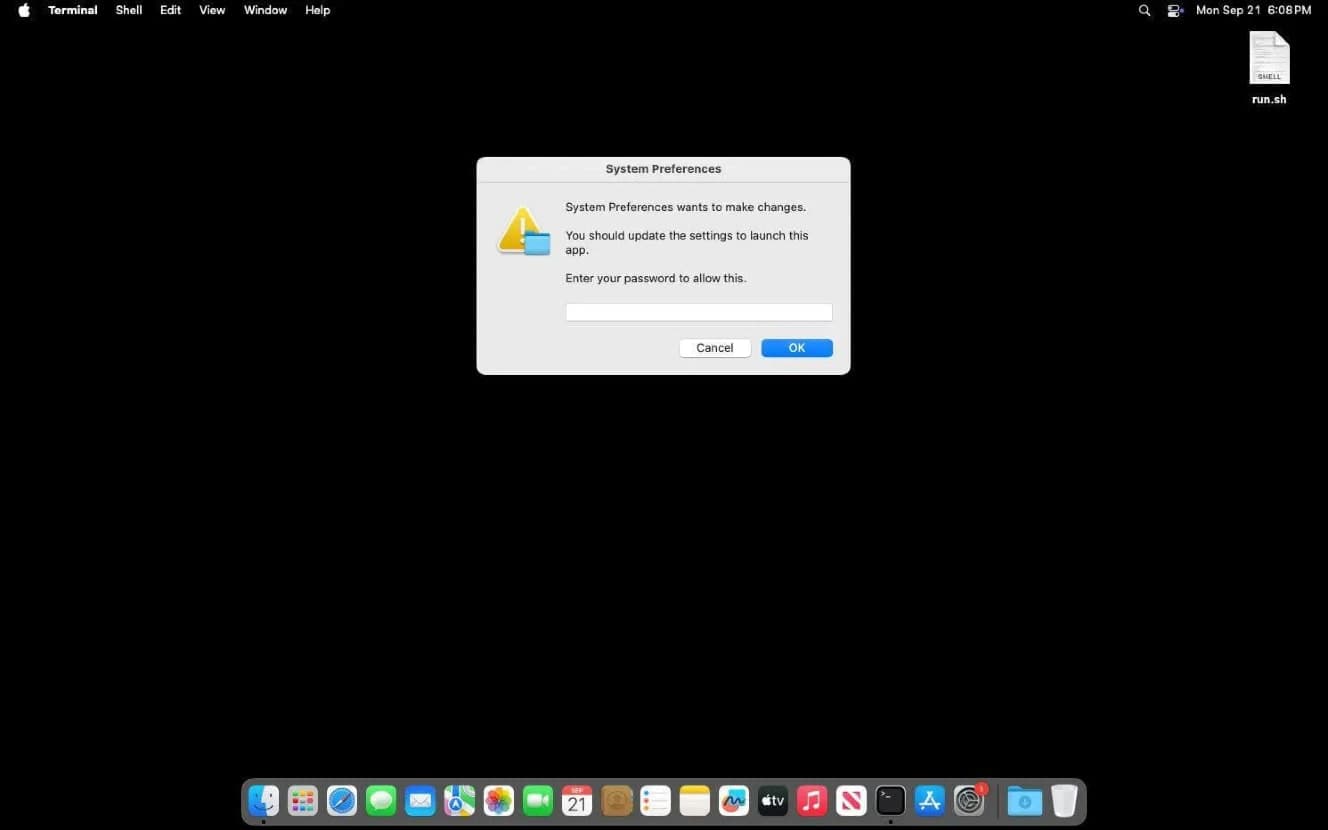
A Mac stealer rented by the week has learned to stay. Moonlock's report, published October 23 by Ray Fernandez, says ICMacOS, the renamed Icarus macOS stealer, "now has full RAT functionality, leveraging WebSockets for Command-and-Control (C2) and LaunchAgents for persistence," and is sold on Russian-language forums at prices starting at $699 a week. It gets onto a Mac when a web page tells you to paste a command into Terminal, a dialog dressed as the system asks for your password, and you type it.
What ICMacOS takes
Moonlock credits the analysis to SOCRadar, whose own page refuses to load for us; SOC Prime's October 12 summary of it says the SOCRadar Threat Research Unit documented two versions, the first built to steal and the second to steal and stay. The haul, per Moonlock, is browser credentials, password manager databases, cryptocurrency wallets, developer secrets such as SSH keys and cloud credentials, messaging data and local files, on Intel and Apple silicon Macs alike. Kevin Coles, quoted in the report, puts it in one line: "Version 1 grabbed what it could and left. But Version 2 sticks around."
The seller is GlowComa, a Russian-speaking actor Moonlock says has been active since January 2026, selling on the XSS, Exploit.in and Rehub forums with a ClickFix panel in the same shop. At $699 a week, with combo offers such as $899 for existing panel users, the report calls it "the most affordable macOS stealer sold on the dark web."
How it gets in, and what Apple built against it
Moonlock says the stealer, "like almost all others," arrives through ClickFix pages reached by a link, a fake ad or a poisoned search result. The page asks you to copy a script into Terminal, or in a newer variation loads Script Editor and asks you to hit play. Once the command runs, a dialog asks for your password; the picture above is Moonlock's screenshot of one. The password is used later, the report says, after a second stager fetches more malware; then come backdoors whose persistence usually hides as LaunchAgents, and the stealer last.
Apple has three answers. Apple's Terminal and script protections page, published August 3, says that on a Mac with macOS 26.4 or later Terminal warns when text is pasted from a browser, Messages, Mail, Preview or a messaging app, but only if Terminal has not been opened in more than 30 days and no developer tooling such as Xcode is detected; that XProtect checks a pasted command's network destinations against Apple's Safe Browsing Service in any terminal app; and that it scans AppleScript. Help Net Security's report of March 31 quotes the dialog: "Possible malware, paste blocked. Your Mac has not been harmed." The gap is the other door. Jamf Threat Labs' April 8 report by Thijs Xhaflaire found a page whose Execute button used the applescript:// URL scheme to open Script Editor with a script already loaded and fetch Atomic Stealer, and 9to5Mac's Security Bite by Arin Waichulis, April 18, said of it: "Because the command never touches Terminal, the new paste warning in macOS Tahoe 26.4 never gets a chance to fire."
What to do now
- Never paste a command from a web page or a chat into Terminal, and never press Run in a Script Editor window you did not open yourself. Moonlock's rule: "Do not run commands on your Terminal unless you know they are 100% safe."
- A password dialog that appears right after you ran something from a web page is the attack, not the system. Press Cancel and quit Terminal.
- If you typed the password, SOC Prime's advice for companies fits one Mac: disconnect it from the network, then rotate SSH keys, cloud tokens and every password a browser stored.
- Open System Settings, General, then Login Items & Extensions, as Apple's Login Items page describes, and look under App Background Activity for anything you do not recognize.
- Keep macOS current. Apple's page on malware protection says macOS checks for XProtect updates daily and "When XProtect detects known malware, it blocks it and moves it to the Trash."
We have not met ICMacOS on our own Macs, and we have treated any pasted command as the thing to check since our September warning on CrashStealer and SHub.
Then and now
On November 1, 2007, we warned of OSX.RSPlugin.A, Intego's name for a trojan that came as a video codec from a porn site and rewrote the Mac's DNS settings; our advice was to download no codec. Nineteen years on, the codec is a pasted command, the DNS change is remote control, and the price list is on a forum. The rule has not changed: nothing you did not go looking for gets your password. [Macs Only!]
Sources
- Moonlock, “ICMacOS evolves from a Mac stealer into a remote-access trojan” accessed Nov 1, 2026
Ray Fernandez, published October 23, 2026, on moonlock.com (copyright MacPaw Way Ltd.): ICMacOS is the new name of the evolved Icarus macOS stealer; "it now has full RAT functionality, leveraging WebSockets for Command-and-Control (C2) and LaunchAgents for persistence"; "Recently, SOC Radar released a report on its investigation into the new ICMacOS"; sold "with prices starting at $699 per week" by GlowComa, "a financially motivated, Russian-speaking actor" active since January 2026, on XSS, Exploit.in and Rehub, alongside the Icarus ClickFix panel; "$899 for existing users of the Icarus ClickFix panel"; "the most affordable macOS stealer sold on the dark web"; Intel and Apple silicon (x86_64 and ARM64); browser credentials, password manager databases, cryptocurrency wallets, developer secrets, messaging application data and local files; Umut Bayram of Picus Security, "ICMacOS deliberately hunts for developer secrets such as SSH keys, cloud credentials and Kubernetes configurations"; Kevin M. Coles of Coles Technical Group, "Version 1 grabbed what it could and left. But Version 2 sticks around"; "This stealer, like almost all others, is breaching devices using ClickFix techniques that are hosted on fake websites" reached via links, malvertising or SEO poisoning; copy and paste into Terminal or "automatically load your Script Editor and ask you to hit play"; the password prompt, "The password is used later, after a second stager is fetched to install more malware on your Mac", third-stage backdoors and RATs "usually hiding as LaunchAgents", the stealer last; "Do not run commands on your Terminal unless you know they are 100% safe"; the screenshot of the fake system password dialog, captioned "ICMacOS prompts you for your password with a fake system password request. Image: Screenshot, Moonlock"; accessed November 1, 2026.
- SOC Prime, “Inside ICMacOS: From an Infostealer to a Persistent RAT” accessed Nov 1, 2026
SOC Prime Team, 12 Oct 2026, crediting SOCRadar Cyber Intelligence Inc.: ICMacOS, also known as Icarus macOS, is a macOS malware-as-a-service that evolved from a credential stealer into a persistent RAT; "The SOCRadar Threat Research Unit (STRU) identified ICMacOS through telemetry analysis and underground forum monitoring"; the progression from Version 1, focused on stealing data, to Version 2 with RAT functionality; ClickFix delivery and WebSockets C2; the response advice to isolate the host from the network and rotate SSH keys, cloud provider tokens and browser-stored passwords; accessed November 1, 2026.
- Apple Support, “Terminal and script protections - Apple Support” accessed Nov 1, 2026
Apple Platform Security, published August 3, 2026: "On a Mac with macOS 26.4 or later, a set of three security enhancements were designed to address such threats"; Terminal paste protection warns on a paste into Terminal from browsers, messaging apps and other communication software, shown only when the user has not opened Terminal in more than 30 days, no common developer tooling such as Xcode is detected, and the paste comes from a listed app including web browsers, Messages, Mail and Preview; pasteboard command blocking, in which XProtect traces the process tree of a command pasted into any terminal emulator and checks network artifacts against Apple's Safe Browsing Service; AppleScript scanning of AppleScript and JavaScript for Automation scripts, from storage or memory, with XProtect; accessed November 1, 2026.
- Help Net Security, “Apple counters ClickFix attacks with macOS Terminal warning - Help Net Security” accessed Nov 1, 2026
Sinisa Markovic, March 31, 2026: the new feature in macOS Tahoe 26.4 warns before harmful commands are entered in Terminal; the dialog text, "Possible malware, paste blocked. Your Mac has not been harmed."; accessed November 1, 2026.
- Jamf, “ClickFix technique uses Script Editor instead of Terminal on macOS” accessed Nov 1, 2026
Jamf Threat Labs, Thijs Xhaflaire, April 8, 2026: an Apple-themed page claiming to help "reclaim disk space on your Mac" with an "Execute" button that invokes the applescript:// URL scheme to launch Script Editor with a pre-filled script; the script runs a curl command that fetches a second stage and a Mach-O binary identified as a recent Atomic Stealer variant; "it ditched the typical Terminal-based execution entry point entirely"; accessed November 1, 2026.
- 9to5Mac, “Security Bite: ClickFix malware authors already bypassing Apple's new Terminal paste warning - 9to5Mac” accessed Nov 1, 2026
Arin Waichulis, April 18, 2026: the paste warning shipped in the public release of macOS Tahoe 26.4; Jamf Threat Labs' Script Editor variant; "Because the command never touches Terminal, the new paste warning in macOS Tahoe 26.4 never gets a chance to fire"; accessed November 1, 2026.
- Apple Support, “Change Login Items & Extensions settings on Mac - Apple Support” accessed Nov 1, 2026
"To change these settings, choose Apple menu > System Settings, click General in the sidebar, then click Login Items & Extensions"; the App Background Activity row, "Allow apps to perform tasks when the app isn't open, such as checking for software updates or syncing data"; accessed November 1, 2026.
- Apple Support, “Protecting against malware in macOS - Apple Support” accessed Nov 1, 2026
Apple Platform Security: XProtect signatures are updated "automatically—independent from system updates" and "By default, macOS checks for these updates daily"; "When XProtect detects known malware, it blocks it and moves it to the Trash. Then it alerts the user in the Finder"; accessed November 1, 2026.
Saw something? Send a tip or a correction
The archive ran on reader tips. What did you see, where, and do you want the credit? Something wrong on this page? Say so and it gets fixed.