My iMac Landing
by
John Penner
August 24, 1998
I just got my new iMac [August 15, 1998]. I preordered the unit through a local
dealer - Computer System's Centre in Toronto - for $1899 Canadian.
I put it through its paces for several hours. Here's how it went:


3:30 - Arrive at dealer. There are iMacs everywhere, and lineups behind
the demo units. I can't help but check through the excellent software
selection, and talk with a couple customers. They've also got the new
Studio display out - does it ever look sharp; however the base doesn't
seem as solid as it could be. All the iMac T-shirts were already given
away by noon. The very helpful salespeople have my pre-ordered iMac
waiting for me, and I'm in a cab back to the office.

5:12 - Arrive to office, setup is a breeze (less than 10 minutes):

> The packaging, like the iMac itself is gorgeous, iMacs on two sides,
  and happy people faces on the other two. You open it open it up, and
  there's a large colour sealed box with a sticker across it saying,
  "Security Seal - To be opened by purchaser only". This is probably
  where five lucky people will find the golden tickets to receive
  free full system upgrades for five years [not any more - Ed].

> Setup in less than 10 minutes: plug in one power cord, ethernet,
  keyboard and mouse. There's holographic stickers on the ports and
  on the bottom of the keyboard and mouse. Press the power button on
  the keyboard, and boots up in under 40 seconds. Looking at the
  included software on CD - most of it is already installed.
  Claris Works 5 is a good all round office package that will fully
  serve the needs of most Soho business, and home users. Optionally,
  you can get $100 back if you purchase Office 98, as there's a coupon
  inside for it.

> The display is incredibly sharp, with a refresh rate of 117Mhz at the
  lowest resolution, and 95 Mhz at the 800x600 resolution. It handles
  16 bit colour at the 1024x768 resolution. Switching resolutions on
  the fly worked flawlessly, and the applications reconfigured their
  window sizes appropriately after the switches.

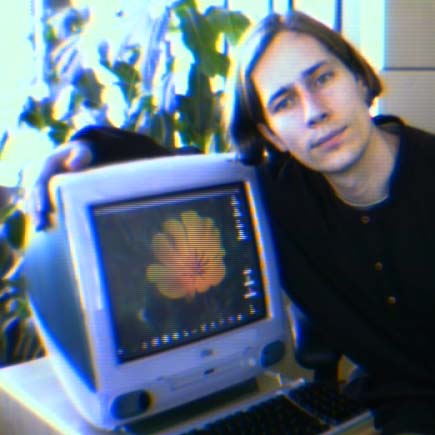
> In the Desktop Pictures Control Panel, I've selected the "Golden
Poppy"
  screen, and it's colour co-ordinated with the Bondi Blue of the case.

> Within the ten minutes setup I didn't yet opt to setup an Internet
  connection, as i've got an Ethernet crossover cable running to an
  old 90Mhz 7200 which has got a ZIP drive connected to the SCSI port.
  I'll be using it to transfer over all my files, but I don't expect
  that'll go too quickly, as data reads from ZIP disks are notoriously
  slow. I can't help wishing it were next month so I could be using the
  USB ZIP Disk from Iomega, but the salesman told me they'd be in "by
  the time school starts".


5:30 - Inserted first ZIP disk into the 7200, selected the volume
  from the iMac's Chooser, and there it is on my desktop. I created
  a temporary folder on the massive hard disk (4Gb), and began the
  process of transferring over all my existing data that I previously
  backed up from my PowerBook 520c.

> When Apple said that the 233Mhz G3 chip was faster than a 400Mhz
  PII, I had my doubts, but decided to defer judgement until I actually
  tried the machine. I must say this is one fast puppy. It keeps
  astounding me by completing tasks hardly an instant after I've
  clicked an icon.

> I'm typing this up in the new Claris Works, while the background
  network copy reports that there are 6 minutes left to transfer 62.8
  of 77.9 MB done onto my hard disk "Tinkadel" --  I brought the machine

  to test on the company network for the weekend, and there's nobody
  else here loading the net.

> 3 minutes left, with 115 files left, 69.5 of 77.9 MB...

> Now, here comes a test. I've always been impressed by the fact
  that the Macintosh is the only computer i can operate usefully for
  a length of time without a keyboard and only a mouse connected.
  Now I've got the CD player going, and am in the middle of a file
  transfer over ethernet. I have run out of desk space with both an
  SGI R5000, the iMac, a cup of earl grey, two mousepads, and two
  keyboards. USB is supposed to be hot-swappable, so let's go - unplug
  mouse, then keyboard -  transfers still running - okay, is the mouse
  acceleration going to slow down when i jack back in? - working the
  same speed. Good job Apple.

> Unmount server (ZIP disk volume on remote machine) -> 1 click (drag
  to trash); doc-martin net over to the 7200, unmount ZIP server volume
  (1 more drag to trash). The other machine - which is running 7.5.2
  and Japanese Language Kit 1.2 for our Japanese translater had shut
  down the monitor to save power, but had maintained ethernet transfers.

  Inserted another ZIP disk - it mounted automatically and showed up as
  a server volume on the desktop. I didn't have to click the mouse or
  anything for it to mount the disk and make it appear on the desktop,
  it knew automatically from the disk insertion what to do.

> Back on the iMac, I need to mount ZIP disk as server, so APPLE >
  CHOOSER > APPLESHARE icon > list of servers shows up, click "Guelph",
  click OK (or hit ENTER), asks me my name and password, I have to type
  in a name. Normally, i'd use the shareware utility POPCHAR to type in
  keyboard characters from a pop-up menu keyboard in the top corner
  of the screen, but I'd have to drag the file out of the folder into
  the Extensions folder and restart, but now I've got to plug the
  USB keyboard back into Port 2 on the computer - and the cables are
  neatly tucked away behind a small door. Continue by typing in my name,

  hit Return, and there it is in a list of drives attached to the
  machine. Click twice on the name, and it's on my desktop (there was
  an option beside the name in case i wanted to remount automatically
  each time on booted up). Command-W to close the Server List window
  (always works with any window in every application). I drag the icon
  that appeared on my desktop to the file window and we're copying
  over another ZIP volume:

6:14 pm - preparing to copy 1325 files, estimated time remaining is
  "About an hour". Pop down the disclosure triangle, and it says 4.2 MB
  of 89.9 MB. While this is going on, I've inserted an audio CD, and it
  started playing automatically. There  was no need to install or
  configure the CD drive - it just worked. The second volume of ZIP
  disk is loading up in less than an hour and 18 minutes. Mind you I've
  made a cup of tea, ate something, took an IndyCam photo, and typed up
  this report in Claris Works during this time as well.

  The new Claris Works 5 intergrates all the functions you could ever
  need in a nice simple format, yet still provides all the tools and
  integrated drag & drop support with the rest of the Macintosh
  environment -- one reminiscent of a planet with better designers.
  It is Steve's planet. We've had vistors from there before,
  starting with the original 128k Mac which had a full windows
  interface with no command line running off a single 800k floppy disk
  11 years before Windows 95 took 16Mb to do the same thing.


> About the mouse - it is small, but not extraordinarily so.
  It doesn't light up. I must applaud Apple for having the courage to
  maintain a one button mouse. It falls into line with the design
  principle of "make everything as simple as possible but still capable
  of performing every function". This is the difference between a
  feature oriented OS like Windows, and a well designed and thought out
  interface like the MacOS. Simply adding an extra mouse button every
  time a new feature is required is somewhat short-sighted, and adds
  another layer of complexity for the user by multiplying the number
  of combinations by an order of magnitude for each extra button added.
  Eventually, you get all sorts of extra buttons which can't be
  eliminated because they have become enshrined, and you become unable
  to simplify your interface without sacrificing backwards
compatibility.
  The Wintel platform is similarly crippled with having to maintain all
  sorts of legacy instructions in the PII processor, whereas the
  streamlined design of the PowerPC has given it the ability to do more
  with less transistors. The MacOS is more elegant in its
implementation,
  for example, in something as basic as how Menus are handled. The
  entire user experience is simplified by providing one menubar, and
  not ten (!).

6:48 - 65 files remaining to be copied, 88.3Mb copied, "About a minute"
6:49 - done. on to the third and final volume.


7:00 - The transfers are still going, and the Beatles Anthology Disc
  is done, so drag the CD to the trash, and it ejects - well kind of,
  there's no more power eject like in the former Macintoshes on the CD
  Drive, but it looks like its modelled after the PowerBook CD Drives,
  which makes me wonder if they're going to make this hot-swapable like
  the PowerBook - maybe that's the reason for the last minute design
  change? If Apple replaced the CD with a DVD drive, this would become
  one hot little DVD TV with  a mouse. Add fast ethernet instead of
  cable and Quicktime streaming technology - hmmm...
  Anyhow, in with a new CD - it automatically starts playing, as if the
  unit were a dedicated AV stereo. I've got my TV, VCR, CD Stereo all
  plugged into a central Power Amplifier, so why not the new AV unit?
  The built in surround speakers on the iMac finally bring a standard
  feature into the box, but they're still no match for a pair of
  LINN Keilidhs, so in it goes - iMac, my next AV appliance, right next
  to VCR1.


ALL IS AS IT WAS AND SHALL BE...

7:30 - So, with a slow transfer off a ZIP over 10Base Ethernet, I've
  managed to completely customise my installation (including the same
  Kaleidoscope colour scheme which controls the appearnce of all
  windows, buttons, and menus in use throughout the system - this is
  something Windows isn't standardized to do to the extent as the Mac
  can). I've been listening to CDs through the built in stereo sound
  card, mounting servers and transfering over Ethernet while running
  a full Office Suite (Claris Works), and although it did give me a
  warning that the Desktop file couldn't be copied from the ZIP disk
  because it was in use, but other than that, not one crash or error
  message. My entire operating environment - windows, colours, fonts,
  desk accesories, legacy files, window positions and icons of every
  window on my hard disk all carry over. All is as it was, and that
  is a testament to Apple's foresight in creating their technologies.

  There is a good feeling in this transfer, because I have Journal
files,
  Illutrator Logos, Audio samples, Photoshop Images, a few Databases
  and several thousand file downloads going back to 1985 - the year I
  first got my own modem. Most of these files have spaces and both
  upper and lowercase in their filenames, and every single one of them
  has retained their custom colour icon and Type/Creator data since
  they were made. Endless amounts of legacy Windows files however are
  still rendered cryptic by the historical 8.3 file system limitations
  of DOS. The Mac stores the creator and type in the directory
structure,
  making it unneccesary to have a work-around mechanism like the
  Windows Registry - which is sure to be lost at some point, and all
  your files lose important pieces of info that need to be associated
  with them. Why didn't Microsoft put this into their new file system
  when they put long names into the operating system. Probably for
  the same reason their Windows 95 operating system needed an upgrade
  in '98 to be ready for the year 2000, while my original 1984 Macintosh

  can handle dates till the year 29940. At least Apple file system
  designers knew the century was going to end. :-\


7:45 - Having purchaed an extra 32Mb of RAM, I wondered how difficult
  it would be to install. It turned out to be relatively painless.
  Remove one screw, pop down the back hatch, remove two more retaining
  screw, and the entire logic board assembly just slides out. There's
  a small daughter card with the CPU and RAM, you ground yourself, and
  snap in the memory SIMM (which is very small, being SDRAM - the same
  type as used in the notebooks). Put it all back together, power up the

  machine, and the "About this Computer..." shows the full 64Mb are
  there.

  I couldn't help noticing several things while the machine was apart:

  1) There's a small place left on the logic board for a 20pin connector

  beside the sound chip - it would be the right size for an internal
  floppy disk connector.

  2) There's an empty expansion connector labeled "Mezzanine" that
  looks very similar to the one on the new powerbooks - could this be to

  add a DVD MPEG decoder in the future? They've already announced a
  kit for the PowerBooks, and it would fit in with the DVD/appliance
  nature of the product.

  3) The video connects to the logic assembly via a standard
D-connector.
  I'd imagine that if you wanted to bypass the built-in display, you
  just could plug in any other monitor and just run the cable out the
  back port.


8:12 - I wanted to test how easy it was to hook into our companies'
  intranet with the iMac. I unpluged the Ethernet crossover cable from
  the 7200, plugged in a regular RJ45 connection to our net, opened the
  TCP/IP control panel (Apple Menu > Control Panels > TCP/IP), entered
  the IP, Router, Subnet Mask, and Name server address, closed window,
  and click "Save" in response to the dialogue. Launched Fetch 3.0
  (my former preferences came over from the notebook), and was accessing

  my SGI hard disk in under 40 seconds. Not a single hicup - it just
  worked. Another 15 seconds confirmed connection to the two Postscript
  laser printers, and had made desktop printer icons for them. Test
  printout of an old file from Quark worked flawlessly. Launching
  Netscape Navigator 4.0 in less than 2 seconds, asks me for my company
  eMail address, and I'm browsing the web. It defaults to display an
  Apple search page on the Excite search engine. Over to www.apple.com,
  and I listened to the iMac radio commercials. Quicktime 3 was already
  installed, so I didn't need to do anything but click on the little
  sound icon on the web page. Used Fetch to drag and drop over my
  Netscape Bookmarks from the SGI, quit Netscape, dropped new bookmarks
  into Preferences folder, relaunched Netscape, and bookmarks were
there.
  Went to a site, clicked on a pdf file, it opened automatically in the
  preinstalled Acrobat 3. A 387k file downloaded in 25 seconds,
  including opening Acrobat Reader - not bad.


A FEW FURTHER STATS:

- Total Bootup time with lots of Extensions and StartupScreen loaded:
  53 seconds.

- MacOS Memory Size (from "About this Computer"): 14.1Mb.
  I had no problem running out of memory, but I've also purchased
  an additional 32Mb of RAM which I'm going to install later, bringing
  the total up to a comfortable 64Mb.

- Total time to extract 3Mb .cpt file into 8.5Mb folder with Expander:
  14 seconds. To stuff using dropstuff: 18 seconds.

- FrameMaker 5.1 loaded up in less then 5 seconds when I double-clicked
  one of my original documents that I transfered. The window position I
  had left it on the Notebook was still in effect, so I resized and
  saved.

- A 200k BBedit file launched the app and opened the document faster
  than I could finish double-clicking.

- Photoshop 2.5 - which I still use on the 68040 Notebook,
  transfered over fine without having to reinstall any other files.
  It opened up a 700x640 image in less than six seconds - Still unsure
  if I really need to upgrade to the PowerPC version 5 with speeds like
  this. My photoshop preferences file came over fine too, the Toolbox
  is in the right place - where I left it.

- Interestingly, Photoshop 3.0ppc took longer than the old 040
  version 2.5. Photoshop 3 took 8 seconds to launch as opposed to 6
  seconds for 2.5, even though 2.5 had Kai's Power Tools installed,
  and 3.0 did not.

- An old copy of Excel 4.0 (the only piece of Microsoft Software
  I have anywhere in my system - as unbelievable that may sound
  to those who have opted to make them their only manufacturer)
  launched in less than a two seconds with a 145x145 cell spreadsheet.

- My copy of AquaZone - an old 68040 application that uses up about
  6Mb to create 3D virtual fish is notoriously slow - taking over
  three minutes to load on the 040 but on the iMac it still runs,
  and loaded up in seven seconds. My old TRS-80 emulator running
  Seadragon was too fast to play, I had to make it run slower in
  order to play it.

- In my testing, other applications: Illustrator 5.5, Quark
  XPress 3.31, MacWrite II, SoundEdit 16, FileMaker Pro 2.0,
  Netscape 4, FutureBasic 1.02, Player Pro, OPcode's Vision 2.08,
  Finale 3.2.1 all worked fine and none of them took longer than 2-3
  seconds to fully load.

- All my legacy data: A font designed in Fontographer 4, Filemaker
  Pro databases, eMail, Illustrator and Photoshop EPS files, Poetry
  Book in Quark XPress, a few odd shareware programmes I've written,
  Sounds, and data still load up and work when I double-click them
  as they always have without having to re-establish which Apps to
  open them - that info is retained in the directory info.

- The audio from the built-in CD, modem, and a Quicktime movie mixed
  correctly through the system's sound controller, even though they
  were playing at different sample rates.

- My existing Fonts (all 83 of them) were transferred and work without
  incident. All applications I tested list them and use them correctly.
  The supplied ATM still works with all the TrueType and Postscript
  Type 1 fonts. I noticed there's a new couple extra Fonts Apple seems
  to have added, including: Bodoni, Georgia, Impact, Minion, and
  Trebuchet.

- My System Sound files and Dvorak keyboard layouts transfered into
  the new System with one click, and switching keyboards worked fine.

- Although the transfer times were severly constrained by the slow
  ZIP drive, I have reports that the beta version of System 8.5 is
  incredibly fast for network file transfers, and at the WWDC it was
  able to nearly saturate a 100base-T connection - which of course,
  is built into the iMac. Looking forward to this one.

- All this is quite amazing consdering that I've just upgraded my
  processor from a 68040 to a G3, upgraded my operating system from
  version 7.6 to 8.1, and migrated to a new system architecture
  with a PCI bus. I can't imagine a Windows user having nearly the
  same experience upgrading from a 486 with Windows 3.1 (the fastest
  comparable CPU at the time I got my 040 notebook) to a Pentium II
  with Windows 98. I didn't need to use a single installer app either,
  as Mac apps can simply be dragged over to a new folder and continue
  to work.


9:30 - I'm going to copy another few ZIP volumes to the iMac. This time
  I'm first going to transfer to the 7200's internal drive so i can test

  out the disk-to-disk transfer speeds. The copied folder is 84.6Mb with

  723 items. Start time: 9:44 - Finish time: 9:57 - 13 minutes. That's
  6.5Mb per minute. I'm going to try a few more of my transferred apps,
  and download some files off the web using the fast T1 connection.


12:30 - Time to conclude the testing for today. During my time breaking
  in this new machine today, I've also used ResEdit to customise the
  keyboard menu shortcuts in Photoshop, played the new MAME 0.33 arcade
  emulator, installed custom System Sounds, added my old Dvorak keyboard

  layout file and switched over the layout, used my old Photoshop to
  customise the StartupScreen for the 800x600 monitor resolution's size.

The machine crashed twice with a Type 10 error when I tried to copy over
a corrupted sound file from the old System 7.6 into the new System file,
but upon restart, both files were okay, and trying the copy a second
time(minus the offending file) worked fine. I only restarted the machine one
other time, and that was to reload all the Control Panels and Extensions
I put in from my old System Folder.

My one loss - Now Menus. I dearly hope they can revive this one, I loved
the ability to dynamically assign menu function keys on the fly to any
application's menus. I hear that Power On software (www.poweronsw.com)
is preparing a new version, so this should be fixed soon.

A few comments on the lack of a floppy drive: By eliminating the
unreliable old floppy technology, Apple is once again showing their
foresight like they did when they were the first company to use 3.5"
floppy disks on the original Mac back in '84. By eliminating the floppy
drive, they're the first to move from Disk-centric paradigm to a
Net-centric paradigm - they are recognising the reality of the future
in this first diskless consumer model. If a file is small enough to fit
on a floppy, it is small enough to email.

I can't describe how pleased I am with the performance and finese of
this unit. Apple has done a first class job in truly delivering the
ulimate consumer machine. I'm off to finish some work on my new iMac,
and i couldn't be happier.  :-)


Best Regards,
John Penner
Copyright © 1998 by Bill
Fox.
All rights reserved--no commercial use permitted without attribution.
Of course . . .
. . . and I am proud to be an Evangelista! . . .
Saw something? Send a tip or a correction
The archive ran on reader tips. What did you see, where, and do you want the credit? Something wrong on this page? Say so and it gets fixed.