Review of an Inexpensive Ethernet Network Solution
A Home 10base-T Ethernet Network
Now It's "Inexpensive", "Easy" and Fast
Company: Macsense (but purchased mail order from Club Mac*)
Price: Approximately $116 exclusive of taxes and shipping [i.e., $25 for an AAUI Transceiver (PowerMac 7100), $37 for a 10base-T PCI Card (PowerBase 180), $30 for a 5-port PalmHUB-5E and $24 for three 7' ethernet patch cables]
Pros: Superfast file copying, sharing of files and applications, easy installation, inexpensive, future ADSL or cable modem superfast internet connection for all three computers
Cons: None
Performance Rating: n/a
September 8, 1998
A high speed ethernet network has always been somewhat of a mystery to me, mostly I guess, because of its presumed expense and assumed complexity. A LocalTalk network is a piece of cake. Just daisy-chain a series of Macs and devices with Apple serial ports using the LocalTalk transceivers and telephone wiring with RJ-11 jacks. Back in the mid/late-1980's I strung one together (actually with locking serial cabling then) to share files and a Laserwriter printer among a dozen or so Macs. However, except for the crossover cable trick of connecting two Macs, high speed ethernet networking remained to me something that the IS people at work took care of. There I've got a wall port from our 10base-T LAN (Local Area Network) connected to a hub which is connected separately by three cables to my 8500, Laserwriter and, from time to time, my PowerBook 3400. I never really thought much about it until the iMac was nearing arrival and a 2-computer ethernet network with a crossover cable seemed to be the best means to transfer files from and older Mac to the iMac. I posted a simple tutorial on what to get and how to set up a crossover cable ethernet network for the weekend that the iMacs were first available. While preparing the tutorial, I was surprised at how cheap ethernet networking equipment had become. In anticipation of getting either Asymmetrical Digital Subscriber Line (ADSL) or cable modem high speed internet service in the near future and for easier maintenance of my three Mac OS home computers (we actually have two Wintels too), I decided to set up a complete ethernet 10base-T network.
The Hardware
I have three Mac OS computers at home:
- Apple PowerMac 7100/80
- PowerComputing PowerBase 180
- Apple PowerMac 9600/200 with a PowerLogix PowerForce G3 250 CPU card installed
 These computers run
the gamut of recent (at least since 1994) PowerMacs with regard
to their ethernet connectivity. The 9600 has built-in ethernet
with both RJ-45 and AAUI ports. The PowerBase has no ethernet
capability but has three PCI slots on a riser card off the motherboard.
The 7100 has "built-in" ethernet but only an AAUI port
which requires an AAUI transceiver with AAUI and 10base-T (RJ-45)
connectors.
These computers run
the gamut of recent (at least since 1994) PowerMacs with regard
to their ethernet connectivity. The 9600 has built-in ethernet
with both RJ-45 and AAUI ports. The PowerBase has no ethernet
capability but has three PCI slots on a riser card off the motherboard.
The 7100 has "built-in" ethernet but only an AAUI port
which requires an AAUI transceiver with AAUI and 10base-T (RJ-45)
connectors.
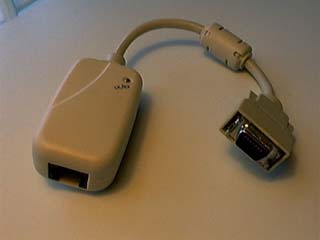
7100: At right is a photo of the Macsense AAUI Transceiver ($25 Club Mac* part number M660 1021) for the 7100. The AAUI connector at the right fits on the port in the back of the 7100 and the RJ-45 jack of a 7' ethernet patch cable fits into the RJ-45 port at the left. In the upper right corner of the transceiver there is an LED light that glows green when the connection is good. The AAUI transceiver needs no additional software, just the Apple Ethernet (Built-In) extension that goes by different names depending on the Mac OS System Version [in 8.1 it's called "Ethernet (Built-In)" v2.02].
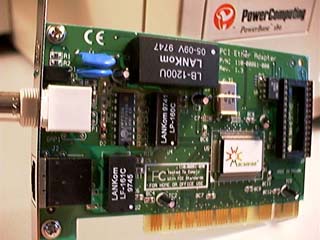 PowerBase: At right is a photo of the Macsense 32-bit
PCI 10base-T ethernet card ($37 Club
Mac* part number M660 1003) for the PowerBase. It is a small
PCI card that fits into a PCI slot on the motherboard of any PCI
PowerMac. The card has both an RJ-45 port and a BNC connector
for a coaxial cable thin ethernet setup. Just use the RJ-45 port
as can be seen below the BNC connector on the metal flange on
the left end of the card. The RJ-45 jack on a 7' ethernet cable
plugs into the RJ-45 port. There is also an LED to show a good
connection just above the BNC connector.
PowerBase: At right is a photo of the Macsense 32-bit
PCI 10base-T ethernet card ($37 Club
Mac* part number M660 1003) for the PowerBase. It is a small
PCI card that fits into a PCI slot on the motherboard of any PCI
PowerMac. The card has both an RJ-45 port and a BNC connector
for a coaxial cable thin ethernet setup. Just use the RJ-45 port
as can be seen below the BNC connector on the metal flange on
the left end of the card. The RJ-45 jack on a 7' ethernet cable
plugs into the RJ-45 port. There is also an LED to show a good
connection just above the BNC connector.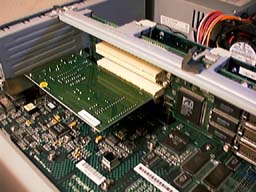
The
ethernet card is shown installed in the PowerBase in the photo
at the left. Instead of the more common PCI slots on the motherboard,
the PowerBase's PCI slots are on a riser card that is connected
to the motherboard. The ethernet card (with yellow dot sticker)
is in the lower slot on the riser card. A floppy disk contains
the driver, an extension named "EtherPCI Extension",
which goes in your Extensions folder in your System folder.
9600: No hardware or software is needed. The RJ-45 jack of a 7' ethernet cable is plugged into the RJ-45 port in the back of the 9600. Make sure the "Ethernet (Built-In)" extension is in the Extension folder of the System folder and is enabled.
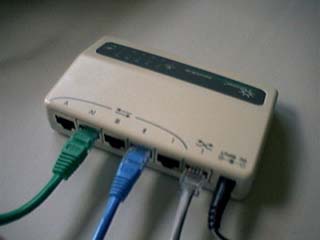 Ethernet Hub: At right is a photo of the Macsense 5-Port
PalmHUB-5E ($30 Club Mac*
part number M660 1008) with the three ethernet cables (green,
blue and gray) from the computers plugged into RJ-45 ports. To
the right is the black power cable from the AC adapter. The hub
is 3.5" by 5" and is very light. It can sit on a table
or can be mounted on a wall with the included bracket. There are
two LEDs for each port plus a green power LED and a red "collision"
LED. The PalmHUB-5E actually has 6 RJ-45 ports. One is a crossover
port for connecting another hub or "uplink" and if it
is used, then port Number 1 is disabled. [Actually, in use I have
the computers plugged into ports 1, 3 and 5 instead of as shown
above when I took the picture]. There's no software with the hub.
Ethernet Hub: At right is a photo of the Macsense 5-Port
PalmHUB-5E ($30 Club Mac*
part number M660 1008) with the three ethernet cables (green,
blue and gray) from the computers plugged into RJ-45 ports. To
the right is the black power cable from the AC adapter. The hub
is 3.5" by 5" and is very light. It can sit on a table
or can be mounted on a wall with the included bracket. There are
two LEDs for each port plus a green power LED and a red "collision"
LED. The PalmHUB-5E actually has 6 RJ-45 ports. One is a crossover
port for connecting another hub or "uplink" and if it
is used, then port Number 1 is disabled. [Actually, in use I have
the computers plugged into ports 1, 3 and 5 instead of as shown
above when I took the picture]. There's no software with the hub.
That's it for the hardware. Just make sure that the hub's AC adapter is plugged in and that the ethernet cables are plugged into the computers and the hub. It's not very expensive and there's really no complexity.
The Network Software
Apple includes all the software that is needed with the Mac OS: AppleTalk control panel, AppleShare extension, Users & Groups control panel, File Sharing control panel, File Sharing extension and File Sharing Library extension. However, configuring them is a bit complex. One has to set up the users and their use privileges, the most complicated procedure. Configuring AppleTalk and File Sharing are simple. Connecting (Login) consists of using the Chooser to select AppleShare and the computers to connect to, entering the password and selecting the drives. The connection can be set up to happen automatically when the computer is turned on and password entered. This is described in your Mac's manual but not exactly step by step. I covered this whole procedure for two computers in the crossover cable tutorial so I won't repeat the steps here.
Use
When set up and connected (logged in or on) to the ethernet network, each computer's internal hard drive and external hard drives chosen to be shared appears on each connected computer's desktop. Copying files among them is a breeze and very fast. Just drag and drop the files from one computer's hard drive icon to another just like among internal and external hard drives or an inserted floppy disk on a single computer. This is especially helpful for very large files like updates of Netscape which run on the order of 14 MB now for a complete version. Just download it once and copy the installer onto each of the other computer's hard drive. Of course, a "sneakernet" using a floppy disk for small files or an external SCSI hard drive for very large files accomplishes the same thing. However, keeping a myriad of small applications or utilities up to date among computers with floppies is tedious and external hard drives are much more expensive than the network. Turning the "donor" computer off, disconnecting the external SCSI hard drive, reconnecting it and then starting up the recipient computer is a real pain, especially for several computers, so thankfully I no longer have to endure it.
Finally, if one is lucky enough to live where ADSL and/or cable internet access exists, an ethernet network will allow each connected computer to share these superfast connections simultaneously.
______________________________
*While I purchased my ethernet hardware from Club Mac, the mention of Club Mac in this article is not necessarily an endorsement or recommendation.
Copyright ©
1998 by Bill Fox.
All rights reserved--no commercial use permitted without attribution.
Of course . . .
. . . and I am proud to be an Evangelista! . . .
Saw something? Send a tip or a correction
The archive ran on reader tips. What did you see, where, and do you want the credit? Something wrong on this page? Say so and it gets fixed.